
Best Laptop for Blender
Discover the top laptops for running Blender optimized for 3D modeling, rendering, and animation. Find powerful GPUs, ample RAM, and fast SSDs that streamline your creative workflow in one concise guide.


Hey there, 3D artists, animators, and Blender enthusiasts! Whether you’re sculpting high-poly models, working on complex physics simulations, or rendering your next animation masterpiece, you need a laptop that won’t freeze, fry, or falter under pressure. But not all laptops are built the same especially when it comes to demanding 3D workloads.
In this guide, we’ve handpicked the top 5 best laptops for Blender in 2025, covering performance, cooling, budget options, and overall value. Whether you're a beginner, a student, or a seasoned pro, there's a perfect machine here for your creative workflow. Let’s dive in.
1. Best Value: ASUS ZenBook Pro Duo
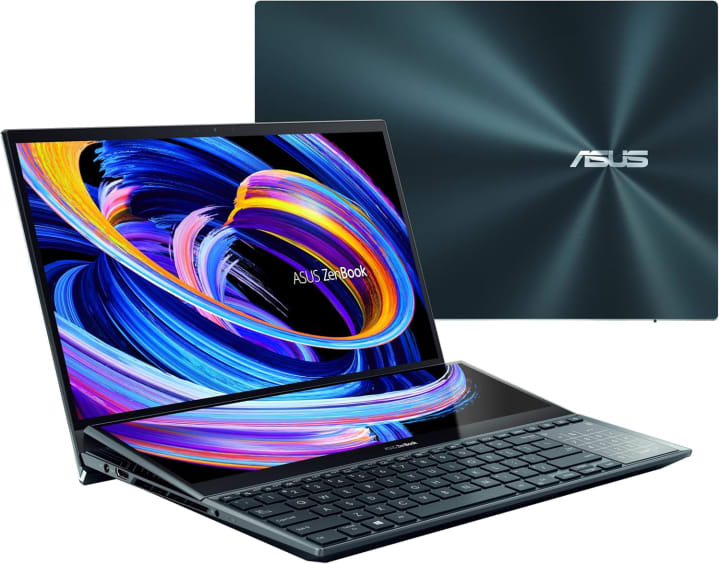
The ASUS ZenBook Pro Duo is a productivity powerhouse and hands-down one of the most unique laptops you’ll ever use for Blender.
Equipped with an Intel Core i7 or i9 processor, up to 32GB of RAM, and an Nvidia RTX 3070 GPU, this beast handles ZBrush sculpting, Blender animation, and large-scale Cycles rendering with ease.
What really sets this laptop apart is its dual-screen setup. The secondary 4K ScreenPad Plus adds real workflow efficiency perfect for docking Blender’s shader editor, managing reference images, or adjusting nodes while previewing renders.
The main display? A stunning 4K OLED touchscreen that offers rich blacks and superb color accuracy ideal for texturing and compositing.
Built from premium aluminum, it’s sturdy and elegant. Downsides? It’s a bit heavy and leans toward the expensive side.
But if you're a multitasker or content creator who juggles multiple creative tools, this laptop is an absolute beast.
2. Best Runner-Up: Lenovo Legion 5

The Lenovo Legion 5 is a fan favorite among creators and gamers alike and for good reason.
Powered by an AMD Ryzen 7 5800H, 16GB or 32GB of RAM, and an RTX 3060 GPU, this laptop nails that sweet spot between performance and affordability.
Blender thrives on both CPU and GPU power, and the Legion 5 delivers smooth viewport navigation, fast Eevee renders, and strong Cycles rendering performance.
Thermals are excellent too thanks to dual fans and large rear vents, overheating is never a concern, even during long sessions.
It also sports a 144Hz Full HD display that’s great for animation previewing and modeling.
While the color accuracy may not be ideal for high-end color grading, it's more than enough for most creative tasks.
Best for intermediate creators and students who want performance without blowing the budget.
3. Best Performance: GIGABYTE G5 GD

If raw performance is your top priority and you don’t care much about flashy looks, the GIGABYTE G5 GD is a hidden gem.
Under the hood, it boasts an Intel Core i7 (11th gen), an Nvidia RTX 3050 or 3060 GPU, and up to 64GB of upgradable RAM perfect for Blender power users.
This laptop shines in simulation baking, animation playback, and high-resolution Cycles rendering. It also comes with a fast NVMe SSD for snappy project loading and seamless multitasking with apps like Photoshop or Premiere Pro.
Cooling is decent with wide rear vents and dedicated heat pipes, though the fans can get a bit noisy under load.
The overall design is basic and no-frills but for creators who care more about performance than aesthetics, this machine is a serious contender.
4. Best Budget: Lenovo IdeaPad L340

Not everyone can spend over $1,500 on a 3D workstation especially students and beginners. That’s where the Lenovo IdeaPad L340 comes in. It’s a surprisingly capable entry-level laptop with an Intel Core i5-9300H, 8GB of RAM, and a GTX 1650 GPU.
While you won’t be doing ultra-complex simulations or massive renders, this machine is excellent for basic modeling, sculpting, and real-time Eevee rendering.
It’s lightweight, cleanly designed, and offers decent battery life something not many gaming laptops can claim.
You’ll definitely want to upgrade the RAM to 16GB for better multitasking, but even stock, it’s a great pick for anyone just starting out in the 3D world. Ideal for students, beginners, and hobbyists looking for Blender on a budget.
5. Best High Airflow: ASUS ROG Zephyrus G15

If thermal throttling and long render times are the bane of your Blender workflow, meet the ASUS ROG Zephyrus G15.
This laptop is a thermal engineering marvel, featuring an AMD Ryzen 9 5900HS, 32GB of RAM, and up to an RTX 3080 GPU.
What makes the G15 stand out is its intelligent cooling system: Arc Flow fans, liquid metal thermal compound, and a well-ventilated chassis keep temperatures low, even under heavy rendering or simulation loads. Whether you're baking lightmaps or rendering fluid sims, it remains consistent and cool.
It also comes with a stunning QHD 165Hz display with top-tier color accuracy great for both Blender work and post-processing.
While the price is premium and the design leans into the gamer aesthetic, this is a serious machine for VFX artists, animators, and heavy-duty Blender users.
Quick Bonus Tips for Choosing a Laptop for Blender
Before you hit “Buy Now,” keep these tips in mind:
Prioritize GPU Power: Blender's Cycles engine runs best on Nvidia RTX cards.
RAM Matters: At least 16GB is a must, but 32GB is ideal for smooth simulations.
Good Cooling: Better Performance Avoid thermal throttling during long renders.
Always Go for SSD: Faster loading, quicker project access, and better responsiveness.
Check Upgrade Options: Extra RAM slots and M.2 SSD bays are great for future-proofing.
Final Thoughts
If this guide helped you pick the perfect laptop, give it a share or bookmark it for later. And for more in-depth guides on tech for creators, stay tuned. Until next time keep creating and happy blending!
About the Creator
Tab Delite
Tab Delite explores the latest trends, reviews, and comparisons in tablets and TVs. From cutting-edge tech to user-friendly options, discover everything you need to know to upgrade your digital entertainment and productivity experience.
Keep reading
More stories from Tab Delite and writers in Education and other communities.
Best Laptop Under 800 USD
A laptop is more than just a computer it’s your daily companion for work, creativity, and entertainment. Lightweight, portable, and powerful enough to handle multiple tasks, laptops have become essential tools for students, professionals, and gamers alike.
By Tab Delite5 months ago in Education
Gold Market Predictions: Strategic Insights for Short-Term Agility and Long-Term Growth
Investors across the globe continue to monitor gold market predictions as economic uncertainty reshapes financial priorities. Currently, inflation data, central bank policy decisions, and geopolitical tensions influence daily price action. As markets digest new information, gold responds quickly to shifts in interest rate expectations and currency performance. When inflation rises or financial instability increases, investors often seek safety in gold. Consequently, demand tends to strengthen during periods of economic stress.
By George Drazenovic6 days ago in Education
A Knight of the Seven Kingdoms Series Review (Season 1)
As one of the biggest properties in fantasy, A Song of Ice and Fire remains immensely popular with audiences. After reaching far into the past with House of the Dragon, a second spin-off was on the cards. A Knight of the Seven Kingdoms serves up a bite-sized slice of action and drama, but it still claims a spot among the best small-screen titles.
By Robert Cain4 days ago in Geeks




Comments
There are no comments for this story
Be the first to respond and start the conversation.