
5 Ways to Automate Your Webinar
Learn more about Automate Webinar
ht
Are you hosting a webinar, but feeling overwhelmed by the amount of work it takes to organize and manage it? You’re not alone! Hosting a successful webinar requires a lot of preparation and coordination. Fortunately, there are ways you can automate the process to make it easier. In this blog post, we’ll share five ways to automate your webinar so you can focus on other aspects of your business. Read on to learn how to take advantage of these simple automation solutions!
1) Use an Auto Responder
An autoresponder is an automated system that sends out emails to your list of subscribers in response to specific triggers. This system allows you to set up automated emails for pre-scheduled webinars, registration confirmations, and follow up messages after the webinar. Autoresponders can save you a lot of time and effort in managing webinar registration, as well as providing personalized customer service.
When setting up an autoresponder, it's important to provide clear instructions on how to register for your webinar. Include links to the registration page, a link to your landing page, and other helpful information such as what materials participants will need to have ready before the webinar. You should also include a contact email address in case participants have questions or need help with registration.
Once you've set up your autoresponder, you can use it to automate webinar reminders. Schedule these emails to be sent out at regular intervals leading up to the webinar date. This will ensure that your webinar registrants are kept up to date with any changes or additions to the webinar, as well as providing a gentle reminder to attend.
By using an autoresponder to automate your webinar, you can focus on other important tasks such as preparing slides, organizing resources, and creating content. You'll also have the peace of mind knowing that your webinar registrations are being taken care of by an automated system, freeing up your time for more important tasks. Additionally, an autoresponder can make it easier to measure webinar success by tracking key metrics such as open rates, click rates, and number of attendees.
You may also want to consider using social media automation tools to promote your webinar and increase engagement. For example, you could schedule posts across various platforms that alert people about upcoming webinars, share registration links, and provide updates about topics covered in the webinar. Additionally, you can use tools such as Hootsuite or Buffer to schedule social media posts ahead of time so they go live when you want them to.
Finally, consider automating your post-webinar process by sending out post-webinar surveys via an email autoresponder. These surveys can help you collect feedback from attendees so you can improve future webinars and measure the success of past ones.
2) Set Up a Landing Page
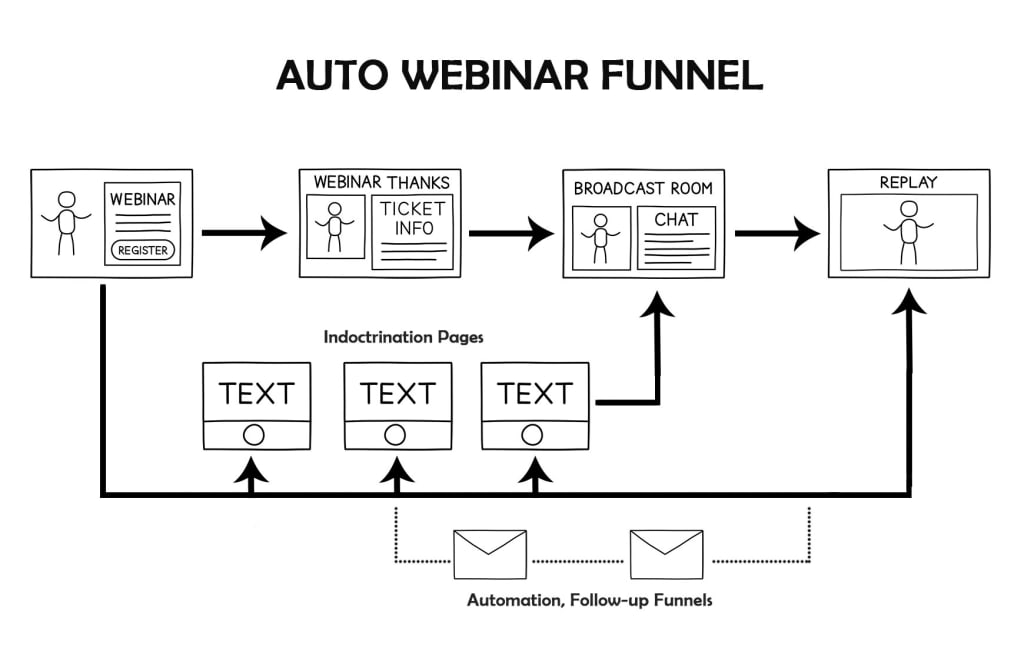
Creating a landing page for your webinar is an essential step to automating the process. It serves as a way for your potential attendees to learn more about your webinar, sign up for it, and be taken to the proper location where they can join the webinar.
To create a landing page, you need to choose a landing page builder or website builder platform. Most offer some type of drag-and-drop functionality so that you don’t have to write any code. These platforms provide templates for landing pages and make it easy to customize them with colors, text, images, and videos.
You’ll also want to consider adding elements like opt-in forms, countdown timers, and social media buttons. You should also include any details about the webinar, such as its date and time, topics covered, guest speakers, etc. When the page is finished, you’ll be able to link directly to it in emails and on social media posts.
In addition to creating the page itself, you should also make sure you’re collecting the necessary data from your visitors. You may want to capture their name, email address, phone number, and other relevant information. The better you understand your target audience, the easier it will be to craft a successful marketing strategy.
By setting up a landing page for your webinar, you’ll be able to automate much of the promotion process. It will enable potential attendees to find all of the necessary information about the webinar in one place and quickly sign up for it.
3) Use a Thank You Page
A thank you page is an essential part of the webinar automation process. It gives attendees the opportunity to review the material they just learned, as well as thank them for taking the time to attend.
Creating a thank you page is fairly straightforward. You’ll want to include links to resources they can use to get more information or access additional material. You may also choose to include a survey or questionnaire to collect feedback on the webinar experience.
In addition to providing value to your attendees, a thank you page helps create a sense of completion. It serves as a reminder that they took the time to participate in your webinar and can help them remember their experience with your brand.
Finally, a thank you page provides an opportunity for follow-up communication. Consider offering discounts or promotions for future events, which can be sent via email or direct mail. Additionally, you can use this page to direct people to your social media channels or newsletter sign-up page, helping to increase your audience and customer base.
4) Use a Webinar Hosting Service
If you’re looking for an easy way to automate your webinar, a webinar hosting service can be an invaluable asset. This type of service allows you to host your webinar without having to worry about managing the technical aspects of running a webinar yourself.
With a webinar hosting service, all you need to do is provide the webinar content, and the rest will be taken care of for you. Most webinar hosting services offer a wide range of features such as automated registration, attendance tracking, event reminders, recording capabilities, streaming options, chat capabilities, and more.
When selecting a webinar hosting service, make sure to evaluate the features and functionality of each one. Some services offer comprehensive packages that include all the features you may need for your webinar, while others may only offer some of the features you need. Additionally, look at the pricing options offered by different hosting services, as they vary widely from provider to provider.
Once you select a webinar hosting service, setting up and running your webinar will become much easier and more efficient. You won’t have to worry about managing the technical aspects of running a webinar, and you can focus on delivering great content and engaging with your audience.
5) Use Webinar Software
Using webinar software is one of the most effective ways to automate your webinars. Webinar software helps you create an interactive and professional webinar that you can host from anywhere in the world. Most webinar software providers come with a variety of features, such as:
• Live streaming capabilities
• Interactive chat
• Screen sharing
• Polls and surveys
• Automated registration and sign-ups
• Automated reminders and follow-up emails
• Social media integration
Using webinar software makes it easier to manage and monitor your webinars, as well as measure their success. It also allows you to create automated workflows that can be used for registration, follow-ups, and more. With the right webinar software, you can save time and effort by automating many of the tedious tasks associated with hosting a webinar.
If you want to learn my #1 way to Autowebinar Funnel, click here now.
About the Creator
Keep reading
More stories from writers in Education and other communities.
Effective App Site Design: Tips & Best Practices
In today's digital age, an engaging and effective app site design is crucial for capturing and retaining user interest. The right design not only showcases your app but also enhances user experience, making it crucial for converting casual visitors into loyal users. This article explores various aspects of app site design, from UI design ideas to responsive layouts, and provides actionable tips to help your app stand out.
By nandbox support2 days ago in Education
Smart Steps Today for a Comfortable Tomorrow
Planning for retirement might feel overwhelming, but it does not have to be. A little preparation now can make your future feel far less uncertain. The most important thing is to start thinking ahead and taking action while you still have time. Key retirement planning tips for a secure future are easier to follow than many people believe. With steady decisions and a clear goal, you can build a future that is both safe and fulfilling.
By Michael Petruska3 days ago in Education
Our Song
Evening has given way to night. Gently, I settle next to you on the comfortable, old love seat and reach for your hand. You snatch it away, again. It cuts me to the quick, but I hide the pain, understanding that the reaction is but part of your demented state. Since the accident, your presence here in our cozy home has been clouded by a haze I can't see. Nevertheless, I feel the frigidity of your expressions and it serves as an excruciating reminder of the immeasurable distance between us.
By Dana Crandell4 days ago in Fiction
The Angry Man in Your House
"If you grow up with an angry man in your house, there will always be an angry man in your house" This statement has caused plenty of controversy online, people say its a statement that blames victims while also undermining those who break traumatic cycles to form health relationships... but if I'm honest now that I'm in my 30s it makes more sense to me than ever, and I'd argue that its not just about fathers and uncles.
By S. A. Crawforda day ago in Humans



Comments
There are no comments for this story
Be the first to respond and start the conversation.