
10 Benefits of Google My Business Photos as a Local SEO Ranking Factor for Small Businesses
Learn the importance of Google My Business Photos as an essential aspect of local SEO ranking
Introduction
In the competitive world of digital marketing, local SEO is crucial for small businesses aiming to attract local customers. Among the various local SEO ranking factors, Google My Business photos play a pivotal role. High-quality photos not only enhance your business's online presence but also significantly impact your local search rankings. In this article, we'll explore ten benefits of using Google My Business photos as a local SEO ranking factor and how they can boost your small business's visibility.
1. Enhanced Visibility in Local Searches
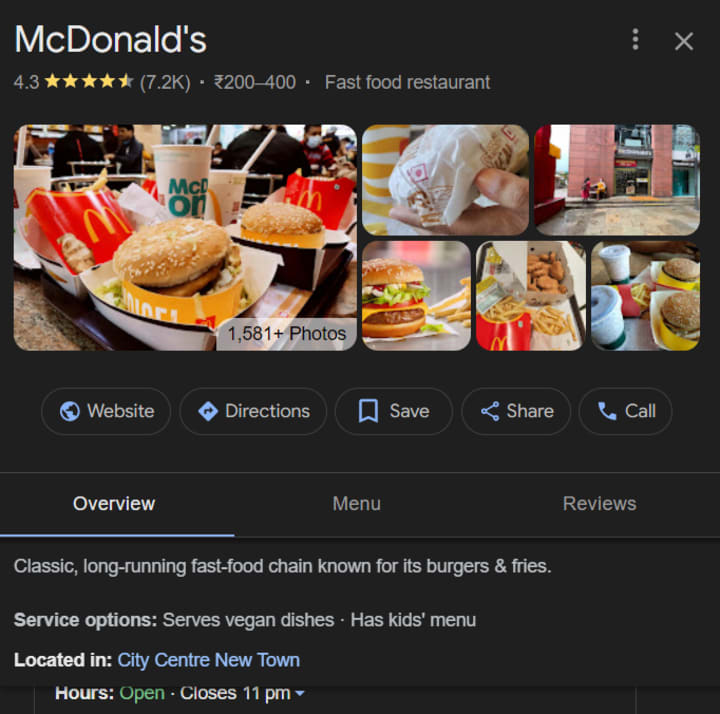
One of the most significant benefits of Google My Business photos is increased visibility in local searches. When potential customers search for businesses in your area, high-quality photos make your listing stand out. Google prioritizes listings with engaging photos, leading to higher rankings in local search results.
Action Steps:
• Regularly update your GMB profile with new photos.
• Ensure photos are high resolution and relevant to your business.
• Use a mix of interior, exterior, and product images to give a comprehensive view of your business.
2. Improved Customer Engagement
Engaging photos on your Google My Business profile encourage potential customers to interact with your listing. Higher engagement rates, such as clicks, views, and actions, signal to Google that your business is relevant and valuable, boosting your local SEO ranking factors.
Action Steps:
• Add photos of happy customers using your products or services.
• Showcase events or special occasions to highlight your business's personality.
• Encourage customers to share their own photos and tag your business.
3. Increased Trust and Credibility
High-quality, authentic photos help build trust and credibility with potential customers. People are more likely to visit and trust businesses that provide a transparent and accurate representation of what they offer. Google My Business photos serve as a visual testimonial of your business's legitimacy and quality.
Action Steps:
• Avoid stock photos; use real images of your business and products.
• Highlight your staff and workspace to create a personal connection.
• Keep your photo gallery updated to reflect any changes in your business.
4. Higher Click-Through Rates
Listings with compelling photos receive higher click-through rates (CTR). When users see attractive images in search results, they're more likely to click on your listing. A higher CTR improves your overall local SEO ranking factors, driving more organic traffic to your website.
Action Steps:
• Use eye-catching and colorful images to grab attention.
• Ensure that your business's logo and branding are consistent across all photos.
• Optimize photo descriptions with relevant keywords to enhance searchability.
5. Showcase Your Products and Services
Google My Business photos provide an excellent opportunity to showcase your products and services. Detailed images give potential customers a clear idea of what to expect, which can influence their decision to choose your business over competitors.
Action Steps:
• Display your best-selling products prominently in your photo gallery.
• Include photos of your services in action to demonstrate their value.
• Use before-and-after images to highlight the effectiveness of your services.
6. Encourage Customer Reviews
Photos play a crucial role in encouraging customer reviews. When customers see authentic images of your business, they feel more confident in leaving reviews and sharing their experiences. Positive reviews further boost your local SEO ranking factors, enhancing your online reputation.

Action Steps:
• Ask satisfied customers to leave reviews and upload their own photos.
• Respond to reviews and thank customers for their feedback.
• Highlight positive reviews with accompanying photos on your profile.
7. Stand Out from Competitors
In a saturated market, Google My Business photos help your listing stand out from competitors. Unique and engaging photos capture the attention of potential customers, making them more likely to choose your business.
Action Steps:
• Highlight unique aspects of your business, such as special amenities or unique decor.
• Use creative angles and compositions to make your photos visually appealing.
• Showcase any awards or recognitions your business has received.
8. Better Customer Experience
Providing a comprehensive visual representation of your business enhances the customer experience. Customers appreciate knowing what to expect before they visit, and detailed photos help them make informed decisions.
Action Steps:
• Include photos of your business's exterior to help customers find you easily.
• Show seating arrangements, parking availability, and other practical details.
• Use photos to highlight any special accommodations or accessibility features.
9. Boosted Social Proof
Social proof, such as photos of customers enjoying your products or services, enhances your business's credibility. When potential customers see others having positive experiences, they're more likely to trust and choose your business.

Action Steps:
• Feature user-generated content prominently on your GMB profile.
• Encourage customers to share their experiences on social media and tag your business.
• Repost customer photos on your GMB profile with their permission.
10. Positive Impact on Local SEO Rankings
Finally, Google My Business photos have a direct positive impact on local SEO rankings. High-quality, relevant photos signal to Google that your business is active and engaged with customers. This can lead to higher rankings in local search results, driving more traffic and conversions.
Action Steps:
• Consistently upload new photos to keep your profile fresh and engaging.
• Use descriptive filenames and alt text for your photos to enhance SEO.
• Monitor your photo analytics to understand which images perform best and why.
Conclusion
Incorporating Google My Business photos into your local SEO strategy offers numerous benefits, from increased visibility and engagement to enhanced trust and higher search rankings. By regularly updating your profile with high-quality, relevant images, you can significantly improve your small business's online presence and attract more local customers. For more insights on improving your local SEO, check out this comprehensive guide on local SEO ranking factors.
Frequently Asked Questions
1. How often should I update my Google My Business photos?
To keep your profile fresh and engaging, aim to update your Google My Business photos at least once a month. Regular updates signal to Google that your business is active, which can positively impact your local SEO ranking factors.
2. What types of photos should I include in my Google My Business profile?
Include a variety of photos that showcase your business's interior, exterior, products, services, and happy customers. High-quality, authentic images are crucial for building trust and improving your local SEO rankings.
3. Can user-generated content help improve my Google My Business profile?
Yes, user-generated content such as photos and reviews can significantly enhance your profile. Encourage customers to share their experiences and tag your business. This boosts social proof and positively impacts your local SEO ranking factors.
About the Creator
Anie Mazie
A avid writer crafting various content for the past 8 years and more to cater the needs and queries of the audience for their seamless gathering of knowledge regarding any topic.
Keep reading
More stories from Anie Mazie and writers in Education and other communities.
10 Impacts of Google My Business Profile Being Temporarily Closed
Introduction In today's digital age, Google My Business (GMB) is an essential tool for local businesses to enhance their online visibility and attract more customers. However, there may be times when your Google My Business Profile is temporarily closed. Understanding the implications of this closure can help you manage your business better during such periods. In this article, we’ll explore the various impacts of having your GMB profile temporarily closed, and offer some tips on how to mitigate these effects.
By Anie Mazie2 years ago in Education
What’s the Difference Between Utility Tokens and Security Tokens for Businesses?
Since then, as blockchain tokenization has shifted from an experimental fundraising approach to a serious consideration for many startups and established firms, which utilize the issue of tokens as a mechanism of raising funds, incentivizing user behavior, decentralizing existing platform ecosystems, and creating new digital marketplaces, a key question has centered on the difference between a utility token and a security token. It's not just semantic, it determines how a token can be sold, who can buy it, how it can be traded, and what obligations a business must take on under law.
By Henry james7 days ago in Education



Comments
There are no comments for this story
Be the first to respond and start the conversation.