
Step-by-Step: How to Get Verified on Spotify for New Artists
How to Get Verified on Spotify

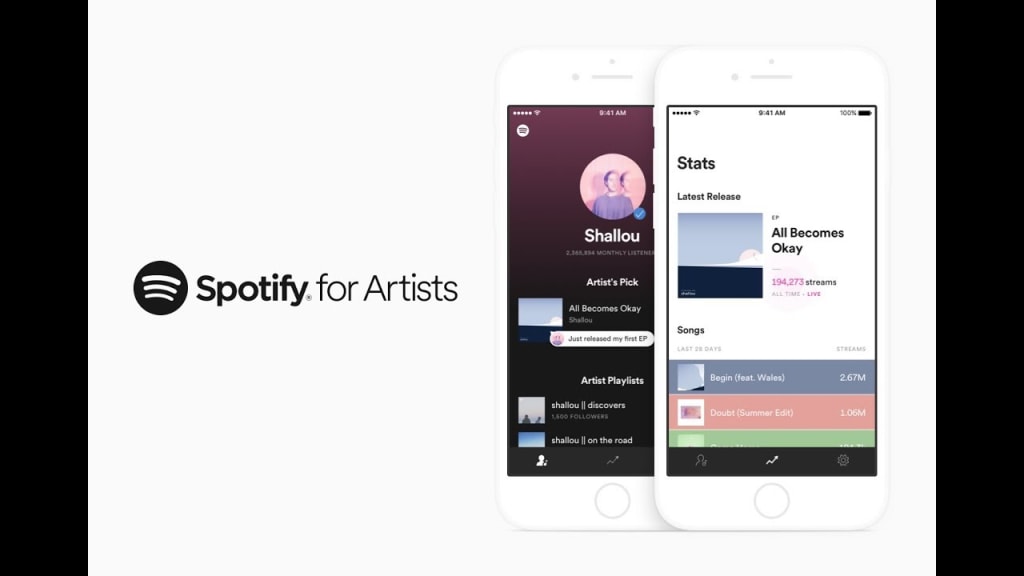
For emerging artists, getting verified on Spotify can seem daunting. However, achieving that coveted blue tick can significantly enhance your credibility and visibility on the platform, setting you on the path to success. This step-by-step guide will demystify the process, helping new artists secure their verification badge and take their music career to the next level.
Why New Artists Need Verification:
Verification on Spotify offers numerous benefits, especially for new artists trying to establish themselves in a competitive industry.
Credibility and Trust:
A blue tick next to your name signifies authenticity and professionalism.
It helps build trust with potential fans, collaborators, and industry professionals.
Increased Visibility:
Verified profiles are more likely to appear in search results and recommendations.
Your music gains more exposure, increasing the chances of attracting new listeners.
Access to Valuable Tools:
Spotify for Artists provides insights and analytics to help you understand your audience and track your performance.
You can use these tools to make informed decisions about your music and marketing strategies.
Playlisting Opportunities:
Verified artists are more likely to be featured on Spotify’s curated playlists.
Being included in popular playlists can boost your streams and followers significantly.
Setting Up Your Spotify for Artists Account:
Before you can apply for verification, you need to set up and optimize your Spotify for Artists account. Here’s how:
Claim Your Profile:
Visit the Spotify for Artists website and click on "Claim Your Profile."
Log in with your Spotify account or create a new one if you don’t have one already.
Search for your artist name and select your profile.
Verify your identity through your distributor or social media accounts. Spotify might ask for additional information to confirm that you are the legitimate owner of the artist profile.
Complete Your Profile:
Upload a high-quality profile picture and header image. These images should be professional and reflective of your brand.
Write a compelling bio that tells your story and connects with your audience. Include interesting details about your musical journey, influences, and achievements.
Add links to your social media accounts and official website to provide fans with more ways to connect with you.
Optimize Your Profile:
Ensure your profile information is complete and up-to-date. This includes your artist name, genre, and location.
Use engaging and professional photos. High-quality visuals make a strong impression on visitors.
Keep your bio relevant and interesting. Update it regularly to reflect your latest releases, tours, and milestones.
Building Your Presence:
To increase your chances of verification, you need to build a strong presence on Spotify and other platforms. Here are some strategies:
Release Music Regularly:
Consistent releases keep your audience engaged and attract new listeners. Plan your releases strategically, considering the best times to drop new music.
Promote your releases on social media, your website, and through email newsletters to drive traffic to your Spotify profile.
Engage with Your Audience:
Respond to comments and messages from fans. Show appreciation for their support and make them feel valued.
Share behind-the-scenes content, personal stories, and updates to create a connection with your audience. Authentic engagement can turn casual listeners into loyal fans.
Encourage listeners to follow your profile and add your songs to their playlists. This increases your streams and helps build a community around your music.
Utilize Social Media:
Cross-promote your Spotify profile on all your social media channels. Use platforms like Instagram, Twitter, Facebook, and TikTok to reach a wider audience.
Collaborate with influencers and other artists to expand your reach. Joint projects and shoutouts can introduce you to new listeners.
Use hashtags and tags related to your genre and music to increase your visibility. Participate in trending challenges and conversations to stay relevant.
Verification Process:
Once your profile is optimized and you have a growing following, it's time to apply for verification. Follow these steps to submit your verification request:
Log in to Spotify for Artists:
Use your credentials to log in to your Spotify for Artists account.
Navigate to the Verification Section:
In your dashboard, find the option to request verification. This is usually located in the profile settings or artist settings section.
Submit Your Request:
Follow the prompts to submit your verification request. Spotify will ask for details about your music, career, and online presence.
Provide any additional information required by Spotify, such as links to your social media profiles, press coverage, or notable achievements.
Wait for Approval:
The verification process can take a few weeks. Be patient and keep an eye on your email for updates from Spotify.
If your request is approved, you will receive an email confirming your verification status. The blue tick will appear next to your name on your profile.
What to Do if Your Request is Denied:
Sometimes, verification requests are denied. If this happens, don't be discouraged. Follow these steps to improve your chances of success next time:
Review the Feedback:
Spotify usually provides feedback on why your request was denied. Carefully review the reasons given.
Identify areas that need improvement, such as profile completeness, audience engagement, or online presence.
Make Necessary Improvements:
Address the feedback provided by Spotify. Update your profile, increase your engagement, and grow your following.
Work on building a stronger presence across all platforms. Show consistent activity and growth.
Reapply for Verification:
Once you have made the necessary improvements, reapply for verification. Highlight the changes you have made and how they address the previous feedback.
Be persistent and patient. Verification can take time, but with consistent effort, you can achieve it.
Next Steps After Verification:
Getting verified on Spotify is a significant milestone, but it’s just the beginning. Here’s how to leverage your verified status to further your music career:
Leverage Your Verified Status:
Use your verified status to enhance your marketing efforts. Mention your verification in press releases, social media posts, and promotional materials.
Collaborate with other verified artists. Networking with established musicians can open up new opportunities and help you grow your audience.
Engage with Your Audience:
Continue to engage with your listeners. Respond to comments, messages, and mentions to maintain a strong connection with your audience.
Use Spotify for Artists tools to understand your audience better. Analyze your data to identify trends and preferences.
Stay Active and Relevant:
Regularly release new music and update your profile with fresh content. Consistency is key to keeping your audience engaged.
Participate in industry events, interviews, and collaborations to stay relevant in the music scene.
Conclusion:
Even new artists can achieve verification on Spotify with the right approach. Verification boosts your credibility, visibility, and access to valuable tools and opportunities. Follow these steps to optimize your profile, grow your audience, and apply for verification. Stay persistent, engage with your audience, and watch your music career flourish. Verification is a testament to your dedication and professionalism, opening doors to new possibilities and success in the music industry.
About the Creator
Music Industry Updates
Welcome to Music Industry Updates, your go-to hub for the latest happenings in the music world.
Stay tuned, stay informed, and stay inspired with Music Pulse – where every beat counts.
Keep reading
More stories from Music Industry Updates and writers in Beat and other communities.
The Power of Multiple Platforms: Why Musicians Should Use Deliver My Tune for Video Distribution
In today's digital landscape, video content is king. Whether you are an aspiring artist, an established musician, or an entertainment brand, having a strong video presence is essential to connect with a global audience. Deliver My Tune, a leading music distribution platform, offers artists a unique and comprehensive video distribution service that ensures your content reaches the right audience on the most influential platforms.
By Music Industry Updatesabout a year ago in Beat
The Tango Connection
I suppose I've become a writer so I wouldn't bore everyone to death telling them my stories. Reading them is reading. Not the same. There's rhythm. And timing and, most importantly, drama and suspense. Unless you have tremendous magnetism and an undeniable stage presence, there's no way you can engage an audience the way you can by writing your story. That's my opinion.
By Rene Volpi 28 days ago in Beat



Comments
There are no comments for this story
Be the first to respond and start the conversation.