
Qobuz vs Tidal: What's the Best for You?
What's the difference between Qobuz and Tidal? Which one is better for you? Learn everything about the Qobuz vs. Tidal full comparison right here.


Qobuz and Tidal are similarily audiophile-friendly music platforms, offering high-fidelity sound and a unique blend of features. But it's difficult for some music enthusiasts to determine which music service aligns best with them. This comprehensive comparison dives deep into the nuances of both services, helping you make the final decision.
See the full post: Qobuz vs Tidal - Full Comparison
Part 1 An Overview of Qobuz and Tidal
Qobuz
Launched in France in 2007, Qobuz is well-known for offering over 100 million tracks focusing on high-resolution audio. The extensive library spans a wide variety of genres but provides less mainstream music compared to other services like Spotify or Apple Music. Qobuz has increasingly expanded its region availability, and as of today, over 20 countries support the opening of Qobuz service.
Tidal
Music fans may be well familiar with the Tidal platform. Like other subscription-based music streaming services, it boasts a vast catalog of songs, audiobooks, podcasts, and more music content. This go-to platform also gained great popularity for its high-quality sound. The HiFi and MQA streams output sound quality that rivals and often exceeds many other platforms. Plus, Tidal is available in over 60 countries and regions worldwide.
Part 2 📊 Qobuz vs Tidal Comparative Table
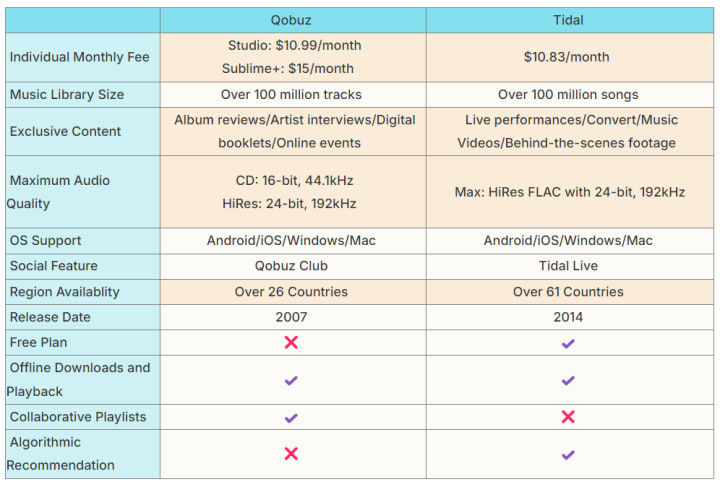
Part 3 Qobuz vs Tidal: In-depth Analysis
Qobuz vs Tidal: Pricing
Two primary subscription plans are available from Qobuz: Studio, which costs $12.99/month, and Sublime, which costs $14.99/month. Both are discounted prices based on an annual single-payment subscription. Although Studio and Sublime share the same features, the latter allows you to have up to 60% OFF of the music you purchase. Numerous hi-res albums from the online digital store can be purchasable and downloadable in various formats. Plus, there is no set price for the membership; it rather depends on the level of service you select, such as Solo, Duo, and Family. The following is a breakdown of Qobuz's specific paid plans.

Tidal offers a free tier called Tidal Access, which allows users to get a taste of listening to music even without paying. However, the free option seems unbearable in its user experience because it consists of unskippable ads for every few songs. In this case, users can upgrade to the Tidal basic paid plan at $10.99 with applicable monthly sales tax. Also, Tidal grants discounted subscription plans that are tailored to specific groups. For example, eligible students can enjoy the Tidal Student Plan at half the regular price. The family plan, which accommodates up to six family members living under the same roof, is normally priced at $16.99 per month. Besides, it is worth noting that Tidal has discontinued Military and First Responder discounts since June 2024.

Verdict: The pricing of Qobuz is higher, particularly for the Sublime plan. Tidal has merged the Hi-Fi and Hi-Fi Plus plan, so the standard subscription fees seem more favorable. Also, the exclusive content and immersive audio formats make Tidal a good option.
Qobuz vs Tidal: Sound Quality
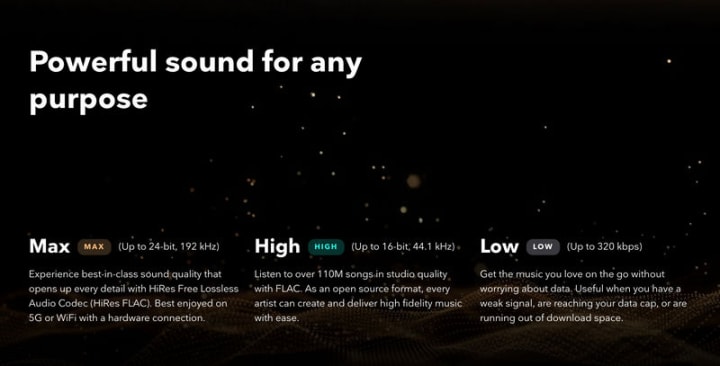
The streaming audio quality is crucial when talking to Qobuz Tidal comparison. Qobuz and Tidal are prominent for their emphasis on high-resolution, lossless audio, which considerably outperforms the compressed audio streams provided by platforms such as Spotify and YouTube Music. Of course, there is something slightly different in the playback quality options, albeit both platforms will give you the FLAC lossless audio format.
Qobuz offers three sound quality levels: MP3 at 320kbps, CD quality at 16-bit/44.1kHz, and Hi-Res FLAC Audio at up to 24-bit/192kHz. Notably, Qobuz does not support spatial audio formats and concentrates solely on high-fidelity stereo sound.

Tidal divides the audio quality into three types: Low for 320kbps, High for 16-bit/44.1kHz, as well as Max for up to 24-bit/192kHz. Meanwhile, Tidal offers extra features like Dolby Atmos for immersive listening, which Qobuz doesn’t provide at the same level.
Qobuz vs Tidal: Music Library & Discovery
Now, let's discuss the music variety and catalog size. Surprisingly enough, both Qobuz and Tidal bank on over 100 million tracks, covering a robust selection of genres for listeners, including popular, classic, niche music, and the like. The library also features curated playlists by in-house editors or partners, suitable for different moods and occasions. Still, the exclusive content and music discovery differ.
Tidal relies on robust AI recommendation algorithms to figure out users' preferences. Tidal Rising, an exclusive feature, spotlights up-and-coming musicians. Tidal focuses extensively on mainstream music, particularly hip-hop and R & B. It has collaborated with numerous notable musicians to provide access to new albums, exclusive live recordings, and video content. Alternatively, Tidal's availability in over 60 countries allows for a greater regional reach and tailored content.
Instead of depending solely on algorithms, Qobuz filters music through thematic selections. Classical, jazz, and rock are the main genres available on Qobuz. Users can explore new artists and tracks within their favorite genres. This platform emphasizes hi-res tracks and extensive editorial content. On top of that, Qobuz is accessible in fewer countries than Tidal, with a focus on the European and North American markets.
Verdict: Qobuz and Tidal each provide exclusive music content. So, the best option is determined by your musical style and whether you value unique content and music discovery.
Qobuz vs Tidal: Interface & Compatibility
Qobuz is information-rich in the user interface, ideal for users who prefer detailed metadata and editorial content. The main screen frequently displays new releases, editorial picks, and high-resolution albums. Users can download the Qobuz app on iOS, Android, Windows, or macOS devices. Mobile and desktop users have much in common, especially when downloading and streaming high-resolution audio.
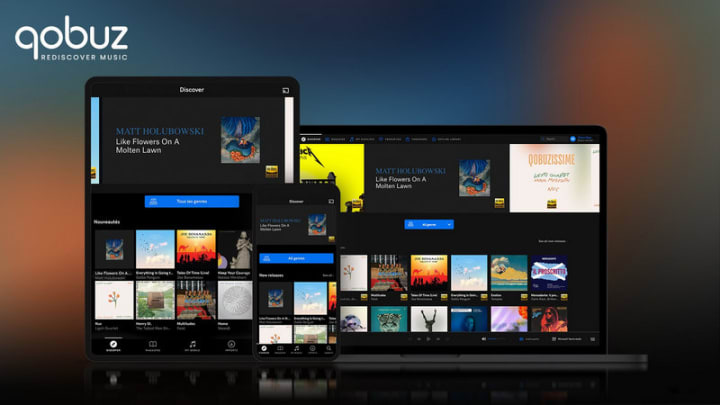
Tidal focuses on ease of use, thereby making the interface more modern and intuitive. The homepage is centered around personalized playlists, new releases, and recommended content based on user's listening habits. It is straightforward for users to discover and access music they like. Like Qobuz, Tidal is compatible with iOS, Android, Windows, and macOS. Tidal also offers a web player that provides easy access from any browser without the need for app installation.

Verdict: While informative, Qobuz’s interface is a bit more complex for newbies due to its editorial-heavy layout. So, if you prefer a streamlined interface and playlist-based music discovery, Tidal is where it's at.
Final Verdict
Consider your subscription budget, sound quality preference, music genre focus, interface style, and device compatibility when deciding between Qobuz and Tidal.
Choose Qobuz if you are a big fan of classical and jazz and appreciate high-resolution audio and comprehensive album metadata. It's worth committing to a subscription for those prioritizing sound quality and profound editorial-driven music discovery.
Tidal is the best option if you favor a slick interface, exclusive artist content, and strong support for mainstream genres like hip-hop and R & B. Tidal also offers an excellent experience for users who want personalized playlists, music videos, and immersive audio formats like Dolby Atmos.
Extra Tips: Download Qobuz & Tidal Music to Computer at Once
Regardless of the music service you select, the AudiCable Streaming Music Converter provides a comprehensive solution that simultaneously downloads Hi-Fi songs from Tidal and Qobuz to the computer.
Tool Required: AudiCable Qobuz & Tidal Music Converter
AudiCable Audio Recorder is an all-in-one streaming music converter capable of converting music from various platforms, including Apple Audio, Spotify, Tidal, and Qobuz. The built-in Qobuz music downloader and Tidal music converter effortlessly extract tracks online and convert audio into MP3, AAC, WAV, FLAC, AIFF, and ALAC files.
The powerful conversion technology perfectly preserves the lossless sound quality and the complete ID3 tags of songs, including title, album, artist, artwork, etc. Beyond that, AudiCable is equipped with advanced output settings and handy audio tools. Users can freely utilize a format converter, ID3 tags editor, vocal remover, CD Burner, etc.

About the Creator
Irene
Love my music life.
The Tango Connection
I suppose I've become a writer so I wouldn't bore everyone to death telling them my stories. Reading them is reading. Not the same. There's rhythm. And timing and, most importantly, drama and suspense. Unless you have tremendous magnetism and an undeniable stage presence, there's no way you can engage an audience the way you can by writing your story. That's my opinion.
By Rene Volpi 28 days ago in Beat
TUS NUA - ch 53
TUS NUA – ch 53 New Beginnings – Mia and Midnight (*)(*)(*) Finola knew Ali’s brother-in-law needed to put his mind at rest. She fed her arm through his and led him outside. “We’ll sit here. If you like, I can put a block around us so our conversation will be private.”
By Margaret Brennan6 days ago in Fiction



Comments
There are no comments for this story
Be the first to respond and start the conversation.