
WARNING:- Flutter application is created using an older version of the Android embedding v2
Migrating to Android X

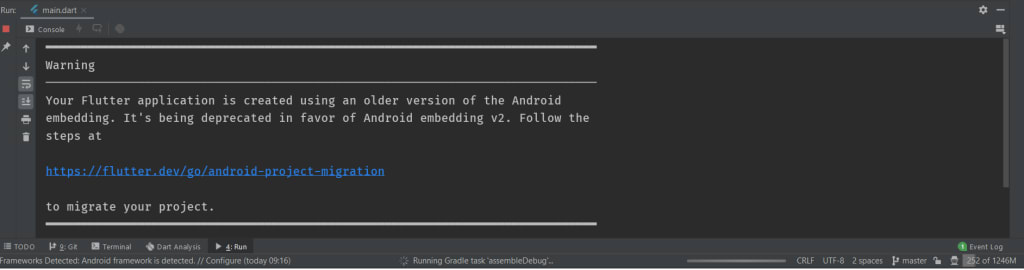
Are you getting the above error when you're running an old flutter app in android studio.
Then you're in the right place.
Migrating to Android embedding v2 is very easy and necessary without this your app will not run in a new flutter environment
Please follow this link which is created by the flutter team.
https://github.com/flutter/flutter/wiki/Upgrading-pre-1.12-Android-projects
The above page will explain how to do it but there are a lot of things is being written on that page which is not that useful and you need to change only some of its code.
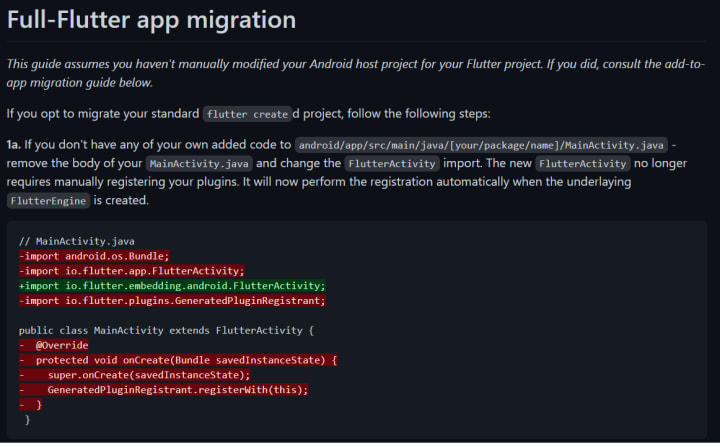
Step 1 - copy the green line(code) from the given link which can be seen in 1a article
Code - import io.flutter.embedding.android.FlutterActivity;
Please remove the (+) sign from the code.
After copying the code open your Android Studio, on the left side you will see an Android folder below .idea folder click on it.
You have to go to android/app/src/main/java/co/[your company name]/[your app name]/MAINACTIVITY.java
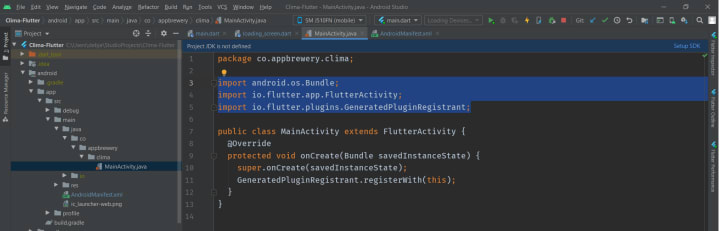
Now delete all the imported files which are present, you can check the above image as an example
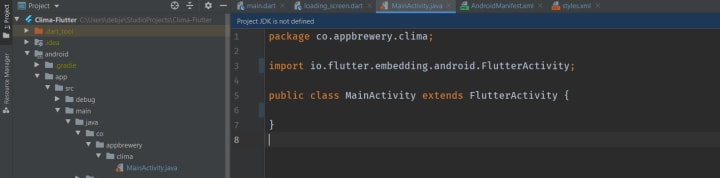
and paste import io.flutter.embedding.android.FlutterActivity;
After new importing delete all the MainAcitivity. check below image for example
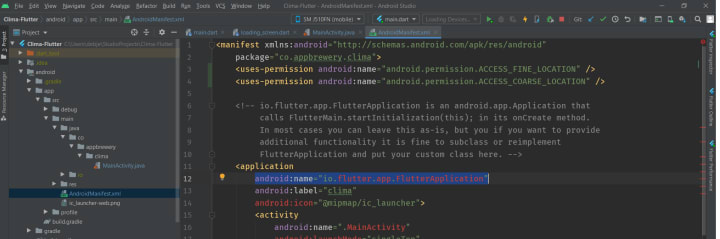
Now go to androidmanifest.xml , inside that go to <application> tag and remove android:name , look below the image for example.
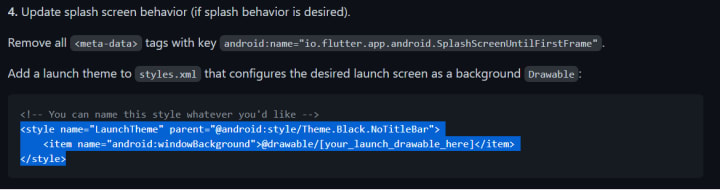
Now go to that link of Github again scroll below to 4. Update splash screen behavior (if splash behavior is desired) section
and copy the <style> tag i.e
<style name="LaunchTheme" parent="@android:style/Theme.Black.NoTitleBar"><item name="android:windowBackground">@drawable/[your_launch_drawable_here]</item> </style>
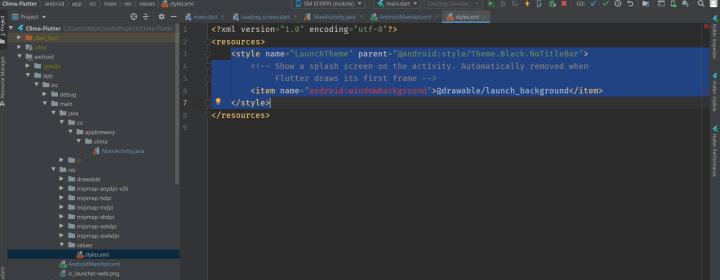
After copying go to the res folder then values then styles.xml and open it and clear all the <style> tag from there and paste the new <style> tag. Look into the below photo for example
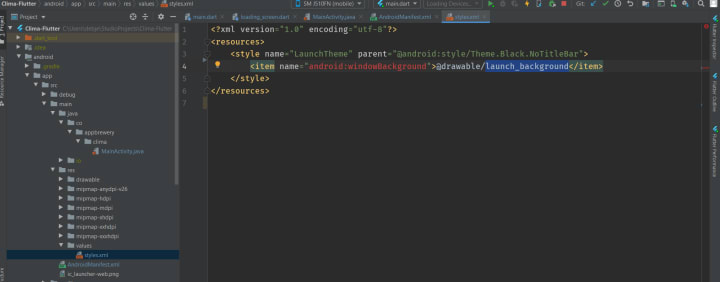
After pasting it change the [your_launch_drawable_here] to launch_background.
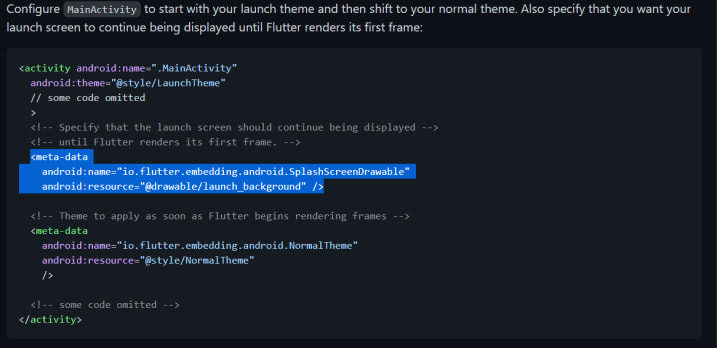
Now again go to the Github link where you will see a post of Configure MainActivity to start with your launch theme and then shift to your normal theme. Also specify that you want your launch screen to continue being displayed until Flutter renders its first frame:
Copy the <meta data>
<meta-data android:name="io.flutter.embedding.android.SplashScreenDrawable"
android:resource="@drawable/launch_background" />
(below is the image example)
Now go to AndroidManifest.xml then go to <activity> tag and remove the <meta data> (Look into below image for example.)
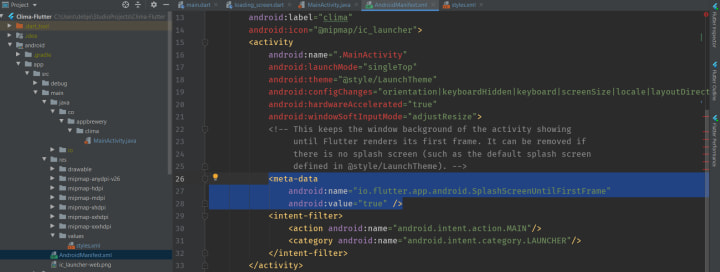
Now copy this <meta data> tag
<meta-data
android:name="flutterEmbedding"
android:value="2" />

and go to the bottom of androidManifest.xml and paste it below </activity> (look below for example)

Now save all the changes and restart your computer.
after restarting your Android embedding v2 warning will not be shown again.
that's all
Thank you for reading.
About the Creator
Keep reading
More stories from writers in 01 and other communities.
Why Natural Stone Pavers Are Worth the Investment for Your Home
When improving outdoor spaces, homeowners often look for materials that offer both beauty and long-term value. Natural stone pavers have remained a popular choice for patios, driveways, and walkways because they combine durability with timeless appeal. While they may come with a higher initial cost compared to manufactured alternatives, natural stone pavers offer benefits that make them a worthwhile investment. This article explores why choosing natural stone can enhance your home’s appearance, performance, and value for many years to come.
By Ammaari Stones6 days ago in 01
Why Legacy Financial Institutions Are Racing to Hire Crypto Exchange Developers in 2026
The financial services landscape is experiencing an unprecedented transformation. What was once dismissed as a fringe technology has now become a strategic imperative for the world's most established financial institutions. Banks, investment firms, and traditional exchanges are scrambling to hire crypto exchange developers, and the competition has reached fever pitch in 2026.
By Tarun Nagarabout 3 hours ago in 01
Instructions Included Challenge Winners
For the Instructions Included challenge, we asked writers to tell a story through instructions and to trust the form to carry what could not be said outright. Across the top entries, that trust paid off in many different ways.
By Vocal Curation Team6 days ago in Resources


Comments
There are no comments for this story
Be the first to respond and start the conversation.