
Understanding the BDD, Gherkin Language & Main Rules for BDD UI Scenarios
In this blog, we will delve into the essentials of BDD, explore the Gherkin language used for writing BDD tests, and share best practices for creating effective BDD scenarios.


Introduction
In the dynamic world of software testing, ensuring the final product aligns with user expectations is crucial. For Quality Assurance (QA) professionals, Behavior-Driven Development (BDD) has emerged as a powerful methodology due to its collaborative and user-focused approach. BDD bridges the gap between technical and non-technical stakeholders, fostering a shared understanding of desired software behavior through clear, concise, and executable specifications. This collaborative approach significantly enhances the QA process by ensuring all team members are aligned on the requirements and expected outcomes.
In this blog, we will delve into the essentials of BDD, explore the Gherkin language used for writing BDD tests, and share best practices for creating effective BDD scenarios. By the end, you’ll have a comprehensive understanding of how BDD can enhance your QA process, ensuring high-quality software that meets user needs and expectations.
What is Behavior-Driven Development (BDD)?
Behavior-Driven Development (BDD) is a software development technique that encourages collaboration among developers, testers, and business stakeholders. It focuses on the behavior of the system from the user’s perspective. BDD helps in ensuring the software meets the users’ needs and expectations by defining scenarios that describe the desired behavior. This approach is crucial for successful BDD development, as it aligns technical and non-technical team members around common goals.
What is Gherkin Language?
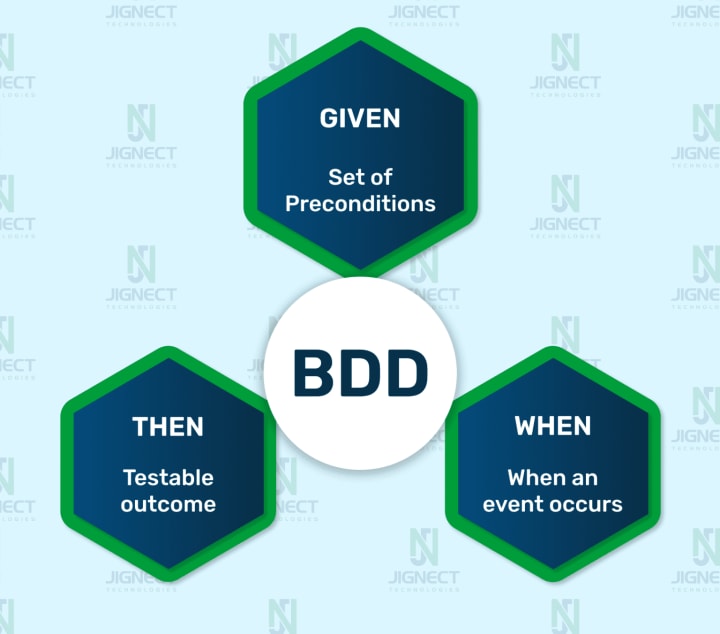
Gherkin is a structured language that is used to write BDD tests. It uses a specific syntax that is easy to read and understand for both technical and non-technical team members. Gherkin scenarios are written in a Given-When-Then format to describe the expected behavior of the system in a clear and concise manner. Mastering Gherkin is essential for effective BDD development, as it ensures clarity and precision in defining user stories.
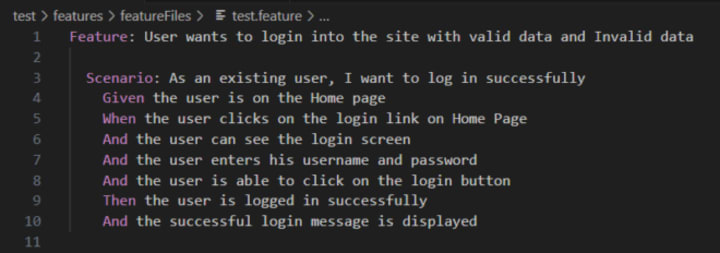
In BDD, “Given-When-And-Then-But” is the proposed approach for writing test cases. Listed below is an example of BDD.

In the above example, there are many keywords, and every keyword has its own meaning and purpose.
Let’s explain each keyword with respect to the above example.
- Feature Keyword: The feature file starts with the keyword Feature. Under feature, you can mention the feature name which is to be tested, as seen below,
- Feature: User login into the site with valid data and Invalid data
- Scenario Keyword: There can be more than one scenario under one feature file, and each scenario starts with the keyword Scenario, followed by the scenario name. In the below example, we can see there are two scenarios.
- Scenario: Login as a new sign-up user with valid data
- Scenario: Login as a new sign-up user with invalid data
- Given Keyword: Given keyword is normally used when we have to give some pre-condition in our test case as seen in the example below,
- Given User is on the home page of the site Or Given User is on the Log-in page of the site
- When Keyword: When the keyword is used to perform some action, as depicted in the example below,
- When the User enters an email Or When the User clicks on the “Log in” button
- And Keyword: There is no annotation for AND keyword. It is used to connect two statements and provides the logical AND condition between any two statements. AND can be used in combination with GIVEN, WHEN and THEN statements and used for positive assertion.
- And the user clicks on the login button
- Then Keyword: Then Keyword is used for the final outcome or for validation.
- Then User should be logged-in successfully
- Then Error message should be displayed
- But Keyword: But the keyword is used to represent negative assertions in addition to the previous statement.
- But Log-in button is not present
- But Re-login option should be available
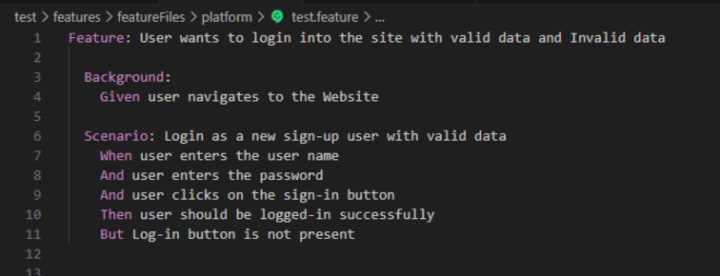
- Background Keyword: If there is any repetitive step that is going to be used in every test case. We just add the repetitive step under Keyword Background. Step keep under Background would be run before every test case.
- Background: Given User navigates to the Website
Best Practices for Writing BDD Tests 📝
When writing BDD tests, it’s essential to follow certain best practices to ensure the effectiveness and efficiency of the tests.
Here are some key best practices to keep in mind:
1. Write test scenarios as early as possible
It’s a good practice if we are ready to write test scenarios before creating test code. Developing scenarios early helps you define software behavior and understand possible problems in a better way. Once a scenario is ready and reviewed by team members who agree with it, we can start implementing the functionality. This will save time and effort and take away uncertainty later, during the development, or when your team will run acceptance tests.
2. Features and Scenarios
A feature is a product functionality, whereas a scenario is the specification of behavior.
- Feature file:
- Feature file should be specific to the page, meaning if you have to cover the login scenario we should create a “login.feature”
- A single feature file can contain multiple scenarios
- Avoid mixing feature files
- Every feature should be ready to be executed alone
2. Scenario:
- To describe the scenarios, Gherkin keywords are used: Given, When, Then, But and And During writing the scenario we have to make sure we should use keywords in an appropriate way.
See below an example of a poorly written scenario.
A better way to write the same above scenario with fewer lines is as follows. It is best to avoid details that don’t contribute much.
better-way-implemented-scenario
3. Use Background
It is always the best practice to put steps that are repeated in every scenario into the Background. The background step is run before every scenario.
Ensure that you don’t put too many steps in there, as your scenarios may become harder to understand. Given below is an example.
4. Try to re-use step definitions
It’s best practice to reuse those step definitions that we are using frequently in various scenarios e.g “Given: User navigates to the Website” this can be one common step that we need in every scenario. So we can reuse this step.
Reusing the steps improves the maintainability if just in case there’s any change come we need to update in a single step.
We have to make sure language/words should be consistent if we want to re-use the step.
In the below example step is the same the but word isn’t consistent Click and clicks both are different words. So we have to take care of case sensitive to re-use the step.
Given (“Click on ‘Sign In link’ on the Home Page”)
Given (“click on ‘Sign In link’ on the Home Page”)
- Step Definitions dos and don’ts
- Don’t call a step definition method from another method.
- Never hard code any test data in step definition.
- Learn how regular expression is used to match a Gherkin step and a Step Definition method.
- Chain the assertions to enable code readability.
5. Use a Data Table
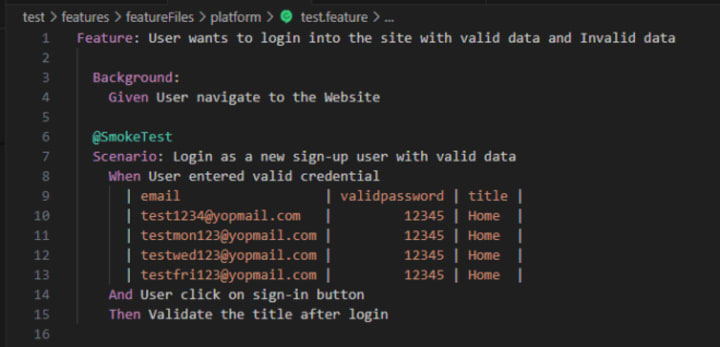
It’s recommended to use Data Table to store the data. We can give data as parameters within the step but once we have a large set of data then it’s not feasible to relinquish all data as parameters. It’s better to use a data table once we have a large set of data.
The data table is used to inject data at the step level. In the below code we have provided data for step “I entered valid credential”.
TO READ THE FULL BLOG...
About the Creator
Jignect Technologies
At JigNect Technologies, we believe that software testing is an art, a science, and a passion. Our team of experts combines years of experience, cutting-edge technology.
Keep reading
More stories from Jignect Technologies and writers in 01 and other communities.
App Development Cost in Wisconsin: What You Need to Know
So, you’ve got a "million-dollar idea" for an app. Great. But before you start dreaming of Silicon Valley exits, we need to talk about the actual bank balance you’ll need to get a dev team in the Badger State to look at your specs. Real talk, building software in 2026 isn't the Wild West it used to be, but it sure isn't cheap.
By Sherry Walker7 days ago in 01




Comments
There are no comments for this story
Be the first to respond and start the conversation.