
Top 12 Free Vocal Remover Tools for 2025: Create Karaoke Tracks with Ease
How to Remove Vocals from Song for Free
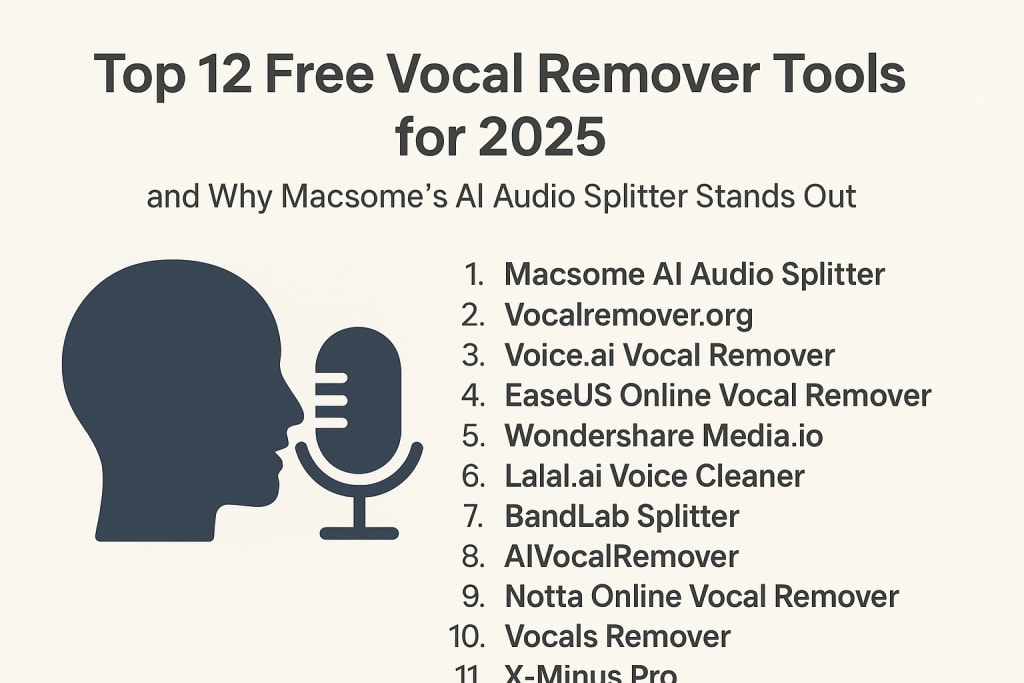
If you're a music enthusiast, producer, or karaoke lover, you’ve likely wanted to strip vocals from a song to create a perfect instrumental track or isolate vocals for a remix. Thanks to advancements in AI technology, removing vocals from music tracks has never been easier. In this blog, we’ll dive into the top 11 free vocal remover tools for 2025 with a special focus on Macsome AI Audio Splitter. Whether you're crafting karaoke tracks or remixing songs, these tools will help you achieve professional results without breaking the bank.
What Is a Vocal Remover?
A vocal remover is a tool designed to separate vocals from instrumental tracks in a song. By leveraging AI algorithms that analyze audio frequencies and patterns, these tools isolate vocals or instrumentals, making them ideal for creating karaoke versions, remixes, or studying specific parts of a track. From online apps to desktop software, the tools listed below offer simple, reliable, and free solutions for your audio editing needs.
Top 11 Free Vocal Remover Tools for 2025
Here’s a curated list of the best free vocal remover tools available in 2025, starting with Macsome’s highly recommended AI Audio Splitter:
1. Macsome AI Audio Splitter [Highly Recommended]
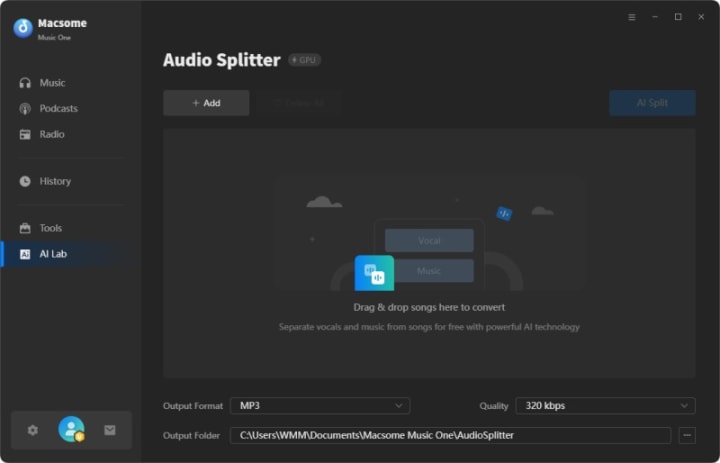
Macsome’s AI Audio Splitter, a free module within the Macsome Music One, is a standout choice for vocal removal. This tool uses advanced AI algorithms to accurately separate vocals and instrumentals from songs and other audio files.
Key features include:
Completely Free: No hidden fees or restrictions for the vocal remover feature.
High-Quality Output: Preserves original audio quality, though output bitrate may be slightly reduced (e.g., 320 kbps input may result in 258 kbps for instrumentals and 277 kbps for vocals).
Supported Formats: Works with MP3, M4A, AAC, FLAC, OGG, and WAV files.
How to use it:
- Open Macsome Music One and navigate to the AI Lab tab.
- Customize your output format, quality, and destination.
- Drag and drop your local songs or click + Add to import.
- Click AI Split to start the vocal separation process.
2. VocalRemover.org
A popular online tool, VocalRemover.org uses AI to separate vocals and instrumentals from MP3 or WAV files. It’s user-friendly and free, ideal for quick karaoke track creation.
Pros: No software installation needed, supports volume adjustments, and allows free downloads of separated tracks.
Cons: Processing can be slow, and a VPN may interfere with functionality.
3. Voice.ai Vocal Remover
This online app seamlessly removes vocals from MP3, WAV, or FLAC files, ensuring high-quality instrumental tracks. It’s perfect for karaoke or remixing.
Pros: Secure and easy to use.
Cons: Limited to 5-minute tracks in the free version.
4. Musiclab
Available as a free AI vocal remover and audio splitter, Musiclab extracts vocals, drums, bass, and other instruments from songs. It’s great for musicians looking to create backing tracks or reduce noise.
Pros: High-quality exports and versatile features like key detection.
Cons: Processing large files can be slow.
5. Wondershare Media.io
Convenient and user-friendly, this tool handles both audio and YouTube videos. Supports previews but shares the same drawbacks: MP3-only output, low bitrate, slow processing, missing tags, and limited downloads.
6. LALAL.AILALAL.AI
provides fast and accurate vocal and instrumental separation with options for isolating specific stems like drums or bass.
Pros: High-quality results and flexible stem separation.
Cons: Free version limits downloads; paid packages start at $10.
7. Ultimate Vocal Remover
An open-source tool available for Windows, Mac, and Linux, Ultimate Vocal Remover is completely free and perfect for creating instrumental versions of songs.
Pros: No cost and open-source.
Cons: May require technical setup.
8. GarageBand
Apple’s free music production software for macOS and iOS includes basic vocal removal features, making it accessible for beginners.
Pros: User-friendly and pre-installed on Apple devices.
Cons: Limited advanced vocal isolation capabilities.
9. Reaper
A flexible DAW for Mac, Reaper offers vocal removal tools for users of all skill levels.
Pros: Preserves instrumental quality.
Cons: Requires some audio editing knowledge.
10. EaseUS Online Vocal Remover
This web-based tool allows users to drag and drop songs for quick vocal and instrumental separation.
Pros: No installation needed and supports cloud imports.
Cons: Processing speed depends on file size.
11. Vocal Remover – Musiclab (Mobile App)
This mobile app for iOS and Android uses AI to extract vocals and create karaoke tracks on the go.
Pros: Convenient for mobile users and supports multiple formats.
Cons: In-app purchases required for unlimited features.
Frequently Asked Questions
Q: Are these tools completely free?
A: Most tools offer free versions with limitations, such as track duration or daily usage caps. Some, like Macsome’s AI Audio Splitter, provide unrestricted vocal removal but may require a paid subscription for additional features.
Q: Will the audio quality degrade after vocal removal?
A: Some tools may slightly reduce output quality (e.g., Macsome’s output at 258–277 kbps from a 320 kbps input).
Conclusion
Whether you’re a karaoke enthusiast, a budding music producer, or just experimenting with audio, these 11 free vocal remover tools for 2025 offer powerful solutions to separate vocals and instrumentals with ease. Macsome’s AI Audio Splitter stands out for its integration and user-friendly interface, making it a top choice for creating high-quality karaoke tracks or remixes. Explore these tools, experiment with your favorite songs, and unleash your creativity!
About the Creator
The Fall of a Legend: How uTorrent Betrayed Its Users and Became a Symbol of "Digital Treachery" ⚠️
Do you remember that moment? You installed a small .exe file that took up just a few hundred kilobytes—smaller than an average photo from back then. The program launched in a split second, didn't require account creation, didn't bombard you with notifications, and didn't ask for access to your private data. It simply did what it was designed to do: it connected you with millions of other users worldwide. For the generation raised in the era of "downloading everything," uTorrent was more than just a tool. It was a gateway to unlimited culture, music, and software. It was a synonym for internet freedom that no one controlled. 🌍
By Piotr Nowak2 days ago in 01
📢 Raise Your Voice Thread: 03/05/2026
Our “Raise Your Voice Threads” are hosted most alternating Thursdays at 12PM ET to offer creators more avenues to uncover exceptional stories on Vocal. As we are continuously searching for fresh creators and inspiring stories, this thread provides an opportunity to exchange and discuss the stories that have moved and motivated us on Vocal.
By Raise Your Voice by Vocal7 days ago in Resources




Comments
There are no comments for this story
Be the first to respond and start the conversation.