
Tools to dip your toes on in reverse engineering
There are several different tools, for an instance you can use GHIDRA for reversing, GDB for debugging and PWN Tools for scripting.


Ghidra

Ghidra is an open sourced decompiler. A compiler takes source code like C, and converts it into machine code. A decompiler tries to do the opposite. It takes machine code and generates code that resembles it's source code.
However, since the process of compiling source code isn't like a 1 to 1 function, the code it gives us isn't always 100% correct. Even with that it can be a great help, and really reduce the amount of time we spend reversing challenges (between reversing is just the process of figuring out what something does).
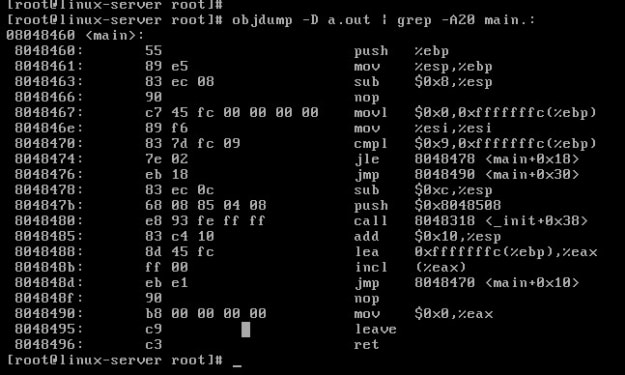
Check this out :
GDB-GEF
This file was contributed to by deveynull (also made the hello_world binary)
So throughout this project, we will be using a lot of different tools. The purpose of this module is to show you some of the basics of three of those tools. We will start with gdb-gef.
First off, gdb is a debugger (specifically the gnu debugger). Gef is an a gdb wrapper, designed to give us some extended features (https://github.com/hugsy/gef). To install it, you can find the instructions on the github page. it's super simple.
A debugger is software that allows us to perform various types of analysis of a process as it's running, and alter it in a variety of different ways.
Now you can tell if you have it installed by just looking at gdb.
Check this out :
PWN-Tools
Pwntools is a python ctf library designed for rapid exploit development. It essentially help us write exploits quickly, and has a lot of useful functionality behind it.
Also one thing to note, pwntools has Python2 and Python3 versions. Atm this course uses the Python2, but I have plans to switch it all over to Python3. Just keep in mind that some things change between Python2 to the Python3 versions, however the changes are relatively small.
## Installation
It's fairly simple process. The installation process is pretty much just using pip:
```
$ sudo pip install pwn
```
If you have any problems, google will help a lot.
## Using it
So this is going to be an explanation on how you do various things with pwntools. It will only cover a small bit of functionality.
If we want to import it into python:
```
from pwn import *
```
Now one thing that pwntools does for us, is it has some nice piping functionality which helps with IO. If we want to connect to the server at `github.com` (if you have an IP address, just swap out the dns name with the IP address) on port `9000` via tcp:
```
target = remote("github.com", 9000)
```
If you want to run a target binary:
```
target = process("./challenge")
```
If you want to attach the `gdb` debugger to a process:
```
gdb.attach(target)
```
If we want to attach the `gdb` debugger to a process, and also immediately pass a command to `gdb` to set a breakpoint at main:
```
gdb.attach(target, gdbscript='b *main')
```
Now for actual I/O. If we want to send the variable `x` to the `target` (target can be something like a process, or remote connection established by pwntools):
```
target.send(x)
```
If we wanted to send the variable `x` followed by a newline character appended to the end:
```
target.sendline(x)
```
If we wanted to print a single line of text from `target`:
```
print target.recvline()
```
If we wanted to print all text from `target` up to the string `out`:
```
print target.recvuntil("out")
```
Now one more thing, ELFs store data via least endian, meaning that data is stored with the least significant byte first. In a few situations where we are scanning in an integer, we will need to take this into account. Luckily pwntools will take care of this for us.
To pack the integer `y` as a least endian QWORD (commonly used for `x64`):
```
p64(x)
```
To pack the integer `y` as a least endian DWORD (commonly used for `x86`):
```
p32(x)
```
It can also unpack values we get. Let's say we wanted to unpack a least endian QWORD and get it's integer value:
```
u64(x)
```
To unpack a DWORD:
```
u32(x)
```
Lastly if just wanted to interact directly with `target`:
```
target.interactive()
```
This is only a small bit of the functionality pwntools has. You will see a lot more of the functionality later. If you want to see more of pwntools, it has some great docs: http://docs.pwntools.com/en/stable/
About the Creator
Motti Kumar
Hey guys i'm Motti Kumar and it’s a pleasure to be a guest blogger and hopefully inspire, give back, and keep you updated on overall cyber news or anything hot that impacts us as security enthusiast's here at Vocal Media.
Keep reading
More stories from Motti Kumar and writers in 01 and other communities.
Why SERP Data Is Crucial for Digital Marketing
When you search on Google or Bing, the results that appear aren’t random. They’re carefully curated to match what the search engines think you want to see. But behind these search results lies a treasure trove of data—one that can provide businesses, marketers, and analysts with a wealth of information to understand how online content performs, what consumers are looking for, and how competitors are positioning themselves.
By Swiftproxy4 days ago in 01
The Complete Guide to Wi-Fi Hacking: How Networks Are Compromised and How to Protect Yours
The Invisible Threat to Your Wireless Network In our hyper-connected world, Wi-Fi has become as essential as electricity. From smart homes to remote work, we depend on wireless networks for virtually everything. Yet, this convenience comes with significant risks. Wi-Fi hacking represents one of the most pervasive and potentially damaging cyber threats facing individuals and organizations today. Understanding how these attacks work isn't just technical knowledge—it's a necessary layer of digital self-defense in our increasingly wireless world.
By Alexander Hoffmann4 days ago in 01
Where's the Glory?
In breaking news, rehabilitated Republican Senator Johnnie Johnson (Pronouns: HE, HIM, HIS) called a press conference from the Men’s room of the New Orleans Louis Armstrong International Airport, Concourse B, across from the Ignatius Reilly’s Lucky Dog stand. The Senator had just returned from a sexual reorientation rehabilitation program in Memphis, TN after being publically disgraced at a Buckee’s Truckstop restroom soliciting sex from an undercover cop three months ago. He is a founding member of the Reformed Christians for Christ, a conservative, pro-family and ex-gay advocacy group. In the spirit of being reborn, Senator Johnson invited reporters to marvel at his plans for a major remodeling of airport bathrooms.
By Cathy Schieffelin5 days ago in Humor


Comments
There are no comments for this story
Be the first to respond and start the conversation.