
The Real Methods of Gmail Hacking: How Accounts Are Compromised and How to Protect Yourself
Exposing the Threats and Empowering Your Digital Defense in 2026

The Illusion of Invulnerability
A Gmail account is more than just an email inbox—it's a digital passport to our online identity, connecting our social media, financial services, cloud storage, and professional communications. Many users operate under the dangerous assumption that Google's security is impenetrable, but the reality is that human error and sophisticated attacks create vulnerabilities that hackers exploit daily. This comprehensive guide will explore the actual methods used to compromise Gmail accounts, examine the tools employed by malicious actors, and provide actionable strategies to fortify your digital presence against these threats.
Part 1: Tools and Software Used in Gmail Compromises
Important Disclaimer: The following information is presented for educational purposes only to help users understand the threat landscape. Using these tools to compromise accounts without authorization is illegal and unethical.
1. PASS BREAKER
PASS BREAKER is the application that utilizes artificial intelligence to hack GMail passwords. It requires only an email address, phone number, or a social media identifier to initiate access. This tool operates without time restrictions and can hack passwords globally within minutes, regardless of their age. The process grants unrestricted entry to any targeted GMail account.
You can download PASS BREAKER from its official website: https://www.passwordrevelator.net/en/passbreaker

2. Phishing Frameworks and Kits
- SocialFish: An open-source phishing tool that can clone websites and manage campaigns.

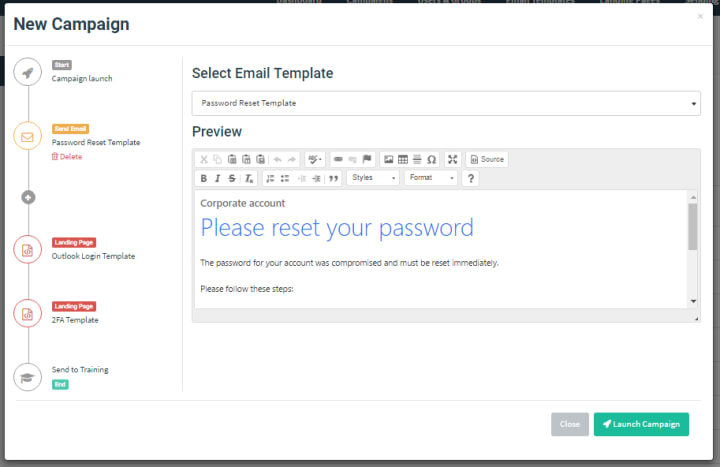
- GoPhish: A popular open-source phishing framework used for security training (and abused by attackers).
3. SIM Swapping Services
On dark web forums, services offering SIM swapping for specific carriers are advertised, with prices ranging from $100 to $1500 depending on the target and carrier.
Part 2: The Real Methods Used to Hack Gmail Accounts
1. Phishing Attacks: The Digital Deception
Phishing remains the most common and effective method for stealing Gmail credentials. Unlike the crude "Nigerian prince" emails of the past, modern phishing is sophisticated and convincing.

How it works: Hackers create fake login pages that appear identical to Google's official sign-in page. These pages are hosted on domains that resemble Google's (like "g00gle-verify.com" or "accounts-google.com.security-update.xyz"). Victims receive emails, texts, or social media messages urging them to click a link to verify their account, check a suspicious login, or access an important document. Once they enter their credentials on the fake page, hackers immediately capture them.
Advanced variants:
A. Spear phishing: Targeted attacks using personal information gleaned from social media
B. Clone phishing: Exact replicas of legitimate emails the victim has previously received
C. Evil Twin attacks: Fake WiFi networks that redirect login attempts to phishing pages
2. Keyloggers and Spyware: The Silent Observers
Keyloggers are malicious programs designed to record every keystroke on an infected device. When you type your Gmail password, the keylogger captures it and sends it to the hacker.
Distribution methods:
- Malicious email attachments disguised as invoices, resumes, or shipping notifications
- Compromised software downloads (especially "cracked" versions of paid software)
- Infected USB drives left in public places (a tactic called "USB dropping")
- Drive-by downloads from compromised websites
Once installed, keyloggers can:
- Capture passwords, credit card numbers, and personal messages
- Take screenshots when you visit specific websites
- Record microphone and webcam input
- Steal browser cookies, potentially allowing session hijacking
3. Credential Stuffing: The Automated Invasion
Many people reuse passwords across multiple services. Hackers exploit this by taking credentials leaked in data breaches from other sites and systematically trying them on Gmail accounts.
The process:
- Hackers obtain username/password lists from breaches of other services
- Automated tools test these credential pairs against Gmail's login system
- Successful logins are flagged for further exploitation or sale
Scale of the problem: According to Google's own data, credential stuffing attempts against Gmail number in the millions daily. Automated tools can test thousands of credential pairs per hour from different IP addresses to avoid detection.
4. Social Engineering: The Human Hack
Sometimes the most effective attack bypasses technology entirely. Social engineering manipulates people into revealing their credentials voluntarily.
Common techniques:
- Pretexting: Creating a fabricated scenario where the victim feels compelled to provide their password (e.g., impersonating Google support)
- Baiting: Offering something enticing (like a gift card or exclusive content) in exchange for login information
- Quid pro quo: Offering a service (like "technical support") in exchange for credentials
5. Session Hijacking and Cookie Theft
When you log into Gmail, your browser stores authentication cookies that keep you logged in. Hackers can steal these cookies through various methods:
- Cross-site scripting (XSS) attacks on websites you visit
- Man-in-the-middle attacks on unsecured public WiFi
- Malicious browser extensions that have permission to read site data
With these cookies, attackers can access your account without needing your password, often bypassing two-factor authentication since the session is already authenticated.
6. SIM Swapping: The Cellular Hijack
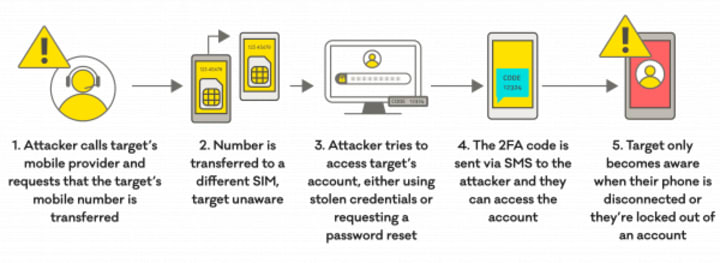
This sophisticated attack targets your mobile phone number, which is often used for account recovery and two-factor authentication.
How SIM swapping works:
- The attacker gathers personal information about the target
- They impersonate the victim to the mobile carrier, claiming the SIM card is lost
- The carrier activates a new SIM card in the attacker's possession
- The attacker receives all calls and texts meant for the victim, including 2FA codes
- They use the "Forgot password" feature on Gmail and intercept the verification code
7. Password Reset Exploitation
Hackers exploit weaknesses in the password recovery process by:
- Compromising the alternate email account listed for recovery
- Answering security questions (answers often found on social media)
- Using previously mentioned methods like SIM swapping
Part 3: Comprehensive Protection Strategies
1. Fortify Your Authentication
- Use a unique, strong password: Minimum 12 characters with uppercase, lowercase, numbers, and symbols. Consider using a passphrase.

- Enable two-factor authentication (2FA): But avoid SMS-based 2FA when possible. Use:
* Google Authenticator or similar time-based apps
* Security keys like YubiKey (most secure option)
* Google Prompt (pushes verification to your trusted devices)
- Set up Advanced Protection Program: Google's strongest security for high-risk users
- Use password managers: Generate and store unique passwords for every service
2. Enhance Account Security Settings
- Review account activity regularly: Check "Last account activity" at the bottom of your Gmail inbox
- Check connected applications: Regularly review which apps have access to your Google account (Security → Third-party apps with account access)
- Set up recovery options properly: Use multiple recovery methods but ensure they're secure:
* Recovery email should be on a different provider with strong security
* Security questions should have answers that aren't discoverable online
* Enable alerts for suspicious activity: Google can notify you of logins from new devices
3. Technical Safeguards
- Keep software updated: Operating system, browser, and antivirus
- Use antivirus/anti-malware: Regularly scan for keyloggers and spyware
- Install browser security extensions:
- uBlock Origin to block malicious ads
* Privacy Badger to prevent tracking
* HTTPS Everywhere to force secure connections
- Use a VPN on public WiFi: Encrypts your traffic against man-in-the-middle attacks
- Enable hardware security features: Windows Hello, Touch ID, or similar biometric protections
4. Behavioral Changes
- Verify URLs before clicking: Hover over links to see the actual destination
- Check for HTTPS and valid certificates: Look for the padlock icon in the address bar
- Never reuse passwords: Use a password manager to maintain unique passwords
- Be skeptical of urgent requests: Legitimate companies rarely demand immediate action via email
- Limit personal information shared online: Social media posts can answer security questions
- Regularly review privacy settings on social media platforms
5. For High-Risk Individuals
- Use a dedicated device for sensitive communications
- Consider separate accounts for different purposes (personal, financial, social)
- Implement enterprise-level security even for personal use if you're a target
FAQ: Frequently Asked Questions
Q: Can someone hack my Gmail without me knowing?
A: Yes, through methods like session hijacking or spyware. Regularly check your account activity and set up alerts for new logins.
Q: How can I tell if my Gmail has been hacked?
A: Signs include: unfamiliar sent emails, changed passwords or recovery options, new forwarding rules, unexpected password reset emails, contacts reporting strange messages from you.
Q: What should I do immediately if my Gmail is compromised?
A:
- Use Google's Account Recovery process immediately
- Change your password on a trusted device
- Review and remove suspicious account activity
- Check and update recovery options
- Review connected applications and remove any suspicious ones
- Enable 2FA if not already active
- Scan all your devices for malware
Q: Are password managers safe?
A: Reputable password managers with strong encryption (like LastPass, 1Password, or Bitwarden) are significantly safer than reusing weak passwords. The master password should be exceptionally strong and unique.
Q: How often should I change my Gmail password?
A: Industry best practices now recommend changing passwords only when there's evidence of compromise, rather than arbitrarily. Focus instead on using a unique, strong password and enabling 2FA.
Q: Can biometric authentication be hacked?
A: While not impossible, biometric hacks require physical proximity and sophisticated techniques. Biometrics should supplement, not replace, strong passwords and 2FA.
Q: Is SMS-based two-factor authentication safe?
A: It's better than no 2FA, but vulnerable to SIM swapping attacks. App-based or hardware key 2FA is significantly more secure.
Q: How can I check if my information has been in a data breach?
A: Use services like HaveIBeenPwned.com to check if your email appears in known breaches. Google's Password Checkup also alerts you if saved passwords have been compromised.
Q: Are "security questions" actually secure?
A: Often not, as answers can frequently be found online or guessed. Consider treating security questions like additional passwords—use random answers stored in your password manager.
Conclusion: Your Digital Security Is Your Responsibility
In the constant arms race between security professionals and malicious actors, understanding the real methods of hacking is your first line of defense. The most sophisticated security measures can be undone by a single moment of human error or misplaced trust.
Remember that Google provides powerful security tools, but they only work when properly implemented. Enable two-factor authentication with security keys when possible, maintain unique passwords through a password manager, and cultivate a mindset of healthy skepticism toward unexpected digital communications.
Your Gmail account is the skeleton key to your digital life. Protecting it requires vigilance, education, and proactive security measures. By implementing the strategies outlined in this guide, you're not just securing an email account—you're safeguarding your digital identity, financial information, and personal communications from those who would exploit them.
Stay informed, stay skeptical, and stay secure. In today's interconnected world, digital hygiene is as essential as locking your front door—perhaps even more so, given that digital threats can come from anywhere in the world at any time of day.
Note: This article is for educational purposes only. Attempting to hack accounts without explicit permission is illegal and unethical. Always respect others' privacy and digital security. The tools and methods described should only be used to understand threats and protect yourself and your organization.
For more security tips and updates on emerging threats, consider following Google's Security Blog and reputable cybersecurity news sources.
About the Creator
Alexander Hoffmann
Passionate cybersecurity expert with 15+ years securing corporate realms. Ethical hacker, password guardian. Committed to fortifying users' digital safety.
Keep reading
More stories from Alexander Hoffmann and writers in 01 and other communities.
The Real Methods of Outlook Hacking: How Accounts Are Compromised and How to Protect Yourself
Microsoft Outlook, with over 400 million active users, is a prime target for cybercriminals. This article isn't a guide to hacking; it's a forensic look at the real methods attackers use to compromise Outlook accounts. By understanding these techniques, you can build an impenetrable defense. We will delve into the dark underbelly of cyber threats, expose the tools used (for educational awareness only), and equip you with the knowledge to shield your digital life.
By Alexander Hoffmann2 months ago in 01
Telemedicine App Development Cost: 2026 Pricing Guide
Building a telemedicine app in 2026 feels like a high-stakes poker game. I have seen founders dump 200k into a platform only to realize their video lag is terrible. It is a tough pill to swallow when users start deleting your hard work.
By Sherry Walker3 days ago in 01


Comments
There are no comments for this story
Be the first to respond and start the conversation.