
The Laptop Screen Extender - Which One Is Best?
How many screens are there?

In today’s fast-paced digital world, optimizing your workspace is more important than ever. Whether you're working remotely, multitasking, or simply looking to enhance your productivity, a larger and more versatile screen setup can make a significant difference. This is where laptop screen extenders come into play, offering an easy way to expand your visual real estate without the need for a bulky desktop setup.
Laptop screen extenders come in various forms, catering to different needs and preferences. For instance, the KEFEYA S1 Dual Portable Laptop Screen Extender offers a streamlined solution for those who need a dual-screen setup that’s easy to transport and set up. If you’re looking for even more screen space, the KEFEYA S3 Triple Laptop Screen Extender provides a robust triple-monitor configuration that enhances multitasking and workflow efficiency. For a more extensive setup, the Trion 14" FHD Portable Monitor Quad Screen delivers a remarkable four-screen solution, ideal for professionals who require comprehensive data and application visibility.
In this article, we’ll explore the various types of laptop screen extenders, examine their benefits, and help you choose the right model based on your needs. From the sleek KEFEYA S1 to the expansive Trion 14" FHD, we’ll guide you through the features and considerations that will help you make an informed decision.
The KEFEYA S1 Dual Portable Laptop Screen Extender
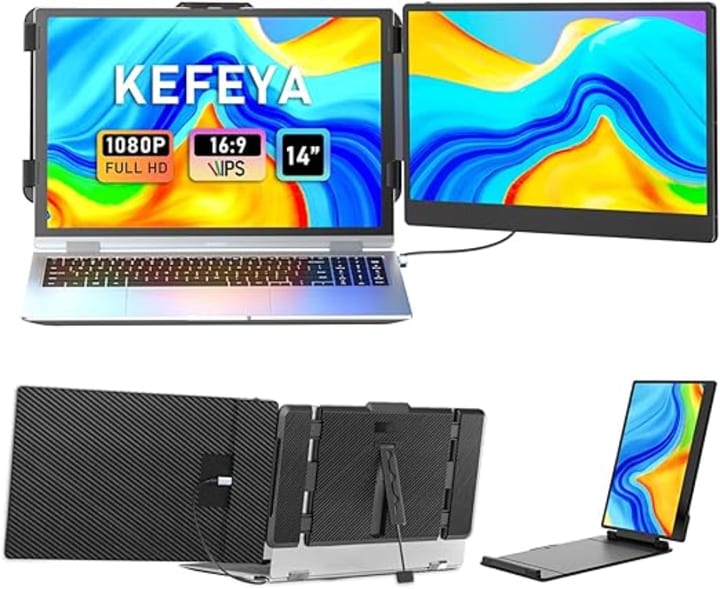
The KEFEYA S1 Dual Portable Laptop Screen Extender is a cutting-edge solution designed to enhance your laptop's display capabilities with ease and convenience. Ideal for professionals who need to boost productivity on the go, this portable extender allows you to effortlessly add two additional screens to your laptop, creating a dual-monitor setup without the need for bulky equipment or a stationary workspace.
Key Features:
- Dual-Screen Capability: The KEFEYA S1 features two high-definition screens that connect seamlessly to your laptop, providing a substantial increase in screen real estate. This dual configuration is perfect for multitasking, allowing you to view multiple applications side by side or manage extensive data more efficiently.
- Portability: Designed with portability in mind, the KEFEYA S1 is lightweight and compact, making it easy to carry and set up wherever you are. The screens can be folded flat against each other when not in use, fitting comfortably into a laptop bag or briefcase.
- Easy Setup: The extender connects to your laptop via a USB-C or HDMI connection, depending on your laptop’s available ports. The plug-and-play functionality ensures a hassle-free setup with minimal configuration required, allowing you to focus on your work rather than technical details.
- Adjustable Viewing Angles: Each screen on the KEFEYA S1 can be adjusted to achieve the optimal viewing angle, enhancing comfort and reducing eye strain. This flexibility is particularly useful for adjusting the display to suit different working environments or ergonomic needs.
- Enhanced Productivity: By expanding your laptop's display capabilities, the KEFEYA S1 helps improve productivity. You can manage multiple tasks more effectively, compare documents side by side, or keep communications open while working on other projects.
Overall, the KEFEYA S1 Dual Portable Laptop Screen Extender is a versatile and user-friendly tool that transforms your laptop into a powerful multi-screen workstation. Its blend of portability, ease of use, and productivity-enhancing features makes it an excellent choice for professionals who need to stay productive while on the move.
The KEFEYA S3 Triple Laptop Screen Extender

The KEFEYA S3 Triple Laptop Screen Extender is an advanced solution designed for those who require an expansive and highly efficient multi-monitor setup. Perfect for professionals, gamers, and creatives who need to maximize their screen real estate, the KEFEYA S3 provides a robust and versatile triple-screen configuration that dramatically enhances productivity and workflow.
Key Features:
- Triple-Screen Configuration: The KEFEYA S3 boasts three high-definition screens, giving users an extensive and immersive viewing experience. This triple setup allows for seamless multitasking, enabling you to spread out applications, manage large datasets, or engage in detailed design work across multiple displays.
- Enhanced Productivity: With three screens, you can manage multiple tasks simultaneously, improving your efficiency and effectiveness. Whether you’re working with complex projects, conducting research, or monitoring various data streams, the KEFEYA S3 helps streamline your workflow and boost productivity.
- Universal Compatibility: The extender connects to your laptop via USB-C or HDMI, making it compatible with a wide range of laptops. This flexibility ensures that you can integrate the KEFEYA S3 into various setups with ease, adapting to your specific needs and equipment.
- Adjustable and Ergonomic Design: Each screen on the KEFEYA S3 can be adjusted independently, allowing you to find the perfect angle for comfortable viewing. This adjustability helps reduce neck and eye strain, creating a more ergonomic workspace that can be tailored to your personal preferences.
- Portability and Ease of Setup: While offering a comprehensive triple-screen setup, the KEFEYA S3 is designed for portability and ease of use. The screens are foldable and compact, making it simple to transport and set up in different locations. The plug-and-play feature ensures a quick and straightforward installation process with minimal technical hassle.
- Robust Build Quality: Constructed with durable materials, the KEFEYA S3 is built to withstand the demands of frequent use. Its solid build ensures longevity and reliability, making it a dependable choice for heavy-duty tasks.
In summary, the KEFEYA S3 Triple Laptop Screen Extender offers an impressive multi-screen solution that significantly enhances your laptop’s display capabilities. Its combination of three high-definition screens, universal compatibility, and ergonomic design makes it an excellent choice for users seeking a powerful and flexible tool to optimize their digital workspace.
The Trion 14" FHD Portable Monitor Quad Screen
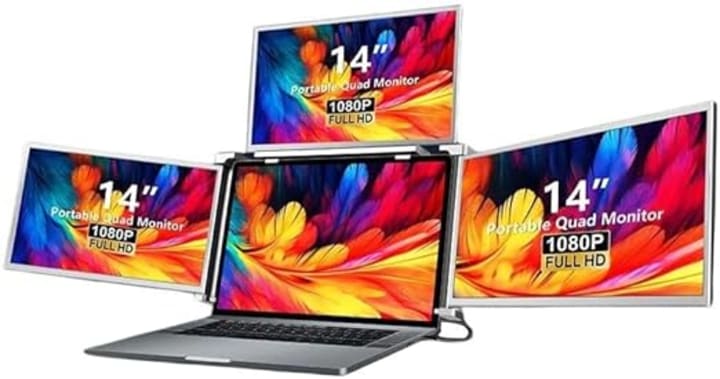
The Trion 14" FHD Portable Monitor Quad Screen represents a cutting-edge solution for those who demand an extensive, high-quality display set-up in a portable form factor. Designed for professionals, gamers, and content creators who require exceptional visibility and multitasking capabilities, this quad-screen monitor offers a powerful and immersive experience that transforms your laptop into a four-screen workstation.
Key Features:
- Quad-Screen Configuration: The Trion 14" features four full high-definition (FHD) 14-inch screens, providing an unprecedented level of screen real estate. This quad configuration allows users to manage multiple applications, conduct in-depth analysis, or immerse themselves in complex gaming scenarios with enhanced visibility and efficiency.
- Ultra-Wide Viewing Area: With four separate screens, the Trion 14" offers a vast and versatile workspace. Whether you’re comparing large datasets, running simultaneous applications, or working on detailed graphic designs, the extensive viewing area significantly boosts productivity and streamlines your workflow.
- High-Definition Display: Each of the 14-inch screens delivers full HD resolution, ensuring crisp, clear visuals and vibrant colors. This high-definition quality is ideal for tasks that require precise detail and accuracy, such as video editing or graphic design.
- Portable and Lightweight Design: Despite its comprehensive quad-screen setup, the Trion 14" remains highly portable. Its lightweight and compact design make it easy to transport and set up, allowing you to take your multi-screen workstation with you wherever you go. The monitors can be folded or collapsed for convenient storage and travel.
- Flexible Connectivity: The Trion 14" connects to your laptop via USB-C or HDMI ports, making it compatible with a broad range of devices. This flexibility ensures that you can integrate the monitor with various laptop models and operating systems without the need for additional adapters or complex setups.
- Adjustable Viewing Angles: Each screen on the Trion 14" can be adjusted to achieve the optimal viewing angle, reducing eye strain and enhancing comfort during extended use. This adjustability is crucial for maintaining an ergonomic workspace and improving overall user experience.
- Durable Build Quality: Constructed with high-quality materials, the Trion 14" is designed to withstand the rigors of frequent travel and daily use. Its robust build ensures long-term reliability and performance, making it a dependable choice for demanding tasks.
In summary, the Trion 14" FHD Portable Monitor Quad Screen is an exceptional tool for users who require a large, high-quality display set-up in a portable and versatile package. With its quad-screen configuration, high-definition displays, and user-friendly design, it provides a powerful solution for enhancing productivity, managing complex tasks, and enjoying immersive multimedia experiences.
The Last Screening
In an increasingly digital and dynamic work environment, having the right tools to optimize your productivity and workflow is essential. Laptop screen extenders, such as the KEFEYA S1 Dual Portable Screen Extender, the KEFEYA S3 Triple Screen Extender, and the Trion 14" FHD Portable Monitor Quad Screen, each offer unique benefits tailored to different needs and preferences. From enhancing your multitasking capabilities to providing a comprehensive, immersive display experience, these extenders can transform your laptop into a versatile and powerful workstation.
By choosing the right screen extender, you can not only expand your visual real estate but also improve your efficiency, comfort, and overall work experience. Whether you're a professional needing extra screens for complex projects, a gamer seeking an enhanced gaming setup, or a creative looking for detailed display options, there's a solution that fits your needs.
As you consider integrating a laptop screen extender into your setup, think about your specific requirements, such as portability, screen size, and connectivity options. With the right choice, you'll be well-equipped to tackle any task with greater ease and productivity. Embrace the potential of these innovative tools and take your work or leisure to the next level with enhanced screen versatility.
About the Creator
Keep reading
More stories from Kirk Inkpen and writers in 01 and other communities.
Best 3 De'Longhi Coffee Machines That Aussies Are Buying Now
De'Longhi coffee machines have revolutionized how we experience our daily brew, transforming a simple cup of coffee into a personalized ritual of flavor and comfort. As coffee enthusiasts seek the perfect balance of convenience, quality, and taste, choosing the right coffee machine becomes essential. In this guide, we’ll explore various coffee machines, focusing on some of the most popular and highly regarded models on the market.
By Kirk Inkpenabout a year ago in 01
Candace Owens pushes theory Charlie Kirk was 'time traveller' who went to 'X-Men school'
In a recent episode of her podcast, Candace Owens said Charlie Kirk told her he was a “time traveler” who was sent to “X-Men school,” and alleged he was monitored since childhood.
By Dena Falken Esq5 days ago in 01
How a Web Development Company in India Builds CMS eCommerce Sites?
The first CMS-based eCommerce project I watched unfold didn’t start with technology at all. It started with confusion. The client wanted an online store, a blog, marketing pages, and the ability to change everything without calling a developer every week. The development team didn’t argue platforms or frameworks. They asked questions—lots of them. That moment stuck with me because it explained how many teams in India actually approach CMS eCommerce work.
By Jane Smitha day ago in 01



Comments (2)
Excellent written
Thanks for sharing.