
Smart Email Summarizer: A Practical Python Tool for Taming Your Inbox
Turn inbox overload into clarity with a Python script that reads, summarizes, and sorts your emails using AI.

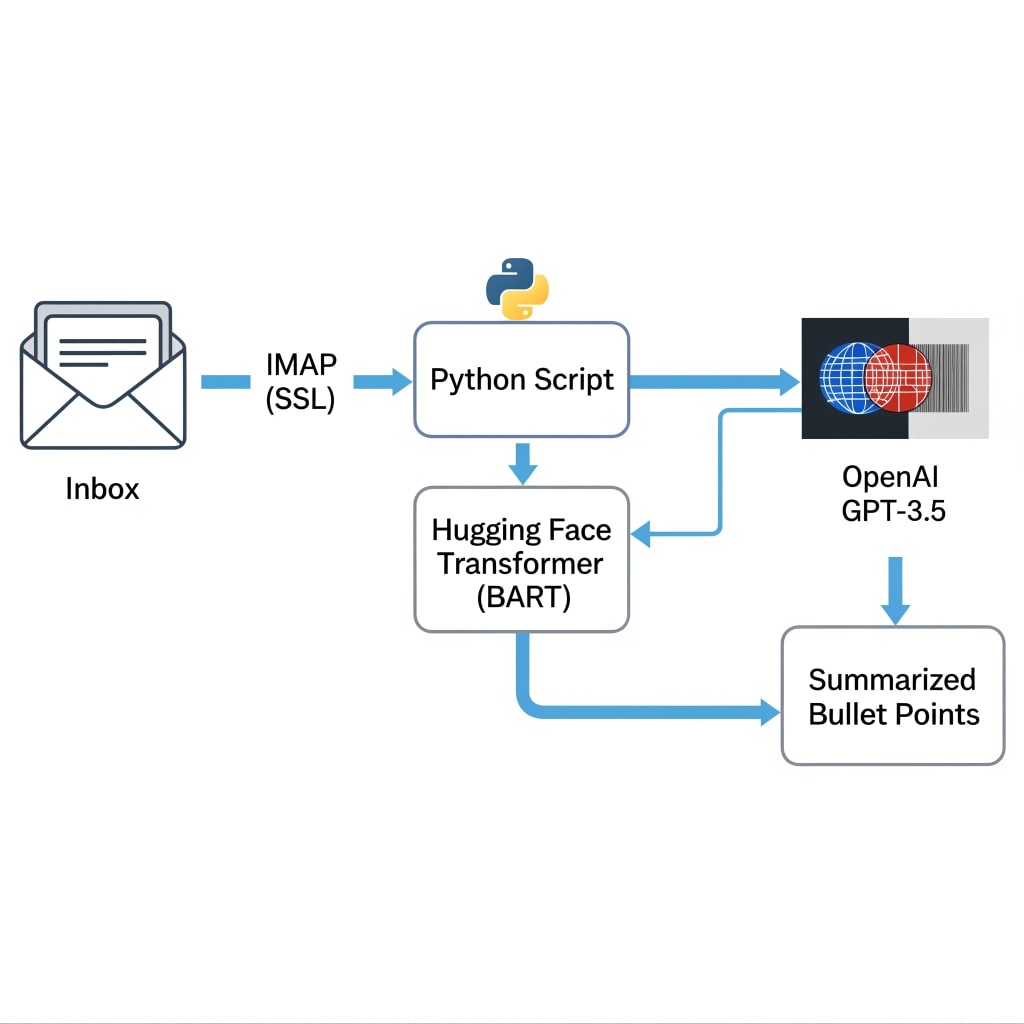
In a world where email overload is a daily battle, having an automated assistant to triage your inbox can save hours of unnecessary reading. The Smart Email Summarizer is a Python script designed precisely for this purpose. It connects to your email account, fetches your latest messages, and distills them into clear, concise summaries using AI. This helps you focus on what matters without wading through walls of text.

This article breaks down the script’s architecture, shows how each part works, and explores how you can adapt it to your own workflows. Whether you're a Python developer looking to build smarter automations or a productivity-minded professional curious about integrating AI into your day-to-day tasks, this walkthrough aims to answer your key questions and spark practical inspiration.
What the Script Does (and Why It’s Useful)
At its core, the script connects to any IMAP-compatible email server (like Gmail), retrieves a defined number of emails, extracts useful metadata (sender, subject, content), and summarizes the body text using either:
- A transformer model from Hugging Face (facebook/bart-large-cnn)
- OpenAI's GPT-3.5-turbo API
You can configure it to process only unread emails, mark them as read afterward, and optionally save summaries to a file. This allows for:
- Quick triage of inboxes without opening every message
- Executive or team assistants to get the gist of emails before forwarding
- Developers to embed this into broader workflows
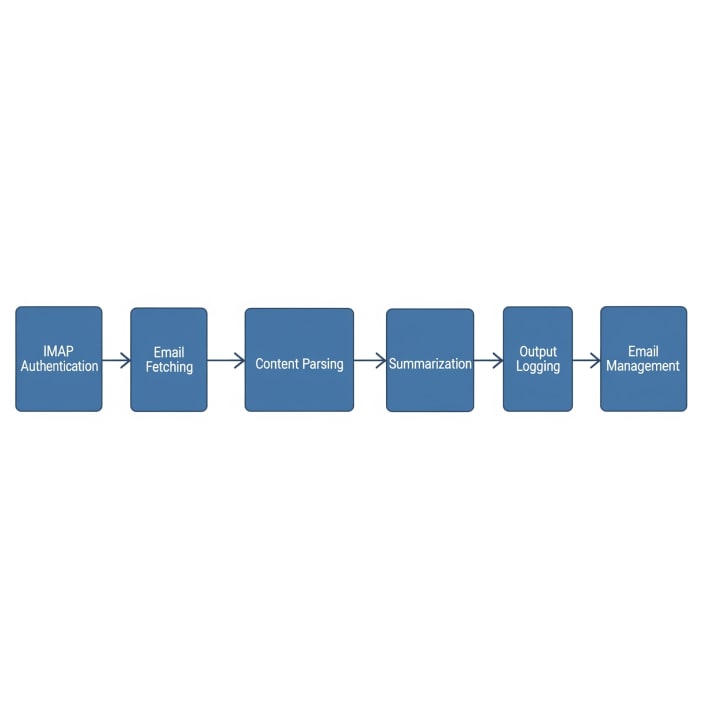
Breakdown of Core Components
1. IMAP Authentication
mail = imaplib.IMAP4_SSL(server)
mail.login(email_user, password)
The script uses Python’s imaplib to connect securely to the mail server. It prompts the user for credentials interactively and retries if authentication fails. App-specific passwords (e.g., from Gmail) are supported.
2. Fetching Emails
status, messages = mail.search(None, "UNSEEN")
Once authenticated, it selects the inbox and searches for unread (or all) emails. It limits results to the N most recent, based on user input. The mail.fetch command then retrieves the full content of each email.
3. Parsing Email Content
msg = email.message_from_bytes(raw_email)
The script handles both plain-text and HTML emails, as well as multipart messages. It uses Python’s built-in email library to decode headers and extract content. This ensures reliable parsing across a wide range of email formats.
4. Summarization Engines

You can choose between two summarization methods:
- Transformer-based: Uses Hugging Face’s pipeline with facebook/bart-large-cnn. This is local, free, and useful for moderate-sized text.
summary = summarizer(text, max_length=100, min_length=20, do_sample=False)
- OpenAI GPT-3.5: Requires an API key. Offers more nuanced summaries and handles longer or more complex text better.
response = openai.ChatCompletion.create(...)
The script includes fallback logic. If a summarization attempt fails, it retries once.
5. Output and Logging
Summaries are printed and optionally written to a user-specified file. Logging statements give visibility into each step: authentication, fetching, parsing, summarization, and error handling.
6. Email Management
Optionally, the script can mark emails as read after summarizing them, using IMAP flags.
Answers to Common Questions
How secure is this? The script runs locally and uses SSL for connecting to the mail server. No data is sent externally unless using OpenAI, in which case only the email body is shared with the API. Will it alter my inbox? Only if you explicitly choose to mark emails as read. Otherwise, messages remain untouched. Can I customize it? Yes. You can:
- Switch models
- Add keyword filters
- Extend it to post summaries to Slack or a dashboard
What are the limitations?
- Transformer models have a context limit
- OpenAI usage depends on internet connectivity and API limits
- Complex HTML or encoding issues may occasionally cause missing content

Why This Matters
This tool reflects a powerful, growing trend: blending traditional scripting with modern AI to solve daily annoyances. Reading and prioritizing emails shouldn’t take hours, and it no longer has to. For developers, this script is a template for smart automation not just in email but in any workflow involving unstructured text. For productivity-minded professionals, it's a glimpse into how accessible and actionable AI is becoming. The Smart Email Summarizer isn't just a tool. It is an example of how to think, build, and work smarter with code. Want to build on this? Consider scheduling it to run daily, turning it into a web app with Flask, or integrating with your company’s communication tools.
Get the Code
You can find the full source code, setup instructions, and contribution guidelines on GitHub: Smart Email Summarizer GitHub Repository
#Python #HowTo
About the Creator
Time Money Code
Content creator exploring the intersection of time, money, and code. Sharing Python tools, automation hacks, and productivity systems to help you work smarter, earn more, and build efficiently.
https://timemoneycode.vercel.app
Keep reading
More stories from Time Money Code and writers in 01 and other communities.
Best Kotlin App Development Companies in USA (2026)
I reckon finding a solid dev team is harder than picking a winner at the races. You want speed, but you also want a build that does not fall apart when users flood in. That is why Kotlin app development companies are so busy lately.
By Samantha Blake5 days ago in 01




Comments
There are no comments for this story
Be the first to respond and start the conversation.