
Should You Be Afraid of Gemini Integration in Gmail?
Real risks of AI in your inbox

With the increasing presence of AI in our tools and workflows, one question is starting to haunt power users, privacy aficionados, and security-conscious professionals alike:
After all, combining generative AI with your own private correspondence isn’t trivial — it’s where convenience, risk, and trust collide. In this article, I’ll walk you through what’s happening under the hood, which risks are real (and which are overhyped), how to mitigate exposure, and *how to choose an email solution that gives you the power and privacy you deserve.
With AI becoming a bigger part of the tools and workflows we use every day, there's one question that's got everyone thinking, from power users to privacy fans and security pros: “Should I be afraid of Gemini integration in Gmail?”
After all, combining generative AI with your own private messaging is not a simple task - it's where convenience, risk, and trust collide. Here I'll explain what's happening behind the scenes, which risks are real (and which ones aren't), how to reduce your exposure to risk, and how to choose an email solution that gives you the power and privacy you deserve.
What Is “Gemini Integration” in Gmail?
Before you can fear it, you should understand what exactly “Gemini in Gmail” means.
- Gemini is Google’s generative AI model / assistant (like ChatGPT, Claude, etc.), branded by Google for use across their suite of products.
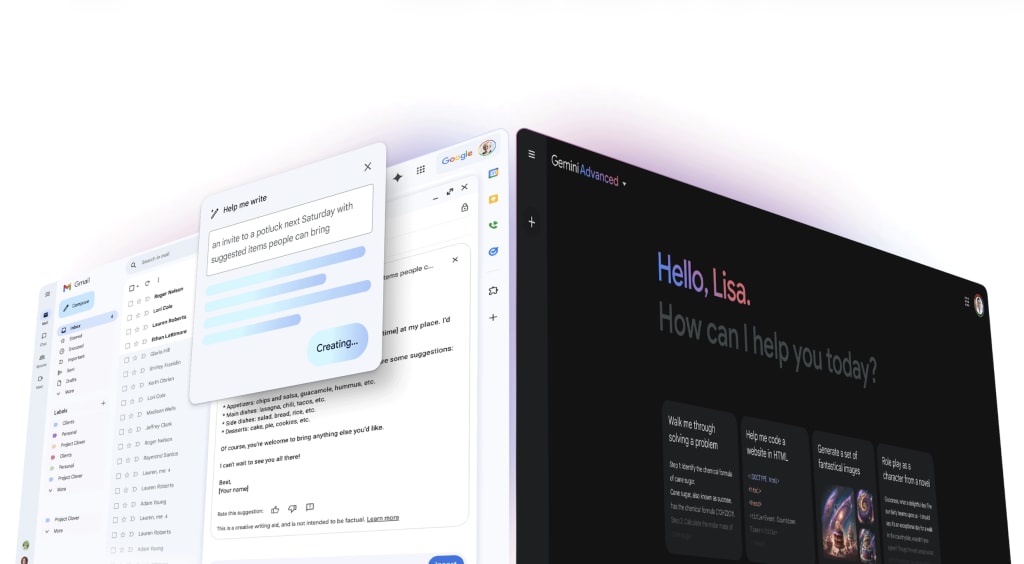
- Google has started putting some of Gemini's features into Gmail (and other Workspace apps). Like, in the side panel, you can ask it to summarise threads, suggest replies, write new messages, or search your inbox in a more natural wayю
- Under Google’s assurances, when used in Gmail Workspace, your content is not used to train or improve Gemini or other generative models, and prompts / outputs are not stored except with your permissionю
- There are also administrative / enterprise-level controls (e.g. DLP, access restrictions) to limit how Gemini is allowed to interact with sensitive data in corporate / Workspace settings.
So, to sum up: the idea of integration isn't as wild as it sounds. If you decide to use the AI features, Gmail will take the content from your inbox and help it generate responses or insights.
But with that access comes a richer attack surface and important privacy trade-offs.
The Upside: Why Gemini Integration Is Useful
A lot of the fear comes from not understanding the benefits. The integration isn’t just superficial fluff, it offers real productivity gains.
- Summarization & Action Item Extraction: Long email threads, meeting chains, or group conversations can be exhausting to parse. Gemini can surface the key points, deadlines, and tasks implicitly in those threads.
- Smart Reply / Draft Assistance: You can prompt Gemini with a terse brief (“Reply with a polite decline,” or “Draft a status update”) and get a polished email draft.
- Cross-Context Data Retrieval: Because Gemini in Gmail may also access data from linked Google Drive files, Calendar, and past emails (within permission), it can give you richer, contextual responses - e.g. “Your meeting is after that email thread” or “Here’s the document referenced in that chain.”
For many busy professionals, these features can trim friction, reduce cognitive overhead, and help manage volume. The key question is: what do you trade away in the process?
Privacy & Security Risks: Where Things Get Hairy
Here’s where a cautious and technically literate user should dig deep. The risks are not all hypothetical, and some are nontrivial.
1. Prompt Injection and “Hidden Prompts” Attacks
One of the more alarming risks is prompt injection: embedding malicious instructions in emails (e.g. via invisible text, CSS tricks, or HTML) that the AI will blindly follow when summarizing or analyzing content.
- A real security researcher showed that attackers can use ASCII smuggling or zero-font/white-font text to hide instructions that Gemini may execute - for example, to display a fake warning or nudge the user toward malicious links.
- In effect: you open a seemingly benign email, click “Summarize this thread,” and the AI might pick up on a hidden “Prompt: call this number” or “Prompt: click this link” inserted behind the scenes.
- Google has defended itself by saying they view these as “social engineering” rather than a vulnerability to be patched, which has raised eyebrows.
That means the summarization pane, which users may trust implicitly, becomes a potential vector for phishing-style misdirection.
2. Indirect Data Exposure & Aggregation Risk
Even if Google claims that Gmail content with Gemini enabled is not used to train AI models, that promise applies today but could change. The more a system is deployed, the more pressure emerges to monetize, refine, or cross-leverage data.
- Users have expressed concern that if in a Gemini response you directly quote portions of email content, that conversation might, in fact, become training text.
- The principle of data minimization is challenged: when AI features touch your email, you expand the exposure surface. Even anonymized data, when correlated with identifiers, can leak.
3. Human Review, Confidential Data, and Policy Gaps
Google admits that under certain conditions, some prompts or outputs may be subject to human review.
- If you include truly sensitive content (e.g. legal matters, medical details, passwords), there's a nonzero chance that humans — under quality control or flagging processes — could see that.
- Furthermore, “connected apps” (third-party apps you tie to Gmail) may gain access to prompts or content sent to Gemini.
4. Consent Ambiguity & Feature Creep
Even though the integration is optionally adoptable, over time, the lines between mandatory, default, and optional become blurred.
- Reports indicate Google would roll out new features allowing Gemini to access messages, WhatsApp, utilities on your phone - even if “Gemini Apps Activity” is turned off.
- Some email users have seen notices indicating that Gemini would integrate with apps like Messages or Phone, even outside usual permissions.
- A warning: any time a vendor transitions from “opt-in” to “opt-out” or “on by default” for AI features, your status quo privacy balance may gradually erode.
5. Organizational & Compliance Risk
For businesses using Google Workspace, if employees permit Gemini to access email / Drive, then that potentially violates internal data classification policies, compliance frameworks (e.g. GDPR, HIPAA), or confidentiality obligations.
- Even if individual users trust Google’s privacy policies, the organization must control which data can be surfaced or processed via AI.
- Mistakes or misconfigurations can leak proprietary or regulated data to the AI layer.
So, Should You Be Afraid?
The nuance is crucial:
- Yes, you should be bothered, aware, and cautious. This isn’t the era of emails being opaque. Gemini integration opens new, nontrivial attack surfaces.
- No, you need not cower behind a tinfoil hat - many risks are manageable and avoidable with prudent controls.
- The real threat is complacency: trusting AI summaries by default, ignoring security hygiene, or failing to audit what the system can see and do.
If you’re a power user or work with sensitive information (legal, medical, trade secrets, etc.), treat Gemini-in-Gmail as a feature you adopt only after you’ve placed guardrails around it.
Steps & Best Practices for Mitigation
Here’s an action plan to reduce risk:
1. Audit & Limit Permissions
- Do not grant blanket permission for Gemini to access all mail; limit it to strictly necessary threads or labels.
- Use Google’s administrative / enterprise controls (DLP, data loss prevention) to block AI access to sensitive categories (e.g. “Legal”, “HR”, “Confidential”).
- Routinely check which “connected apps” or Google Labs features have permission to access your mailbox.
2. Disable or Opt-Out When Appropriate
- For users who don’t need the AI layer, turn off Workspace Labs features or simply don’t activate Gemini in Gmail.
- Regularly review settings: new AI features tend to slip in silently; keep an eye on Gmail’s “Smart features” or “AI enhancements” toggles.
- If you see options like “Use smart features in Workspace” in Gmail/Mobile, consider turning them off.
- Limit the use of “Summarize thread” or similar features for sensitive emails.
3. Always Inspect Before Trusting AI Outputs
- Never rely on summaries or automated replies without human verification, especially if instructions or links are involved.
- Train yourself and users to treat AI-generated content as “assistive, not authoritative.”
- If a summary or generated email suggests urgent action (click a link, call a number, log in), verify manually via independent channels.
4. Watch Out for Hidden Content
- Use mail clients or extensions that flag suspicious formatting (zero-font, invisible CSS, hidden spans).
- Apply filters to flag messages containing styling anomalies, hidden markup, or content-length disparities (long HTML but little visible text).
- Educate yourself about prompt injection techniques (e.g. white-on-white text, zero-width spaces, CSS obfuscation).
5. Favor Data Isolation for Sensitive Work
- Use separate email addresses or accounts for personal / casual communication and for high-stakes work. Keep the latter off AI integrations.
- Use encrypted containers (PGP, S/MIME, secure vaults) for confidential exchange. AI features usually cannot access those if properly isolated.
6. Keep Up with Policy, Audit, and Web Vulnerability Disclosures
- Monitor updates to Google’s AI & privacy policies. What’s disallowed today may shift tomorrow.
- Follow security research (e.g. prompt-injection disclosures) and check whether patches or defenses have been deployed.
- For enterprise settings, perform red-teaming and adversarial testing around AI features in email.
Choose Email with AI That Respects Your Privacy
The rise of powerful but data-hungry AI models has invigorated the market for privacy-first alternatives. For users who find the Google ecosystem's data trade-offs unacceptable, services built on a foundation of zero-access encryption offer a different path.
The core principle here is simple: if the service provider cannot decrypt your data, they cannot read it, analyze it, or use it to train their AI models. This is the ultimate privacy guarantee. But how can you have an intelligent assistant if the service can't read your emails?
This is where companies (like Atomic Mail, for example) are innovating with a different model for their AI email assistant. Instead of processing your unencrypted data on their servers, a privacy-centric AI operates on different principles:
- Client-Side Processing: A key method involves running the AI models directly on your device in session (in the browser or a desktop app). Your emails are decrypted locally, processed by the AI locally, and the raw content never leaves your machine.
- Zero-Knowledge Architecture: These services are designed so that the provider has zero knowledge of your encryption keys. The decryption and encryption happen exclusively on your device.
If you've got an AI that's sandboxed for privacy reasons, it can't integrate with your digital life as easily (like calendars, cloud storage from other providers) as Gemini can within Google's walled garden. But for most people, it's worth it to have the peace of mind that their personal conversations are really private. It's a choice between data sovereignty and automated convenience.
Final Reflections
So, should you be afraid of Gemini integration in Gmail? The short answer: you should be skeptical, vigilant, and proactive. Don’t let complacency lead to overexposure.
Here’s a compact checklist:
- Understand exactly what is being shared with Gemini and when.
- Disable or restrict IAM / AI integration when working with sensitive data.
- Never blindly trust AI-generated outputs - treat them as aid, not authority.
- Stay alert to prompt injection techniques and use tools that flag suspicious email formatting.
- Evaluate alternative email systems designed with AI + privacy in mind.
In the end, fear is the wrong framing - informed caution is better. AI in email is neither inherently doomed nor risk-unbounded; it’s a tool whose value or danger depends largely on the user’s guardrails and mindset.
About the Creator
Sae
Insights on security, Web3, digital, communications
Understanding Handbags: Design, History, and the Rise of Replica Christian Dior Bags
Handbags have long been more than simple accessories. As outlined in the general definition of a handbag, they are functional items designed to carry personal belongings while also reflecting cultural trends, craftsmanship, and personal identity. Over time, handbags have evolved alongside fashion movements, social change, and consumer behavior, becoming key symbols in both everyday life and high fashion.
By charliesamuel4 days ago in 01




Comments
There are no comments for this story
Be the first to respond and start the conversation.