
Samsung’s Secure Folder
Is Your Private Data Really Safe?

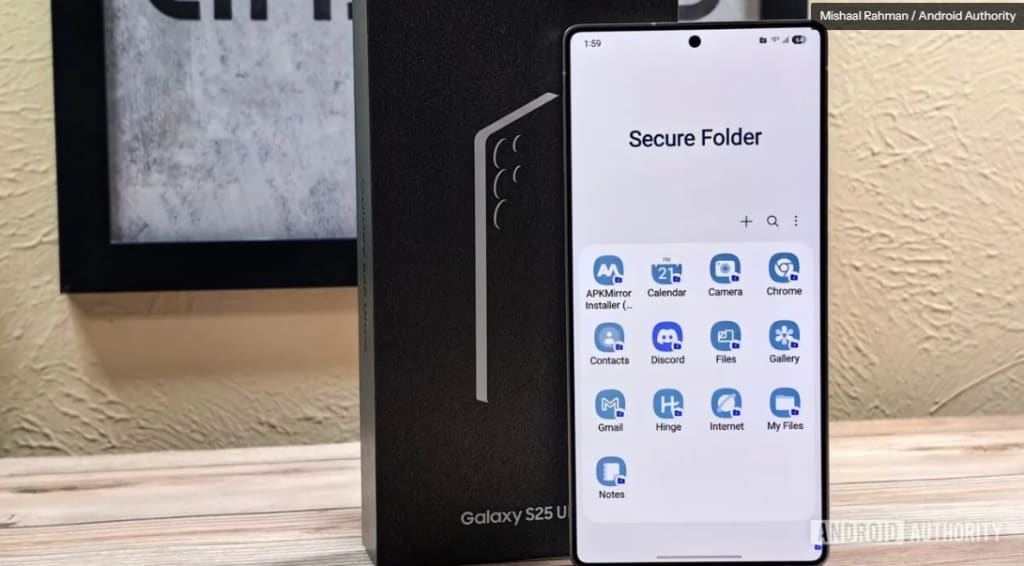
In an age where privacy is more valuable than ever, smartphone users are constantly looking for ways to secure their sensitive data. Samsung’s Secure Folder claims to provide an extra layer of protection, keeping your personal files, photos, and apps hidden from prying eyes. But is it really as safe as it sounds? Let’s break it down.
What Is Samsung’s Secure Folder?
Samsung’s Secure Folder is a built-in security feature available on Galaxy devices. It creates an encrypted space where users can store apps, files, and private data, protecting them from unauthorized access. This feature is especially useful for those who want to keep their personal and work data separate or simply enhance their privacy.
Key Features of Secure Folder
Encryption Technology – Uses Samsung Knox for added protection.
App Locking – Lock individual apps with passwords or biometrics.
Cloud Integration – Back up Secure Folder to your Samsung account.
Customization Options – Rename and personalize your Secure Folder.
Who Uses Secure Folder and Why?
Business Professionals – Store sensitive work documents securely.
Privacy-Conscious Users – Hide personal files from curious eyes.
Parents – Keep certain apps hidden from children.
How Secure Is Samsung’s Secure Folder?
Samsung markets Secure Folder as a highly protected space, but let’s take a closer look at its security mechanisms.
Encryption and Data Protection
Secure Folder is powered by Samsung Knox, a defense-grade security platform. It encrypts files, making it nearly impossible for unauthorized users to access them without the correct authentication.
Access Control and Authentication
Biometric Security – Unlock with fingerprint or facial recognition.
PIN or Password – Set a strong password for extra security.
Two-Factor Authentication – Adds another layer of protection.
The Privacy Concerns Around Secure Folder
Despite its security measures, some users question whether Secure Folder is truly 100% private.
Can Samsung Access Your Secure Folder?
Samsung claims not to have access, but Secure Folder relies on Samsung services, which raises concerns about potential data collection.
Cloud Backups – A Double-Edged Sword?
While cloud backups help in case of device loss, they also introduce potential risks. If Samsung’s servers were compromised, could Secure Folder data be at risk?
Possible Exploits and Hacks
While no major breaches have been reported, hackers are constantly evolving. If an exploit is found, users could be vulnerable without their knowledge.
Comparing Secure Folder to Other Privacy Tools
How does Samsung’s Secure Folder compare to other security solutions?
Samsung Secure Folder vs. Apple’s Secure Enclave
Apple’s Secure Enclave – Focuses on hardware-based encryption, making it harder to breach.
Samsung Secure Folder – Relies on Knox software but is more customizable.
Third-Party Apps That Offer Better Security
Some privacy-focused apps offer even better security, such as:
ProtonDrive – Secure cloud storage with end-to-end encryption.
Signal – Private messaging with self-destructing messages.
How to Maximize Security on Samsung’s Secure Folder
If you’re using Secure Folder, here’s how you can make it even more private.
Best Practices for Stronger Protection
Use a Complex Password – Avoid easy-to-guess passwords.
Disable Cloud Sync – If privacy is a top concern, avoid cloud backups.
Regularly Update Software – Prevent vulnerabilities by keeping your system up to date.
What You Should Avoid Doing
Sharing Your Password – Even with trusted individuals.
Storing Highly Sensitive Information – Use offline storage for critical data.
Using Public Wi-Fi to Access Secure Folder – Prevent potential network-based attacks.
Should You Trust Samsung’s Secure Folder?
While Secure Folder is a great option for basic privacy, it may not be the ultimate security solution for those dealing with highly sensitive data. If you need maximum privacy, additional encryption tools or offline storage may be better options.
Conclusion
Samsung’s Secure Folder offers a solid layer of security, but it’s not completely foolproof. While it’s great for protecting everyday personal files, users should be aware of its limitations. If privacy is your top priority, consider additional security measures.
FAQs
1. Can Samsung employees access my Secure Folder?No, Samsung claims that they cannot access the contents of Secure Folder. However, cloud backups may still pose some risk.
2. Is Secure Folder safe from hackers?While Secure Folder is well-protected, no system is completely hack-proof. Using strong authentication helps minimize risks.
3. Can I move my Secure Folder to a new phone?Yes, you can transfer your Secure Folder if you back it up to your Samsung account.
4. Does Secure Folder work offline?Yes! Secure Folder works without an internet connection, making it a great option for local storage.
5. What’s the best alternative to Secure Folder?For better privacy, consider ProtonDrive, VeraCrypt, or hardware-encrypted storage devices.
About the Creator
Apleetech
Apleetech is a Professional Technology Platform. Here we will provide you only interesting content, which you will like very much. We're dedicated to providing you with the best of Technology, with a focus on dependability and Tech.



Comments
There are no comments for this story
Be the first to respond and start the conversation.