
Learn How to Import EML File Format to Outlook?
In this blog post, you will come to know all possible methods to import EML file format to Outlook PST. Simply read it and perform the working steps.
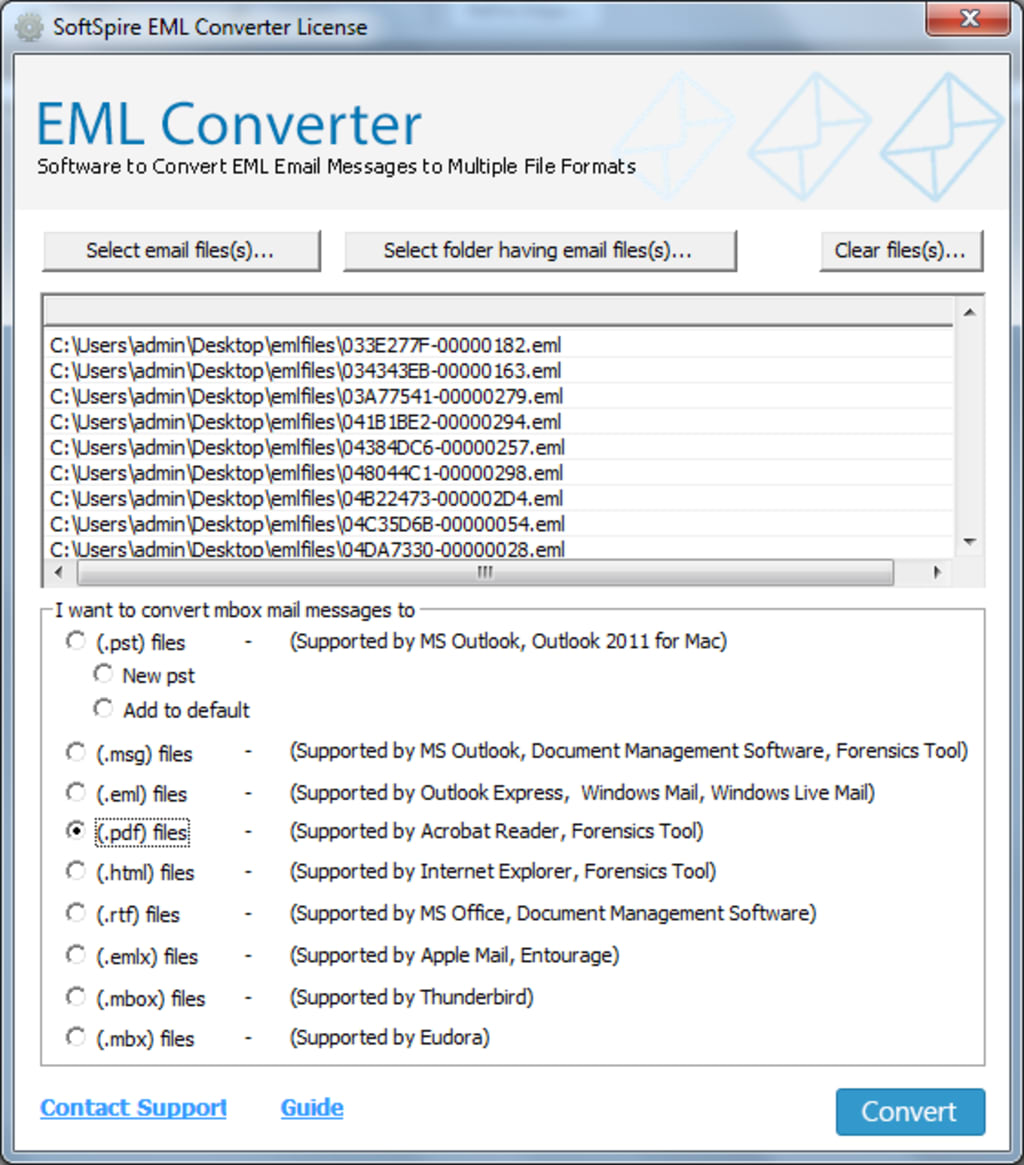
EML is a popular file extension designed by Microsoft. Various email clients such as Mozilla Thunderbird, Windows Mail, Windows Live Mail, Yahoo Mail, Turnpike, DreamMail, Outlook Express, eM Client, Eudora etc. support this format. User can simply open EML file with internet explorer or a text editor. EML files includes the plain ASCII text for headers and the main message body, hyperlinks as well as attachments. Whereas, MS Outlook saves its data in PST format. Microsoft Outlook is flexible as compared to EML file. Many of the organizations are willing to import, convert or save EML file into Outlook.
In this segment, we will discuss how to import EML file format to Outlook 2019, 2016, 2013, 2010, 2007 and other below versions. If you are also seeking for the ideal solution to import EML to PST, then this write-up will be helpful for you.
Manual Method to Import EML File Format to PST
Step1: Launch and open MS Outlook and Windows Live Mail email client on your system
Step2: From WLM, hit on File>>Choose Export>> Email Messages
Step3: Choose MS Exchange as an export option and press on Next
Step4: Now a message box will appear with message “All Emails Will Be Exported to MS Outlook or MS Exchange”. Click on Next
Step4: Here you can Convert complete mail data or opt needed mails only
Step5: After selecting Files/Folder, hit on Ok
Step6: Now the Export procedure will start, wait till the process finished
Step7: After completion, a dialogue box will appear with Successful Message. At last, press on the Finish tab
You can also open and view EML files in Outlook without WLM application, but for this procedure, you have to save data from email app to your system.
Step1: Open your Microsoft Outlook email application and open it
Step2: Now, go for those Files which you need to open into your Outlook app
Step3: Then, follow the drag and drop method for the convert procedure. Drag file and then Drop it in your Outlook application
Limitations of Free Manual Approach
- With the help of these explained free manual solutions, one cannot move data all time. These process holds inaccuracy and sometimes cannot save data in a perfect way.
- The manual solution may not keep the structure of database. It cannot open your file attachments in your Microsoft Outlook application that is the main problem regarding this free manual approach.
- If in case, there are a huge number of files to convert into Outlook PST format. Then, opting the manual way is considered to be a bad option to perform. This solution is only suitable in the case of converting few EML files.
- This procedure is quite difficult to perform and considered a very time-taking method.
Ultimate Solution to Import EML File Format to Outlook PST
EML to PST Converter- an amazing, safe, cost-effective, trustworthy an ideal solution to successfully import EML file into PST format including email attachments. You can process limitless EML files through this efficient tool without facing any problem. The tool allows the user to convert bulk EML files to PST format. So, it is the best-suited solution for solving your issue of “how to import EML file format to Outlook”. Moreover, it maintains all the data structure and RTF formatting throughout the conversion task. All Windows (32-bit & 64-bit) OS and Microsoft Outlook (2019, 2016, 2013, 2010, 2007 etc.) editions are also suitable with the EML to PST Converter Tool. Also, the tool has very simple graphical interface so that all technical and non-technical users can operate the tool without any technical skills.
In order to experience the complete program working, try the free demo copy of the EML Converter Tool which allows to convert only 25 EML files to PST format for free of cost. With freeware copy of the program, you can check and understand the tool working and benefits free of cost before buying license version. Besides PST, you can also check the procedure of EML to PDF, Office 365, MSG, EMLx, MBOX and more.
About the Creator
Keep reading
More stories from writers in 01 and other communities.
Top IT and Marketing Recruitment Agencies in Canada
IT recruitment agencies Canada play a crucial role in connecting businesses with skilled tech professionals. In the Canadian IT market, specialized recruiters have deep industry networks and technical expertise. For example, Insight Global is described as “specializing in delivering talent and technical solutions” to major companies, and Wexpand focuses on “staffing, headhunting, and talent acquisition” with a proactive, client-focused approach. Such agencies leverage local and global connections to speed up hiring for roles from software developers to network engineers. By maintaining large pools of vetted candidates and understanding Canadian tech trends, top IT recruiters help companies bridge talent gaps efficiently.
By Kashif Khan5 days ago in 01
No, Jeff Bezos didn't predict the future of the home PC would see it being swept away into the cloud
If there's one thing that the tech industry really loves to do, it's speculate on the future, especially if someone of note in the sector has made some newsworthy remark. Of late, there seems to be quite a bit of talk about the future of the home PC and that it might end up going the way of the dodo, all because of something Jeff Bezos said.
By Dena Falken Esqa day ago in 01
The Devil's Cut
“Comrade, finally you’re awake.” The voice was smooth, sensual. A flickering incandescent bar was all that lit the white, sterile room. All Vladimir remembered was everything going black. He tried to move his arms and found them strapped to the gurney.
By Matthew J. Fromm7 days ago in Fiction


Comments
There are no comments for this story
Be the first to respond and start the conversation.