
iPhone Autocorrect Drama
Why ‘Racist’ is Being Transcribed as ‘Trump’

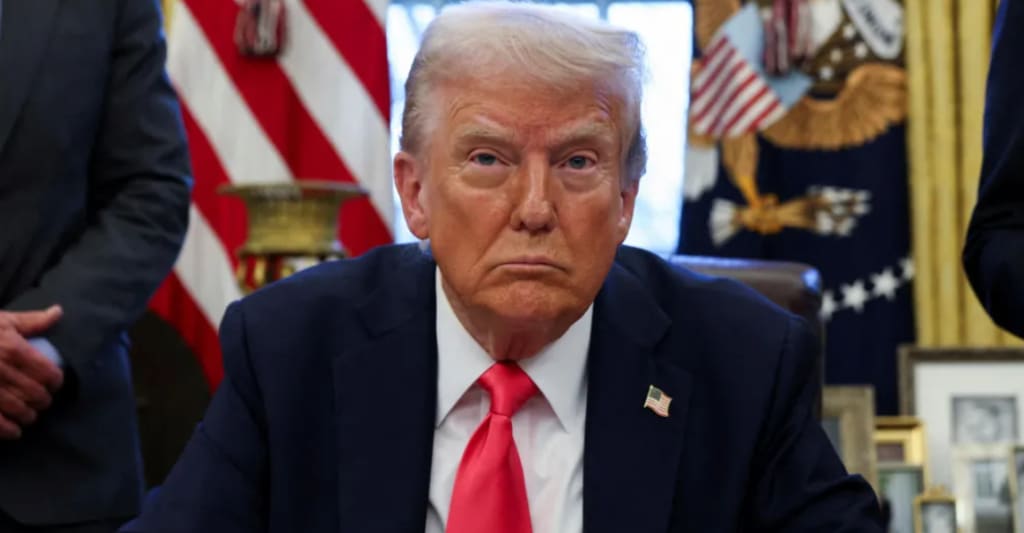
The world of smartphone AI just got caught in the middle of a controversy. Users have reported that when using Apple’s dictation feature, the word “racist” is being transcribed as “Trump”. Naturally, this discovery has led to outrage, debates, and even conspiracy theories. Is this a simple autocorrect error, a technical glitch, or something more?
In this article, we’ll break down how Apple’s AI-powered dictation feature works, why this issue is happening, and whether it’s intentional or just an unfortunate mistake.
The iPhone Dictation Feature Explained
How Apple’s Dictation Software Works
Apple’s voice-to-text dictation feature relies on advanced AI and machine learning algorithms. When you speak into your iPhone, the system processes your words, predicts what you’re saying, and converts them into text.
AI and Machine Learning Behind Voice-to-Text Conversion
The technology behind iPhone dictation uses past user inputs, language models, and an extensive database of commonly used words and phrases. This means the system learns from real-world usage—but sometimes, that learning process leads to unexpected errors.
The Controversy: ‘Racist’ Becoming ‘Trump’
How the Issue Was Discovered
This issue first came to light when users across social media noticed that when they dictated the word “racist,” their iPhones autocorrected it to “Trump.” Screenshots and videos of the glitch quickly went viral.
Social Media Reactions and Viral Discussions
On platforms like Twitter and Reddit, users began debating whether this was a simple mistake or a case of political bias creeping into AI algorithms. Some found it hilarious, while others were deeply concerned about the implications.
Is This a Technical Glitch or Intentional Bias?
Understanding How Autocorrect and Transcription Errors Happen
Autocorrect mistakes happen all the time. Apple’s dictation AI is designed to predict words based on context, phonetics, and frequency of use. Sometimes, it misinterprets phrases, leading to bizarre replacements.
The Role of AI in Recognizing and Linking Words
AI is trained on large datasets of human language. If certain words frequently appear together in user data, the AI may incorrectly associate them.
Apple’s Response to the Issue
Has Apple Acknowledged the Problem?
As of now, Apple has not officially responded to the controversy. However, similar issues in the past have led to software updates to correct AI transcription errors.
Previous Instances of Controversial AI Behavior in Apple Products
This isn’t the first time Apple has faced AI-related controversies. Past issues included autocorrect errors, Siri’s controversial answers to political questions, and biased search results.
The Role of AI Bias in Language Processing
How AI Learns from Data Sources
AI is only as good as the data it’s trained on. If the data itself contains biases, then the AI will reflect those biases.
Examples of Past AI Biases in Tech
Big tech companies like Google and Microsoft have also faced AI bias scandals. From racist image recognition to biased hiring algorithms, AI mistakes are more common than most people realize.
Political Interpretations and Public Reactions
Why People See This as More Than a Simple Glitch
Given the polarized political climate, many are interpreting this as an intentional jab at Trump. However, others argue it’s just a random and unfortunate AI error.
Polarizing Opinions in Political and Tech Communities
Tech forums and political groups are divided, with some believing Apple’s AI is programmed with bias and others calling it a harmless coding mistake.
Has This Happened Before?
Other Notable Autocorrect and AI Mistakes
From Google labeling Black people as “gorillas” to Microsoft’s chatbot turning racist, AI failures have been making headlines for years.
Lessons from Past AI Language Failures
The biggest lesson? AI is far from perfect, and without constant oversight, it can make embarrassing and offensive mistakes.
The Future of AI and Speech Recognition
Can AI Ever Be Truly Neutral?
Despite advancements, no AI can be 100% neutral. The challenge is ensuring that AI doesn’t unintentionally reinforce harmful biases.
What Tech Companies Are Doing to Prevent Bias
Companies like Apple, Google, and Microsoft are investing in better data moderation, transparent AI training, and bias-reducing techniques.
How Users Can Fix or Report Such Issues
Steps to Correct Dictation Errors on iPhones
Go to Settings > General > Keyboard
Turn off Auto-Correction
Manually correct words and train the AI
How to Report Bugs and AI Biases to Apple
Users can report these issues to Apple through Apple Support or Feedback pages.
Conclusion
While the iPhone’s dictation issue is making waves, it’s likely just another AI hiccup rather than a deliberate statement. However, it does highlight the importance of constant AI monitoring and improvement.
FAQs
1. Why is my iPhone dictation replacing words incorrectly?
Apple’s AI uses predictive algorithms that sometimes misinterpret speech.
2. Has Apple responded to this controversy?
No official statement has been made by Apple yet.
3. Can AI be programmed to avoid political bias?
It’s possible, but removing all bias is extremely difficult.
4. How can I manually fix dictation errors on my iPhone?
You can disable auto-correct and retrain AI suggestions in your settings.
5. What other AI transcription errors have gone viral?
Past cases include Google AI labeling people incorrectly and Microsoft’s chatbot turning racist.
About the Creator
Apleetech
Apleetech is a Professional Technology Platform. Here we will provide you only interesting content, which you will like very much. We're dedicated to providing you with the best of Technology, with a focus on dependability and Tech.
Google's Sergey Brin admits he's hiring 'tons' of workers without degrees: 'They just figure things out on their own in some weird corner'
Google’s Sergey Brin admits he’s hiring ‘tons’ of workers without degrees: ‘They just figure things out on their own in some weird corner’
By Dena Falken Esq4 days ago in 01
How to Choose the Best Website Maintenance Company in India for UK Businesses
In today’s fast-paced digital world, a company’s website is often its most important business asset. For UK businesses, maintaining a high-performing, secure, and up-to-date website is critical to attracting customers and staying competitive. However, managing website upkeep in-house can be resource-intensive and time-consuming. This is why many UK businesses turn to professional website maintenance companies in India.
By Dyna Gilbertabout 8 hours ago in 01
Miss Persephone's Manual to a Seemingly Ordinary Life
Miss Persephone was found at the dining table, her blue eyes swollen, her tears arriving and retreating like the tides of the ocean. Earlier that day, her family had visited her in the retirement home where she had lived for eight years. It was her eightieth birthday.
By Imola Tótha day ago in Fiction


Comments
There are no comments for this story
Be the first to respond and start the conversation.