
How to Use Google Autocomplete for Keyword Research and SEO Strategy
How to Find Hidden Keywords Using Autocomplete


Disclaimer: This content was generated using AI.
Introduction
Google Autocomplete is not just a convenience feature—it’s a game-changer for SEO professionals, content creators, and digital marketers. This predictive search function, which suggests queries as users type in the search bar, provides valuable insights into real-time search behaviors, trends, and user intent. By leveraging Autocomplete effectively, businesses can uncover high-impact keywords, generate content ideas, and optimize their digital strategy for maximum visibility and engagement.
Understanding how Google Autocomplete works is crucial for tapping into its full potential. The suggestions displayed are influenced by factors such as search frequency, geographic location, trending topics, and even individual user behavior. By analyzing these predictions, marketers can align their content with what users are actively searching for—giving them a competitive edge in the ever-evolving landscape of search engine optimization.
In this comprehensive guide, we’ll explore the mechanics of Google Autocomplete, how it can enhance your SEO efforts, and the best strategies to utilize it effectively. Whether you’re looking to refine your keyword research, improve content planning, or optimize for voice search, this tool offers an abundance of opportunities to boost your online presence and drive targeted traffic. Let’s dive in!
What is Google Autocomplete?
Google Autocomplete is a predictive search feature that suggests search queries as users type into the Google search bar. It’s designed to save time and help users find relevant results faster by anticipating their search intent.
These suggestions are based on multiple factors, including:
- Search frequency: Popular queries appear as suggestions.
- User behavior: Personalized results based on past searches.
- Trending topics: Real-time data influences what appears.
- Geographical location: Localized searches impact suggestions.
For example, if you type "best coffee", Google might suggest:
- "best coffee shops near me"
- "best coffee beans"
- "best coffee maker"
- "best coffee brands"
These predictions provide valuable insights into what users actually search for—making it a goldmine for SEO and content marketing.
How Google Autocomplete Can Boost SEO
Google Autocomplete is a powerful asset for digital marketers, helping to:
1. Discover Long-Tail Keywords
Instead of targeting high-competition short keywords like "running shoes", you can use Autocomplete to find long-tail variations such as:
- "best running shoes for beginners"
- "running shoes for flat feet"
- "affordable running shoes under $100"
These long-tail keywords are often less competitive and have a higher intent, meaning users searching for them are closer to making a decision.
2. Uncover User Intent
Understanding search intent is crucial for ranking well on Google. Autocomplete helps identify whether users are looking for:
- Informational content ("how to clean suede shoes")
- Comparison content ("Nike vs Adidas running shoes")
- Transactional content ("buy waterproof running shoes")
By aligning your content with user intent, you increase the chances of ranking higher and driving targeted traffic.
3. Generate Blog & Content Ideas
Autocomplete can help spark fresh content ideas by revealing what topics people are searching for.
- Start typing a broad topic (e.g., "social media marketing")
- Look at the suggestions (e.g., "social media marketing strategy," "social media marketing tips")
- Use these as inspiration for blog posts, guides, and videos
4. Optimize for Voice Search
With the rise of voice search, people are using more natural, conversational queries. Autocomplete helps you identify these longer, more specific searches, such as:
- "What’s the best way to cook quinoa?"
- "How do I start a YouTube channel?"
- "Best digital marketing strategies for small businesses"
By incorporating natural language keywords into your content, you improve your chances of ranking for voice searches.
Advanced Autocomplete Research Techniques
For those looking to go beyond basic keyword research, advanced techniques can uncover deeper insights and opportunities.
1. Using Asterisks for Mid-Sentence Suggestions
Inserting an asterisk (*) in your search forces Google to fill in missing words, revealing hidden keyword variations.
Example: Searching for "best * for weight loss" may return:
- "best diet for weight loss"
- "best exercise for weight loss"
- "best tea for weight loss"
2. Testing Autocomplete in Different Languages
If your business operates in multiple regions, try changing the language settings to discover unique search trends in different markets.
3. Utilizing Google’s Related Searches
After performing a search, scroll to the bottom of the results page to view related searches. These provide additional keyword ideas that complement Autocomplete suggestions.
4. Leveraging Google Trends for Seasonal Insights
Pairing Autocomplete research with Google Trends helps you track keyword popularity over time. This is especially useful for industries with seasonal demand, like travel, retail, and events.

Best Practices for Using Autocomplete in SEO
To maximize the impact of Google Autocomplete, follow these best practices:
1. Always Use Incognito Mode
Personalized search history can influence Autocomplete suggestions. Conduct research in incognito mode to get unbiased results.
2. Analyze Competitor Keywords
Look at your competitors’ content and test their target keywords in Autocomplete to discover new keyword opportunities.
3. Update Content Based on New Trends
Autocomplete results evolve over time. Regularly update your content to reflect the latest search trends and maintain rankings.
4. Optimize for Question-Based Queries
Since many Autocomplete suggestions are in question format, create content that directly answers common user questions to increase visibility in featured snippets.
5. Combine with Other SEO Tools
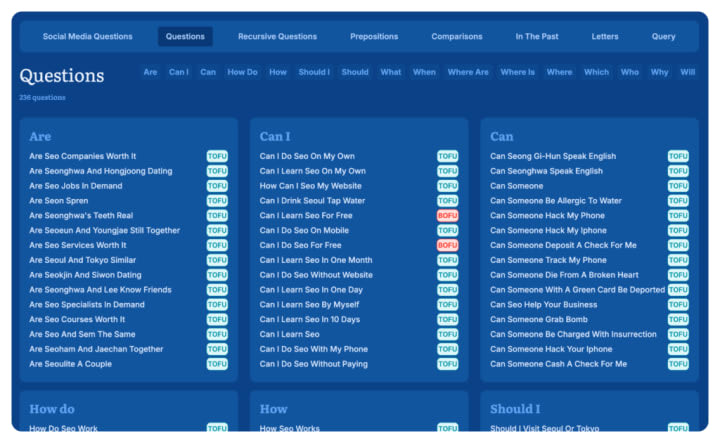
Use Google Autocomplete alongside Google Trends, Ahrefs, SEMrush, and AnswerSocrates.com to enhance keyword research and content planning.
Practical Applications of Google Autocomplete
Google Autocomplete isn’t just a handy search feature—it’s a powerful tool for shaping your SEO strategy. Whether you’re crafting content, optimizing on-page elements, or conducting keyword research, the insights from Autocomplete can give you a competitive edge. Let’s explore some of the most effective ways to put this tool to work.
Content Planning
A well-structured content plan is the backbone of a strong SEO strategy. Google Autocomplete helps eliminate the guesswork by revealing exactly what people are searching for in real time.
Blog Topic Generation
Struggling to come up with fresh content ideas? Autocomplete can be your brainstorming assistant:
- Start with broad industry-related terms and observe the suggested queries.
- Look for comparison-based searches (e.g., "best coffee makers vs. espresso machines").
- Identify pain points or common problems (e.g., "why is my WiFi so slow").
- Track search variations over time to uncover trending topics.
By leveraging Autocomplete, you can generate dozens of relevant blog post ideas that are not only engaging but also backed by actual user searches.
Question-Based Content Structure
Content that directly answers user questions tends to perform well in search rankings. Use Autocomplete to:
- Extract commonly searched questions related to your niche.
- Organize content logically by using these questions as H2 and H3 subheadings.
- Address concerns comprehensively, offering in-depth solutions.
- Create content clusters around related queries to strengthen topical authority.
This method improves user engagement and increases the likelihood of earning featured snippets.
FAQ Development
FAQs are a great way to capture organic traffic and provide instant value to your audience. Autocomplete helps refine your FAQ strategy by:
- Identifying frequently asked questions in your industry.
- Grouping related questions into cohesive sections.
- Using the exact phrasing of Autocomplete queries to align with search intent.
Keeping FAQs updated to reflect new search trends.
Bonus: Well-structured FAQs with schema markup improve your chances of securing a position in Google’s People Also Ask (PAA) boxes.
Keyword Research
Traditional keyword research tools provide search volume metrics, but Autocomplete uncovers how people naturally search. This makes it a powerful method for discovering high-intent keywords.
Long-Tail Keyword Discovery
Long-tail keywords are essential for targeting users with specific intent. Autocomplete helps you find:
- Multi-word search queries with clear commercial intent.
- Niche topics with lower competition and higher conversion potential.
- Modifiers that indicate urgency, such as “best,” “cheap,” or “near me.”
- Question-based long-tail keywords that align with user concerns.
These keywords often lead to higher engagement and better conversion rates due to their specificity.
Exploring Related Terms
One search often leads to another. Google Autocomplete exposes keyword relationships by showing:
- Alternative ways users phrase similar searches.
- Related terms that indicate deeper user intent.
- The natural flow of search behavior within a niche.
By mapping these connections, you can create comprehensive content hubs that cover a topic from multiple angles.
Question Keyword Mining
Questions indicate different stages of user intent, from research to purchase:
- "How does [product] work?" (Awareness stage)
- "Is [product] worth it?" (Consideration stage)
- "Where to buy [product]?" (Purchase stage)
- "How to use [product]?" (Post-purchase stage)
By aligning content with these stages, you can create a full-funnel SEO strategy that captures traffic at every step of the buyer’s journey.
On-Page Optimization
Once you’ve identified the best keywords from Google Autocomplete, the next step is implementing them effectively on your pages.
Title Tag Optimization
Your title tag is one of the most critical SEO elements. Autocomplete can help refine it by:
- Incorporating exact-match search phrases that users frequently type.
- Testing different variations to see what resonates best.
- Adding modifiers like "best," "guide," or "top" to increase click-through rates.
If your title tag matches an Autocomplete prediction, users are more likely to click since it aligns with their search habits.
Strategic Content Integration
Rather than stuffing keywords into your content, focus on addressing the user’s actual needs:
- Dedicate sections to popular autocomplete queries.
- Answer each prediction in a structured and detailed manner.
- Use lists, tables, and images to enhance readability.
- Continuously update content as new search trends emerge.
This approach improves user satisfaction and helps content rank higher by directly addressing searcher intent.
URL Structure Enhancement
A clear and keyword-rich URL can improve SEO performance. Use Autocomplete to:
- Identify the most commonly searched term for your page.
- Keep URLs concise while including relevant keywords.
- Align URL structure with the way users naturally search.
By optimizing URLs based on search patterns, you enhance both SEO and user experience.
Local SEO
For businesses targeting local customers, Google Autocomplete reveals invaluable insights into how people search in specific locations.
Identifying Local Search Patterns
Search behavior varies by region, and Autocomplete helps detect these differences:
- Alternative names for cities, neighborhoods, or landmarks.
- Local slang or regional terminology.
- Seasonal shifts in local search trends.
These insights allow you to tailor content to better match local audience preferences.
Mining Local Modifiers
Autocomplete exposes local intent through specific modifiers such as:
- "Near me" and "nearby" variations.
- "Best" combined with location-based terms.
- Business hours-related searches like "open now."
- Queries involving local transportation options.
Optimizing for these variations ensures you capture high-intent local searches.
Neighborhood-Specific Targeting
To refine your local SEO strategy, consider:
- Creating individual pages targeting specific neighborhoods.
- Addressing local concerns or preferences that appear in Autocomplete.
- Mentioning relevant landmarks or popular areas in your content.
- Leveraging Autocomplete data to refine Google My Business (GMB) listings.
This granular approach helps businesses dominate local search results and attract highly targeted traffic.
E-commerce SEO
Google Autocomplete is a goldmine for e-commerce businesses looking to optimize product pages, categories, and marketing campaigns.
Product Feature Keywords
Shoppers search for highly specific product attributes. Autocomplete helps uncover:
- Color variations (e.g., "red running shoes").
- Material preferences (e.g., "leather wallet").
- Feature-based terms (e.g., "waterproof smartwatch").
- Sizing details (e.g., "king size duvet cover").
Incorporating these search terms into product descriptions, filters, and metadata can improve rankings and conversions.
Price-Based Modifiers
Autocomplete reveals how users qualify searches by price:
- Budget-conscious: "cheap," "under $50," "affordable."
- Mid-range: "best value," "good quality."
- Premium: "luxury," "high-end," "professional grade."
Creating targeted landing pages for different price segments helps capture shoppers at every budget level.
Seasonal Shopping Insights
Consumer search behavior shifts based on the time of year. Autocomplete helps track:
- Holiday-driven searches (e.g., "Christmas gift ideas for mom").
- Seasonal product trends (e.g., "summer dresses 2024").
- Event-based searches (e.g., "graduation gift ideas").
Anticipating these trends allows you to optimize your inventory, promotions, and content strategy accordingly.
International SEO
Expanding globally? Google Autocomplete provides critical insights into regional search behavior.
Cross-Language Keyword Research
Rather than direct translation, use Autocomplete to find:
- Localized search terms with different phrasing.
- Cultural variations in product descriptions.
- Language-specific modifiers and slang.
This approach ensures your content aligns with actual user search behavior in different markets.
Adapting to Cultural Differences
Autocomplete helps identify region-specific search priorities, such as:
Different ways of searching for the same product.
- Unique preferences in certain countries.
- Localized brand alternatives or competitor names.
- These insights help tailor your messaging for international audiences.
Technical Considerations for International Research
For accurate results, adjust your research setup:
- Use country-specific Google domains (e.g., google.de, google.fr).
- Enable a VPN to simulate searches from different locations.
- Search in both the native language and English.
By leveraging Autocomplete data across regions, you can fine-tune your international SEO strategy and maximize global reach.
This practical application of Google Autocomplete ensures you’re aligning your content, SEO efforts, and strategy with what users are actively searching for.
Common Mistakes to Avoid
1. Ignoring Search Intent
Not all keywords are suitable for every type of content. Ensure your content aligns with whether users are looking for information, comparisons, or products.
2. Overstuffing Keywords
Using too many autocomplete suggestions unnaturally can hurt readability and rankings. Instead:
- Prioritize the most relevant phrases.
- Use keywords naturally within the content.
3. Not Using Incognito Mode
Your personal search history influences autocomplete suggestions. Always use incognito mode to get unbiased results.
4. Neglecting Updates
Autocomplete results evolve. Track monthly trends and adjust your content to stay relevant.
Pro Tips for Maximum Impact
1. Use Wildcards to Reveal Hidden Keywords
Typing an underscore (_) within a query forces Google to fill in the blank with suggestions.
Example:
- "best _ for students" might suggest:
- "best laptops for students"
- "best apps for students"
- "best planners for students"
2. Search from Different Locations
Autocomplete varies by region. Use a VPN or search from different locations to uncover localized keywords.
3. Automate the Process
Instead of manually typing every variation, tools like AnswerSocrates.com can generate hundreds of autocomplete results in seconds.
4. Combine with Other SEO Tools
Enhance your research by combining autocomplete with:
- Google Trends (for seasonal keyword trends)
- People Also Ask (for related questions)
- SEO tools like Ahrefs & SEMrush (for search volume and competition analysis)
5. Analyze Competitor Strategies
- Identify which keywords competitors rank for.
- Test those keywords in autocomplete to uncover gaps.
- Create better, more targeted content to outrank them.
Final Thoughts
Google Autocomplete is a powerful, free tool that offers real-time insights into what users are searching for. Whether you’re looking to enhance your keyword strategy, improve content relevance, or optimize for voice search, leveraging autocomplete can give you a competitive advantage.
By incorporating autocomplete insights into your SEO and content marketing strategy, you can attract more traffic, improve engagement, and boost search rankings.
Would you like additional refinements or any specific sections expanded further?
About the Creator
James Oliver
I help entrepreneurs build profitable online businesses. Sharing proven strategies and insights as I grow my own affiliate marketing business to $1M per year.
Keep reading
More stories from James Oliver and writers in 01 and other communities.
How to Use Recursive Keyword Research (Manual + AI Method) to Outrank Your Competitors
Disclaimer: This content was generated using AI. Keyword research is the backbone of SEO, but let’s be honest—traditional tools only get you so far. They show you the most obvious keywords, but what about the ones that really matter—the ones your competitors aren’t even thinking about yet?
By James Oliver9 months ago in 01
A Detailed Guide for Startups Mobile App Developers in Miami
It usually happens quietly. A founder in Miami opens a laptop early, coffee untouched, scrolling through two proposals that look nothing alike. One promises speed, low cost, and a launch in eight weeks. The other is slower, heavier, and nearly double the price. Both claim experience. Both say they understand startups.
By Samantha Blake2 days ago in 01
Mexico Online Grocery Market Opportunity and Forecast 2025–2033
Introduction Mexico’s grocery retail landscape is undergoing one of the most significant transformations in its history. What was once dominated by neighborhood tiendas, supermarkets, and open markets is now being reshaped by smartphones, digital platforms, and fast-evolving logistics networks. Online grocery shopping—once considered a niche convenience—is quickly becoming an essential channel for millions of Mexican consumers.
By Aaina Oberoi5 days ago in 01
Smart phones, Humans and Aliens.
WARNING. I will be tapping into one of your favorite creative tensions: The absurdity of humans worshipping their glowing rectangles as if they were tiny oracles. There’s something deliciously poetic about that contradiction, and it lends itself beautifully to an instructive proviso.
By Novel Allen5 days ago in Poets


Comments
There are no comments for this story
Be the first to respond and start the conversation.