
How to Set Up SSL Certificates on Barracuda SSL VPN Devices
Confused about SSL setup on Barracuda VPN devices? Follow this simple guide to secure your connection with the right certificate configuration.

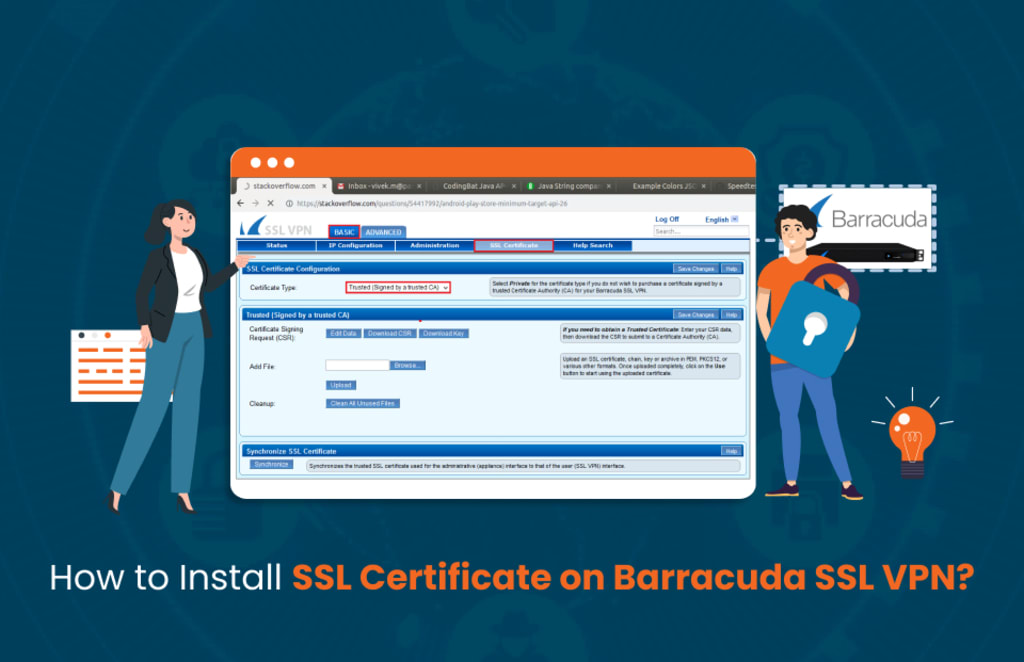
The Barracuda SSL VPN is a remote access solution that allows users to connect to an organization's internal network utilizing any device with Internet access.
The Barracuda SSL Secure VPN client secures remote connections with end-to-end encryption utilizing SSL/TLS protocols to ensure sensitive activity is encrypted while in transit.
Barracuda SSL VPNs allow users to connect securely without specialized VPN client software, unlike traditional VPNs.
This platform-based access makes it a great remote access solution for employees, contractors, and mobile personnel that leverage access to corporate applications, file shares, and email securely without compromising access.
Requirements for Installing SSL
Administrative Access to Barracuda SSL VPN
In order to install an SSL certificate onto a Barracuda SSL VPN, you must have administrative-level access to the Barracuda device. With administrative access, you can navigate through the web interface, configure options and upload certificate files.
If you do not have administrative access to the Barracuda device, request credentials from your IT or network security personnel prior to beginning the process.
Create a Certificate Signing Request (CSR)
A Certificate Signing Request (CSR) must be generated to get the SSL certificate from a trusted Certificate Authority.
You can generate the CSR through the Barracuda Web Interface, which is located at Basic > SSL Certificate > Generate CSR, or use a third-party tool, such as the DigiCert Certificate Utility for Windows.
The CSR includes essential information, including your domain name, organization information, and public key information, to be used by the CA to issue a signed certificate.
Submit the CSR
After the CSR is generated, submit it to a trusted Certificate Authority (CA). The CA will validate your information and provide an SSL certificate and will typically provide you with a primary certificate (your_domain_com.crt) and an intermediate certificate (DigiCertCA.crt), and if needed, a root certificate.
Be sure to select the right certificate type (either PEM (.crt, .pem) or PKCS#12 (.pfx)) that is compatible with Barracuda SSL VPN.
Private Key File
When the CSR is created using Barracuda Web Interface then the device has already saved the private key and you do not need to upload it separately.
If the CSR was created outside of the Barracuda Web Interface, be sure to securely keep the associated private key file (your_domain_com.key) as this is an essential part of the SSL installation. The certificate will not work without the private key.
Store SSL Certificate Files Securely
It is important that SSL certificate files, especially the private key, are stored securely so that they cannot be accessed by unwanted people.
If you plan to install the SSL certificate on multiple servers, make sure transferring the certificate and private key to each server is done securely so that they cannot be compromised during the transfer process.
This means you cannot send them via email or in some other unsecured way because you cannot be sure they are not intercepted. It is wise to keep backup copies of these files in case you need to reinstall for whatever reason.
How to Install SSL Certificate on Barracuda SSL VPN?
Sign in to the Barracuda SSL VPN Web Interface
To begin the process of installing your SSL, open a web browser and navigate to the Barracuda SSL VPN Admin Panel by entering the following URL: https://your-ssl-vpn-server:8443
This will take you to the login screen, where you will enter your administrator credentials to get into the Barracuda SSL VPN Management Dashboard.
If you have forgotten your credentials, or if you do not have administrator access, you will need to reach out to your IT team to get access.
It is important to obtain access as a full administrator and NOT just a regular user. Managing SSL certificates will require you to be run as an elevated user.
Once you are logged in, you will be able to manage security settings, and continue to install your SSL certificate.
Keep Reading - https://cheapsslweb.com/resources/how-to-install-ssl-certificate-on-barracuda-ssl-vpn
About the Creator
Eden Allen
I am Eden Allen, a Cyber Security Consultant with a solid technical background. I've more than a decade of consulting experience in various cyber-security domains.
Keep reading
More stories from Eden Allen and writers in 01 and other communities.
Top 10 SEO Experts in Pakistan 2026
Pakistan continues to establish itself as a key contributor to the global digital marketing industry. By 2026, the country has developed a mature SEO ecosystem that extends well beyond traditional keyword optimization.
By SEO EXPERT IN PAKISTAN 20253 days ago in 01
Best AR15 Rail Systems for Home Defense, Duty & Range Use
The AR15 platform is renowned for its modularity, and choosing the right rail system—also known as an AR15 handguard or AR15 rail—can significantly enhance performance for specific applications. For home defense, the Aero Precision ATLAS S-ONE stands out as a lightweight, slim M-LOK option that allows quick accessory mounting like lights for low-light scenarios. In duty use, the Midwest Industries Combat Rail excels with its rugged quad-rail design for heavy attachments. For range sessions, the STNGR HWK M-LOK handguard offers excellent value, balancing weight and versatility for extended shooting.
By Ar15handguard4 days ago in 01


Comments
There are no comments for this story
Be the first to respond and start the conversation.