
How to Download Disney+ Hotstar Videos
—SameMovie DisneyPlus Video Downloader


Disney+ Hotstar is an Indian subscription over-the-top streaming service operated by Disney Streaming. This streaming service contains material from Disney Star's regional networks, including movies, TV shows, live sports, Bollywood films, and Disney+ Originals. Except for India, users can also enjoy Hotstar services in Indonesia, Malaysia, and Thailand. If you want to download Disney+ Hotstar videos, you are landed in the right place. In the following, a step-by-step guide will be provided for you if you want to save Hotstar content on your devices.
The guide will be divided into 2 parts, the first part is about downloading videos on iOS and Android devices, and you will learn how to download Hotstar videos on PC and Mac in the second part.
Part 1: Download Hotstar from iOS and Android Devices
To download Hotstar movies and series on your iOS and Android Devices, you need to download the Disney+ Hotstar app from the App Store or Google Play Store first.
For iOS App
Step 1: Find the content that you wish to download.
Step 2: Click on the ‘Download’ option under the film/series thumbnail and your download should start.
For Android App
Step 1: Go to the content that you wish to download.
Step 2: Click on the ‘Download’ option under the film/series thumbnail. You will see the option to choose the video quality of the download.
Step 3: Select one from the video quality option- High, low, medium and your download should start.
Part 2: Download Hotstar from PC and Mac
As mentioned before, you can only download and watch Hotstar videos offline in its app. To prevent the content you download from being removed, you must connect to the Internet once every 30 days. Additionally, certain films may only be stored temporarily on the app; as a result, if you want to keep the video on your computer permanently, you need to use a tool.
Simply download SameMovie DisneyPlus Video Downloader, which will enable you to download Hotstar videos up to 1080p in MP4 or MKV format. You can then watch the downloaded videos locally rather than through the Hotstar app. There is no time restriction on viewing, and you can watch the downloaded videos on your device offline anytime you want. Most importantly, you don’t have to worry about the downloaded videos being removed even if you cancel the Hotstar subscription. SameMovie's outstanding performance will make you feel easy when downloading Hotstar content.
To get a tutorial on downloading Disney+ Hotstar content, please click https://bit.ly/3VS7JBU.
Tutorial: Download Disney+ Hotstar Videos on Computer
SameMovie DisneyPlus Video Downloader is available on both Windows and Mac devices, and it's very easy to use due to its user-friendly interface. Read on and get a tutorial on how to download Hotstar video from a computer.
STEP 1 Run SameMovie and Log in to Disney+
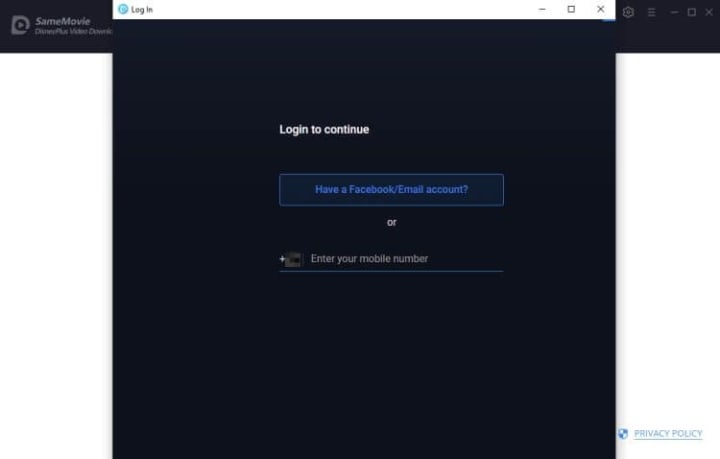
Install and launch SameMovie DisneyPlus Video Downloader on your computer. To access the Disney+ login page, enter any word in the SameMovie search bar. After doing so, sign in with your account.
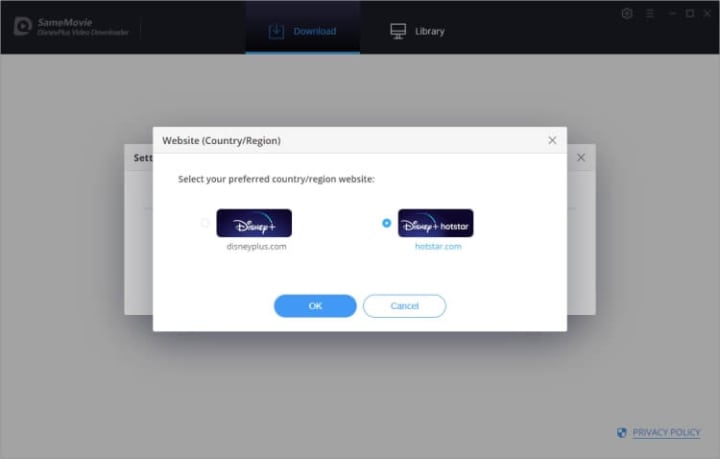
To download Hotstar content, you need to choose "hotstar.com" when the program start. Or you can click Setting > Account Setting, and then select "hotstar.com".
STEP 2 Customize Output Settings
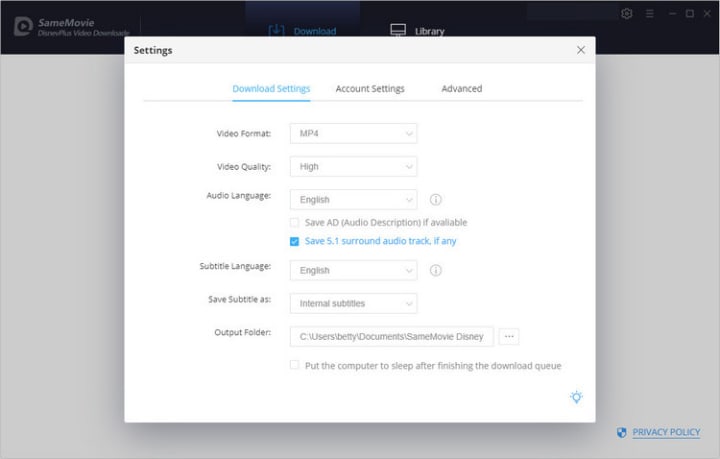
You can customize the download settings in this step. Click the gear icon in the upper-right corner, then you can select the video quality (High, Medium, Low), video format (MP4 or MKV), audio track, subtitles and output path.
STEP 3 Search for the Video
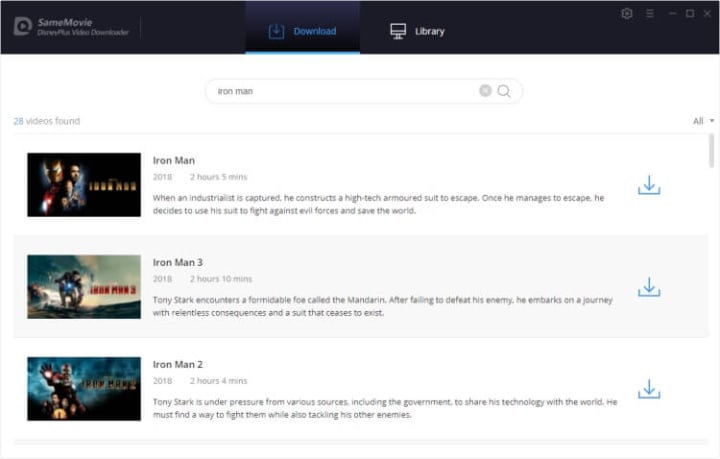
You can search for the video you want to download in 2 ways. Just type the key words in the search bar, and the searching results will be listed. Or you can copy the video URL from the Hotstar website, and paste it into the search field of SameMovie.
STEP 4 Start to Download
Once you click the "Download" button, the video will begin downloading. The amount of time it takes to download the video will depend on its length and the speed of your internet connection.
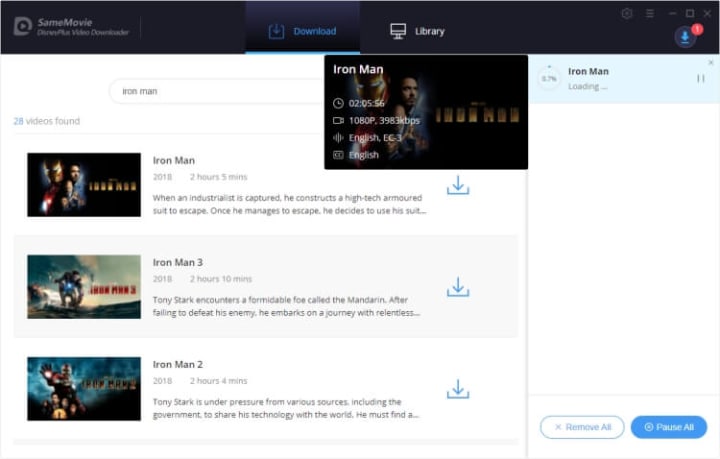
Tap "Library" to locate the downloaded video. Now you can enjoy watching Hotstar videos offline locally, and you can also move them to other devices you have such as TV, mobile phone, and tablets.
To learn more about downloading Disney+ Hotstar content, please click https://bit.ly/3VS7JBU.
About the Creator
Louise Walker
Trying to find useful video downloaders.
Keep reading
More stories from Louise Walker and writers in 01 and other communities.
What Are Disney+ Download Limits, and How to Remove Them?
The Disney+ app is the go-to way of downloading for many people. Although various mobile devices can download videos from Disney+, Windows and Mac customers are unable to use this approach to download their favorite Disney+ videos, which is very frustrating. At the same time, some other people are wondering if there is a way to watch Disney+ videos offline at any time without being restricted by the Disney+ download limits.
By Louise Walker3 years ago in 01
How One EdTech App Doubled Retention With AI in 90 Days
In the competitive landscape of 2026, the primary challenge for educational platforms is no longer the delivery of content. It is the persistence of the learner. For many developers, AI in EdTech has shifted from a speculative feature to the core engine of user stickiness. This transition is critical because, despite the massive influx of digital learning tools over the last decade, the industry has long struggled with a "completion crisis." The average course completion rate often hovered below 15% for non-mandatory content.
By Del Rosario7 days ago in 01



Comments
There are no comments for this story
Be the first to respond and start the conversation.