
How to Create a Can Mockup
How to Create a Can Mockup: A Beginner Friendly Guide

If you’ve ever wondered how brands make their product packaging look so realistic before anything is even printed, the answer is simple – they use mockups. Mockups help turn your design ideas into visuals that feel real, even before your product hits the shelves. One of the most useful and common types is the can mockup. Whether you're working on a soda can, an energy drink, or even a food product, a well-made mockup can make your design look stunning and professional.
In this guide, we’ll walk you through everything you need to know about creating a can mockup – step by step. You don’t need to be a professional designer, and you don’t need expensive tools. In fact, by the end of this article, you’ll be ready to create your own can mockup like a pro.
What is a Can Mockup?
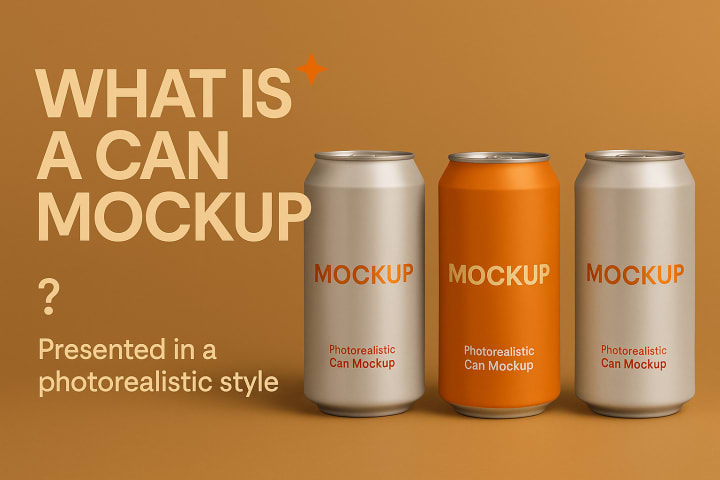
A can mockup is a digital template or visual model that helps you place your product design on a realistic looking can. Instead of just showing your label on a flat image, a can mockup allows you to see how your design would actually look when wrapped around a real can.
This is especially helpful for packaging designers, branding experts, and business owners who want to preview their products in real-world settings. Whether it’s a beverage can, energy drink, or a sparkling water, mockups are used to visualize the product clearly before it’s manufactured.
Why You Need a Can Mockup
Creating a can mockup is not just about having something that looks good. It’s also a smart way to test, promote, and refine your product design before launching it to the market. Here’s why using a mockup is so helpful:
- Showcase your product professionally – A mockup turns your design into something tangible.
- Use in presentations and pitches – Impress clients or investors with realistic visuals.
- Test how your design looks on a real can – See if everything fits properly and looks attractive.
- Market your product before launch – Use your mockup in ads, social media posts, or online stores.
- Save time and money – You won’t need to print a sample just to see how it looks.
Whether you're launching a new drink or simply refreshing your brand, a good can mockup can boost your confidence and your presentation.
Tools You Can Use to Create a Can Mockup
You might be thinking: “Do I need Photoshop or design skills for this?” The good news is – no. While graphic software like Photoshop is powerful, it’s not necessary for creating great mockups today. There are many tools available that can help you build a beautiful can mockup without any design background.
One popular option is Mockey, which is designed for simplicity and quality. Mockey is a free AI mockup generator that helps you create can mockups in minutes without any need for professional tools. You simply upload your design, choose your style, and download your mockup.
Other options include:
- Canva (for simple overlay designs)
- Smartmockups
- Placeit
- Adobe Express
If you're looking for speed and ease, a can mockup generator like Mockey can save you a lot of time and hassle. You’ll be surprised how easy it is to go from a plain design to a photo realistic product mockup.
Step by Step: How to Create a Can Mockup
Let’s now walk through how you can actually create your own can mockup. Follow these steps and you’ll have a professional-looking result in no time.
Step 1: Choose the Right Template
Start by selecting a blank can mockup template. Look for a mockup that matches the shape and size of your product. This could be a tall energy drink can, a short soda can, or even a juice can. If you’re using Mockey or another online tool, you’ll find ready made templates that look clean and modern.
Step 2: Upload Your Design
Next, upload your label or artwork. Make sure your design file is high resolution and preferably in PNG format with a transparent background. This ensures your artwork blends smoothly onto the can surface.
Align your logo, text, and graphics so they sit perfectly on the curved part of the can. Don’t place text too close to the edges, as it may wrap in a strange way.
Step 3: Adjust Size and Position
Most tools will allow you to drag, resize, and rotate your design. Make small adjustments to make sure your artwork is centered and balanced. If the mockup includes highlights or shadows, be sure your design does not clash with them.
Step 4: Customize the Background
Choose a background that fits your brand style. You can go with a clean white or grey background for a minimal look, or place your can in a realistic environment, such as a kitchen counter or store shelf. This step makes your mockup look more relatable and real.
Step 5: Download Your Mockup
Once you’re happy with how it looks, download the mockup in high quality. Most mockup generators will offer PNG or JPG formats. Now your can mockup is ready to use on your website, in a catalog, or on your social media platforms.
Tips for a Perfect Can Mockup
Here are a few simple tips to make your can mockup stand out:
Use high quality images – A blurry design will ruin the whole look.
Keep your design clean – Avoid placing too many elements.
Match the design with the product’s tone – For example, use bright colors for an energy drink and elegant fonts for sparkling water.
Double check for alignment – Make sure your logo and text are not tilted or stretched.
Use shadows and lighting wisely – This adds depth and realism.
Common Mistakes to Avoid
Creating mockups is easy, but there are a few things to watch out for:
- Using low resolution images – This can make your product look unprofessional.
- Overcrowding the design – Keep it simple and readable.
- Choosing the wrong can shape – Make sure your mockup matches the real product.
- Ignoring spacing – Leave enough room around the label for a clean look.
- Clashing backgrounds – Use colors and settings that highlight the product, not distract from it.
Conclusion
You don’t need to be a design expert or have expensive software to create a beautiful can mockup. With the right tool and a clear design, you can turn your ideas into real looking product visuals that are perfect for marketing, pitching, or just testing your concept.
Thanks to easy to use tools like Mockey, anyone can create a mockup in just a few minutes. Whether you’re designing for a new product or just want to test out ideas, a well-made mockup can help your brand look polished and professional.
Try creating your own today and see how much of a difference it can make in your design process.
About the Creator
Keep reading
More stories from Zaheer Ansari and writers in 01 and other communities.
How to Create Card Mockups
If you're a designer, small business owner, or creative freelancer, chances are you've worked with cards at some point — business cards, invitation cards, thank you cards, and more. But before you send your designs for printing or post them online, wouldn't it be nice to see how they look in real life?
By Zaheer Ansari5 months ago in 01
Bitcoin: The Cornerstone of the Digital Financial Revolution
holds the largest market capitalization, but because it remains the structural axis around which the entire digital asset ecosystem rotates. Every liquidity cycle, every altcoin rally, every regulatory discussion — all eventually reference Bitcoin. This week, Bitcoin once again demonstrated why it is not just a speculative asset, but a macro-sensitive financial instrument and a technological network with deep-rooted resilience. Price Structure: Controlled Consolidation, Not Weakness Throughout this week, Bitcoin traded within a relatively narrow range. For inexperienced observers, sideways movement may appear uninteresting. However, in market structure analysis, consolidation after a significant move is often constructive. Volatility metrics have compressed. Funding rates in derivatives markets remain neutral to slightly positive, indicating the absence of excessive leverage on either side. Open interest is elevated but not extreme — suggesting participation without euphoric overexposure. On-chain data supports this constructive narrative. Long-term holder supply continues to increase, meaning coins are moving off exchanges into cold storage. Exchange reserves have slightly declined, historically a signal that immediate sell pressure is not dominant. In professional portfolio management terms, this resembles accumulation rather than distribution. Institutional Behavior: Gradual Integration Bitcoin is no longer an isolated retail-driven experiment. Institutional integration continues to deepen. Custodial platforms report steady inflows, and structured products tied to Bitcoin maintain liquidity. What is important this week is not explosive institutional buying, but consistency. Institutions do not chase momentum aggressively; they allocate strategically. The presence of patient capital reduces systemic fragility. Bitcoin’s correlation with macro assets — particularly risk-on equities and liquidity expectations — remains visible but is gradually decoupling during periods of geopolitical uncertainty. This dual behavior strengthens its narrative as both a speculative growth asset and a hedge against monetary instability. Network Fundamentals: Hash Rate and Security From a technical standpoint, Bitcoin’s hash rate remains near historical highs. This metric reflects the computational power securing the network. A rising hash rate signals miner confidence and network robustness. Mining difficulty adjustments this week continued to stabilize block production intervals. Despite energy cost fluctuations globally, mining operations appear structurally resilient. Security remains Bitcoin’s core value proposition. Unlike many newer chains, Bitcoin prioritizes decentralization and immutability over rapid experimentation. That conservative design philosophy has proven durable across multiple market cycles. Supply Dynamics: Scarcity as a Monetary Thesis Bitcoin’s fixed supply cap of 21 million coins remains one of its defining characteristics. This scarcity model differentiates it from fiat currencies, which expand through monetary policy decisions. Post-halving dynamics continue to influence long-term expectations. With block rewards reduced, newly issued supply entering the market is structurally lower. When combined with increasing long-term holder accumulation, circulating liquidity tightens. This week’s on-chain metrics suggest that a significant portion of supply remains dormant. Dormant supply indicates conviction — holders unwilling to sell despite volatility. From an economic standpoint, constrained supply plus stable or rising demand creates asymmetric upside potential over time. Macroeconomic Context: Liquidity and Policy Expectations Bitcoin’s short-term performance cannot be separated from macroeconomic conditions. Central bank commentary this week hinted at cautious positioning regarding interest rates and inflation targets. Liquidity expectations matter. When markets anticipate accommodative policy, risk assets tend to perform well. Bitcoin often responds positively to increased liquidity expectations due to its fixed supply structure. However, Bitcoin also benefits from monetary uncertainty. In environments where confidence in traditional systems weakens, alternative monetary networks gain conceptual appeal. This dual sensitivity — to both liquidity expansion and systemic doubt — makes Bitcoin uniquely positioned among digital assets. Market Psychology: Discipline Over Emotion One of the most underestimated elements of Bitcoin analysis is behavioral finance. Market participants oscillate between fear and greed rapidly. This week, sentiment indicators remained relatively neutral. Extreme fear is absent; extreme greed is also absent. Neutral sentiment often accompanies accumulation phases rather than blow-off tops. Experienced investors understand that the absence of excitement can be constructive. Sustainable trends often build quietly before accelerating. Regulatory Environment: Gradual Maturation Regulatory discussions continue globally, but Bitcoin’s classification as a commodity in several jurisdictions provides relative clarity compared to many altcoins. Institutional investors require regulatory predictability. This week’s tone from policymakers in major economies suggests a movement toward structured frameworks rather than outright hostility. Clearer compliance pathways reduce systemic uncertainty and encourage larger capital participation. Bitcoin, as the most established digital asset, stands to benefit disproportionately from regulatory maturation. Technological Stability vs. Rapid Innovation Unlike smart contract platforms that frequently upgrade execution layers, Bitcoin evolves cautiously. Development this week focused on incremental improvements rather than radical redesign. Layer-two solutions, such as the Lightning Network, continue gradual expansion, enabling faster and cheaper transactions without compromising base-layer security. Bitcoin’s philosophy prioritizes durability over experimentation. Critics sometimes interpret this as stagnation. Supporters interpret it as institutional-grade conservatism. In long-term infrastructure, stability often outperforms novelty. Risk Assessment: What Could Challenge Bitcoin? No asset is without risk. Bitcoin remains exposed to: Sudden macro liquidity contraction Coordinated regulatory crackdowns in major economies Black swan cybersecurity events (though historically rare) Miner capitulation if energy economics deteriorate severely However, this week none of these risks materialized in a structurally alarming way. Volatility remains controlled, network metrics remain strong, and capital flows remain stable. Risk-adjusted analysis therefore remains neutral-to-positive. Strategic Outlook: Structural Strength Beneath Surface Calm The most important takeaway from this week is not dramatic price appreciation — it is structural health. Bitcoin’s: Hash rate remains elevated. Long-term holder supply continues rising. Exchange balances trend downward. Institutional integration remains steady. Regulatory clarity improves incrementally. This combination rarely aligns during distribution phases. It more commonly appears during consolidation before expansion. However, disciplined analysis avoids prediction without confirmation. Breakouts require volume and macro support. Conclusion: Bitcoin as Digital Monetary Infrastructure Bitcoin is no longer merely an asset class; it is digital monetary infrastructure. It operates without central authority, without discretionary supply expansion, and without reliance on a single jurisdiction. This week reaffirmed its resilience. No dramatic headlines were necessary. Strength often expresses itself quietly — in stable network metrics, in patient accumulation, and in disciplined market structure. In a world of expanding debt, fluctuating policy credibility, and technological transformation, Bitcoin continues to offer a fixed, transparent, algorithmic monetary alternative. Short-term volatility will persist. Cycles will repeat. Narratives will shift. But beneath those fluctuations, the foundation remains intact. Bitcoin is not just surviving this cycle. It is maturing within it.
By yusuf selho7 days ago in 01

Comments
There are no comments for this story
Be the first to respond and start the conversation.