
How to Choose the Right Replacement Keys for Your Laptop
Choose the Right Replacement Keys
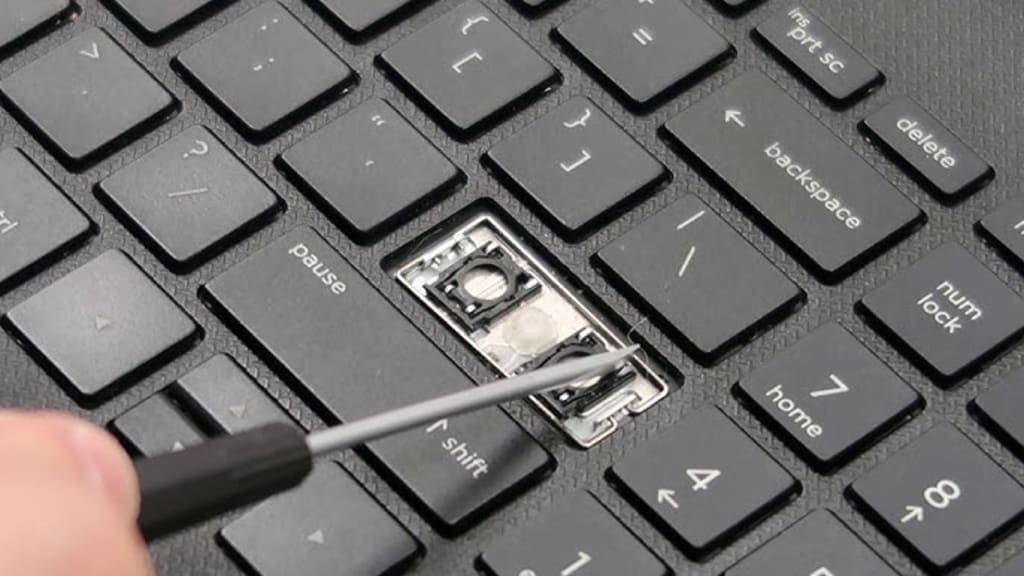
When a laptop key breaks or stops working, it can be frustrating. Whether you’ve spilled coffee on your keyboard, dropped something on it, or just worn out the keys from years of use, there’s no need to panic. Replacing individual keys on your laptop is a relatively easy and cost-effective way to get your device back in working order. However, choosing the right replacement keys can sometimes be tricky. In this article, we’ll guide you through the process of selecting the right replacement keys for your laptop, with helpful tips and considerations to make sure you get the right fit for your device.
Understand Your Laptop’s Keyboard Type
Before you begin looking for replacement keys, it’s crucial to understand the type of keyboard your laptop uses. Laptops come in various styles, and each keyboard has a unique design and layout. Common types of laptop keyboards include:
Chiclet Keys: These are flat, square keys that have a little gap between them. They are commonly used in modern laptops like MacBooks and ultrabooks.
Scissor Switch Keys: These keys have a scissor-like mechanism that helps the key cap remain stable when pressed. This design is often found in laptops like Dell and Lenovo.
Mechanical Keys: Found in gaming laptops, these keys use individual switches underneath each key, providing a distinct feel when pressed.
Once you know the type of keyboard your laptop has, you’ll be able to choose a replacement key that matches. You can find out which keyboard your laptop uses by checking the manufacturer's manual or looking up the model number online.
Find Your Laptop’s Exact Model and Key Layout
Every laptop model has its own specific layout and dimensions for the keys. This means that keys from one laptop may not fit another, even if the two laptops are the same brand. When searching for replacement keys, make sure you know your laptop’s exact model and key layout.
The key layout refers to the arrangement of the keys on your keyboard. Most laptops follow the standard QWERTY layout, but there are variations depending on the region and language settings. If you're replacing a specific key, like the spacebar or enter key, it’s important to get the exact size and shape to ensure proper fitting. Some laptop brands, such as Apple, have unique key designs, which means you’ll need to buy replacements specifically made for your MacBook or other Apple devices.
In addition to the layout, check whether your laptop has backlit keys. Backlit keyboards often require specific key designs to allow the light to shine through correctly, so make sure you get a replacement key with a cutout for the backlight.
Search for the Right Replacement Key or Keycap
Once you know the type of keyboard and layout, you can start searching for replacement keys. Many third-party suppliers sell individual replacement keys, which can be purchased online. One important factor to consider is the key material, as laptop keys are often made from different materials like plastic or rubber.
Plastic Keys: Most laptop keys are made from plastic. This type of key is sturdy, lightweight, and offers the right feel for most users. If your laptop key is made from plastic, you should aim for a replacement key made from a similar material.
Rubber Dome Keys: Some laptops use rubber dome technology, which provides a soft, cushiony feel when typing. If your laptop uses this type of key, you’ll need to replace it with another rubber dome key.
Durability: It’s a good idea to choose replacement keys that are durable. Over time, frequent typing can wear down the keycaps, making them harder to press. If you’re looking for a long-lasting replacement, it’s worth investing in high-quality keycaps that are resistant to wear and tear.
If you’re unsure about the right material, check the specifications of your laptop model online or consult the manufacturer’s website for more details. You can also visit a local electronics store to see if they have replacement keys that match your laptop.
Consider the Price of Replacement Keys
Laptop keys aren’t very expensive individually, but if you need to replace several keys or the entire keyboard, the cost can add up. The price of replacement keys varies depending on the brand, model, and the type of key you’re replacing. If you’re only replacing one or two keys, you might be able to find cheap individual keys for just a few dollars each. However, if you need to replace the entire keyboard or more complex keys like the spacebar, the price may be higher.
One factor that affects the price is the availability of the keys. Popular laptop brands like HP, Dell, and Lenovo usually have replacement parts readily available at a lower cost. On the other hand, less common or older laptop models might have more expensive replacement parts due to limited availability.
When shopping for replacement keys, be sure to check prices from multiple sources to find the best deal. Remember that while a lower price may seem appealing, it’s important to prioritize quality and durability to ensure the replacement keys last.
Check the Compatibility with Your Laptop Model
One of the most important factors to keep in mind when selecting replacement keys is compatibility. Laptop keys are not universal, meaning a key from one laptop may not fit another, even if both laptops are from the same manufacturer. To ensure that the replacement key you’re purchasing will fit your laptop, check the product’s compatibility.
Manufacturer Websites: Many manufacturers offer replacement keys for their specific laptop models. For example, if you have a Dell XPS laptop, you can visit the Dell website to find the exact replacement keys that fit your device.
Third-Party Sellers: If you’re looking for a more affordable option, many third-party websites specialize in selling laptop keys and keycaps. However, make sure the keys are specifically designed for your laptop model, as some third-party sellers offer generic keys that may not fit correctly.
Laptoptaste: This is a popular marketplace for laptop parts, and it can be a great resource for finding replacement keys. Just make sure to double-check that the keys you’re purchasing are compatible with your laptop’s model and layout. Some sites, like Laptoptaste, provide detailed compatibility charts to help you find the right fit.
How to Install Replacement Keys on Your Laptop
Once you’ve purchased the right replacement key, the next step is installing it. Replacing a key on your laptop is typically a simple process that requires no special tools. Here’s how to do it:
Remove the Broken Key: Carefully pry the broken or damaged key off the keyboard. You can use a plastic tool, like a spudger, to gently lift the key from its place. Be cautious not to damage the surrounding keys or the key mechanism.
Align the New Key: Once the old key is removed, align the new replacement key with the slot on your keyboard. Make sure the key is positioned correctly, and check that it’s facing the right direction.
Press Down Gently: Press down on the new key until it snaps into place. You should hear a small "click" as the key locks into position. Avoid pressing too hard, as this could break the key or the keyboard mechanism.
Test the Key: After the key is installed, test it by pressing it several times to make sure it functions properly. If the key feels loose or doesn’t work, remove it and try again, ensuring it is aligned correctly.
Conclusion
Choosing the right replacement keys for your laptop doesn’t have to be difficult if you follow these simple guidelines. By understanding your keyboard’s layout, checking compatibility, and choosing the right material and design, you’ll ensure your replacement keys fit and function just like the originals.
To avoid future keyboard issues, remember to take good care of your laptop’s keyboard. Clean your keys regularly to prevent dirt and dust buildup, and try to avoid eating or drinking near your laptop to prevent accidental spills.
By choosing high-quality replacement keys and handling them with care, you can extend the life of your laptop and enjoy a fully functional keyboard for years to come. Whether you buy from Laptop Taste or another supplier, always verify compatibility and quality to ensure your replacement keys meet your needs.
In the end, replacing laptop keys is a simple task that can help extend the life of your device. Just remember to take your time in selecting the right keys and to install them carefully. Happy typing!
About the Creator
Keep reading
More stories from Seo Musarrat and writers in 01 and other communities.
How to Choose the Best Digital Marketing Agency in Phoenix
In today’s digital world, businesses in Phoenix need a strong online presence to stay competitive. A digital marketing agency helps companies improve their brand visibility, attract potential customers, and increase revenue. The right agency can handle everything from social media marketing to search engine optimization (SEO), pay-per-click (PPC) advertising, and content creation. Choosing the best digital marketing agency in Phoenix is crucial for achieving your business goals.
By Seo Musarratabout a year ago in 01
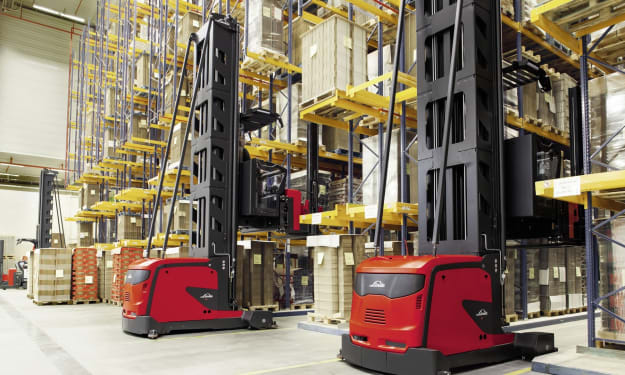
How a Three Way Forklift Improves Efficiency in Narrow Warehouse Aisles
Warehouses and distribution centers are constantly evolving to meet the growing demands of modern supply chains. As businesses handle larger volumes of goods while trying to control operational costs, efficient storage solutions have become more important than ever. One innovation that has significantly improved warehouse efficiency is the Three Way Forklift, a specialized machine designed to operate effectively in narrow aisles while maintaining high lifting performance.
By charliesamuel2 days ago in 01
Wearable Device App Development Driving 80% EHR Interoperability
In today’s fast-evolving digital health ecosystem, the convergence of wearable technology and electronic health record (EHR) systems is transforming how health data is collected, shared, and used. Wearable device app development companies are now at the forefront of enabling seamless interoperability — connecting patient-generated health data with clinical systems and creating a more unified view of health. This isn’t just a trend — it’s reshaping patient care, efficiency, and outcomes.
By Kunal Chouhan5 days ago in 01
Review of 'Man on the Run'
My wife and I saw Man on the Run, a nearly 2-hour documentary on Amazon Prime, about Wings, Paul McCartney's group that flew around the world from shortly after The Beatles broke up in early 1970 to shortly after John Lennon was murdered at the end of 1980, making a Beatles reunion forever impossible.
By Paul Levinson7 days ago in Beat



Comments
There are no comments for this story
Be the first to respond and start the conversation.