
⏱Hangfire + Serilog: How EasyLaunchpad Handles Jobs and Logs Like a Pro
If you’ve ever wondered how to queue, manage, and monitor background jobs in a .NET Core application — without reinventing the wheel — this post is for you.


Modern SaaS applications don’t run on user actions alone.
From sending emails and processing payments to updating user subscriptions and cleaning expired data, apps need background tasks to stay efficient and responsive.
That’s why EasyLaunchpad includes Hangfire for background job scheduling and Serilog for detailed, structured logging — out of the box.
If you’ve ever wondered how to queue, manage, and monitor background jobs in a .NET Core application — without reinventing the wheel — this post is for you.
💡 Why Background Jobs Matter
Imagine your app doing the following:
- Sending a password reset email
- Running a weekly newsletter job
- Cleaning abandoned user sessions
- Retrying a failed webhook
- Syncing data between systems
If these were handled in real-time within your controller actions, it would:
- Slow down your app
- Create a poor user experience
- Lead to lost or failed transactions under load
Background jobs solve this by offloading non-critical tasks to a queue for asynchronous processing.
🔧 Hangfire: Background Job Management for .NET Core
Hangfire is the gold standard for .NET Core background task processing.
It supports:
- Fire-and-forget jobs
- Delayed jobs
- Recurring jobs (via cron)
- Retry logic
- Job monitoring via a dashboard
Best of all, it doesn’t require a third-party message broker like RabbitMQ. It stores jobs in your existing database using SQL Server or any other supported backend.
✅ How Hangfire Is Integrated in EasyLaunchpad
When you start with EasyLaunchpad:
Hangfire is already installed via NuGet
It’s preconfigured in Startup.cs and appsettings.json
The dashboard is live and secured under /admin/jobs
Common jobs (like email dispatch) are already using the queue
You don’t have to wire it up manually — it’s plug-and-play.
Example: Email Queue
Let’s say you want to send a transactional email after a user registers. Here’s how it’s done in EasyLaunchpad:
_backgroundJobClient.Enqueue(() =>
_emailService.SendWelcomeEmailAsync(user.Id));
This line of code:
- Queues the email job
- Executes it in the background
- Automatically retries if it fails
- Logs the event via Serilog
🛠 Supported Job Types
Type and Description:
Fire-and-forget- Runs once, immediately
Delayed- Runs once after a set time (e.g., 10 minutes later)
Recurring- Scheduled jobs using CRON expressions
Continuations- Run only after a parent job finishes successfully
EasyLaunchpad uses all four types in various modules (like payment verification, trial expiration notices, and error logging).
🖥 Job Dashboard for Monitoring
Hangfire includes a web dashboard where you can:
- See pending, succeeded, and failed jobs
- Retry or delete failed jobs
- Monitor job execution time
- View exception messages
In EasyLaunchpad, this is securely embedded in your admin panel. Only authorized users with admin access can view and manage jobs.
🔄 Sample Use Case: Weekly Cleanup Job
Need to delete inactive users weekly?
In EasyLaunchpad, just schedule a recurring job:
_recurringJobManager.AddOrUpdate(
“InactiveUserCleanup”,
() => _userService.CleanupInactiveUsersAsync(),
Cron.Weekly
);
Set it and forget it.
🧠 Why This Is a Big Deal for Devs

Most boilerplates don’t include job scheduling at all.
In EasyLaunchpad, Hangfire is not just included — it’s used throughout the platform, meaning:
- You can follow working examples
- Extend with custom jobs in minutes
- Monitor, retry, and log with confidence
You save days of setup time, and more importantly, you avoid production blind spots.
📋 Logging: Meet Serilog
Of course, background jobs are only useful if you know what they’re doing.
That’s where Serilog comes in.
In EasyLaunchpad, every job execution is logged with:
- Timestamps
- Job names
- Input parameters
- Exceptions (if any)
- Success/failure status
This structured logging ensures you have a full audit trail of what happened — and why.
Sample Log Output
{
“Timestamp”: “2024–07–20T14:22:10Z”,
“Level”: “Information”,
“Message”: “Queued email job: PasswordReset for userId abc123”,
“JobType”: “Background”,
“Status”: “Success”
}
You can send logs to:
Console (for dev)
File (for basic prod usage)
External log aggregators like Seq, Elasticsearch, or Datadog
All of this is built into EasyLaunchpad’s logging layer.
🧩 How Hangfire and Serilog Work Together
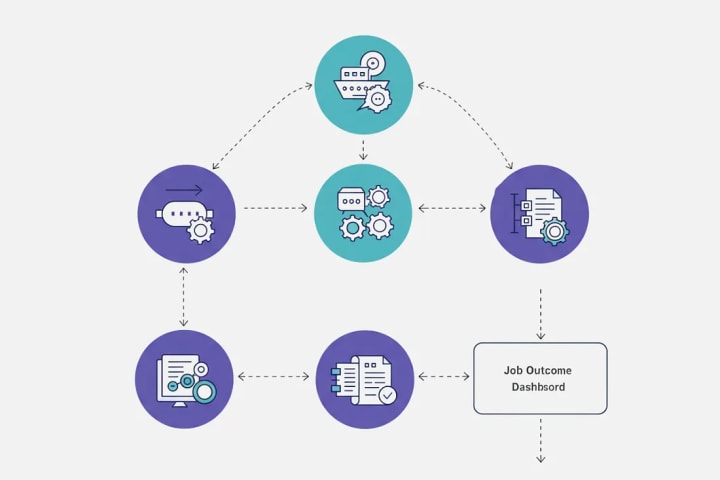
Here’s a quick visual breakdown:
Job Triggered
→ Queued via Hangfire
Job Executed
→ Email sent, cleanup run, webhook processed
Job Outcome Logged
→ Success or error captured by Serilog
Job Visible in Dashboard
→ Retry if needed
Notifications Sent (optional)
→ Alert team or log activity via admin panel
This tight integration ensures your background logic is reliable, observable, and actionable.
💼 Real-World Use Cases You Can Build Right Now
-Feature and the Background Job
- Welcome Emails- Fire-and-forget
- Trial Expiration- Delayed
- Subscription Cleanup- Recurring
- Payment Webhook Retry- Continuation
- Email Digest- Cron-based job
- System Backups- Nightly scheduled
Every one of these is ready to be implemented using the foundation in EasyLaunchpad.
✅ Why Developers Love It
-Feature and the Benefit
Hangfire Integration- Ready-to-use queue system
Preconfigured Retry- Avoid lost messages
Admin Dashboard- See and manage jobs visually
Structured Logs- Full traceability
Plug-and-Play Jobs- Add your own in minutes
🚀 Final Thoughts
Robust SaaS apps aren’t just about UI and APIs — they’re also about what happens behind the scenes.
With Hangfire + Serilog built into EasyLaunchpad, you get:
- A full background job system
- Reliable queuing with retry logic
- Detailed, structured logs
- A clean, visual dashboard
- Zero config — 100% production-ready
👉 Launch smarter with EasyLaunchpad today.
Start building resilient, scalable applications with background processing and logging already done for you. 🔗 https://easylaunchpad.com
#HangfireDotnetExample #SerilogUsageDotnet #BackgroundJobsLogging #Easylaunchpad #SaasAppDevelopment
About the Creator
Adil Yousaf
EasyLaunchpad is a .NET Core SaaS boilerplate built for developers, founders, and startups who want to launch software products faster without building the core architecture from scratch.
Keep reading
More stories from Adil Yousaf and writers in 01 and other communities.
📊Why .NET Developers Love EasyLaunchpad’s Tailwind UI + Admin Panel Combo
Building a powerful backend is essential — but what about the admin interface your team will use every day? Let’s face it: Most admin panels are either outdated, bloated with unused UI components, or too time-consuming to design from scratch.
By Adil Yousaf8 months ago in 01
Web3 Mobile Apps: What Actually Changes When You Build One
If you spend enough time around product teams, you’ll notice that Web3 tends to enter conversations in two very different ways. Sometimes it shows up as marketing language — the “future of the internet” narrative. Other times it appears as a practical engineering question: what actually changes when parts of your mobile stack stop living on your own servers?
By Valeriia Shulga3 days ago in 01
TUS NUA - ch 53
TUS NUA – ch 53 New Beginnings – Mia and Midnight (*)(*)(*) Finola knew Ali’s brother-in-law needed to put his mind at rest. She fed her arm through his and led him outside. “We’ll sit here. If you like, I can put a block around us so our conversation will be private.”
By Margaret Brennan4 days ago in Fiction



Comments
There are no comments for this story
Be the first to respond and start the conversation.