
Google Unusual Traffic: Causes, Solutions, and Prevention
Google Unusual Traffic

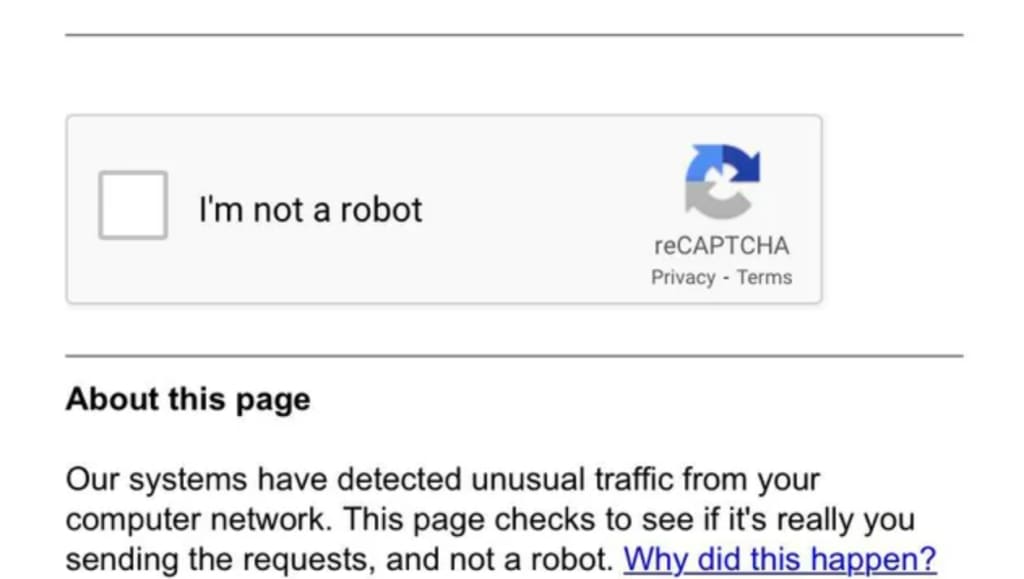
Google is the most widely used search engine in the world, processing billions of search queries every day. To maintain the quality of its services and protect users, Google employs advanced systems to detect and respond to unusual traffic patterns. If you’ve ever encountered a message like, “Our systems have detected unusual traffic from your computer network,” you’ve experienced Google’s way of safeguarding its platform. This article delves into what Google unusual traffic means, its causes, how to resolve it, and steps to prevent it in the future.
________________________________________
What Is Google Unusual Traffic?
Google defines unusual traffic as activity that appears to be automated or non-human in nature. This could include bots, scripts, or tools that send a high volume of requests to Google’s servers in a short period. Such traffic can strain Google’s infrastructure, disrupt services, and potentially indicate malicious activity like scraping, hacking attempts, or spam.
When Google detects unusual traffic from a specific IP address, device, or network, it may temporarily block access to its services (e.g., Google Search, reCAPTCHA, or Gmail) and display a warning message. The message typically reads:
“Our systems have detected unusual traffic from your computer network. This page checks to see if it’s really you sending the requests and not a robot. Please try again later.”
This warning is Google’s way of verifying that the traffic is coming from a human user and not an automated system.
________________________________________
Causes of Google Unusual Traffic
Unusual traffic can originate from various sources, both intentional and unintentional. Below are the most common causes:
1. Automated Bots or Scripts
• Web scraping tools that extract data from Google Search results.
• SEO tools that send repeated queries to analyze search rankings.
• Malicious bots attempting to brute-force accounts or exploit vulnerabilities.
2. High Volume of Requests
• Sending too many requests to Google’s servers in a short time, such as rapidly refreshing search results or using automated tools to check rankings.
3. Shared Networks
• Using a shared network (e.g., public Wi-Fi, office networks, or VPNs) where multiple users or devices may trigger unusual traffic patterns.
4. Malware or Compromised Devices
• A device infected with malware may send automated requests to Google without the user’s knowledge.
• Compromised websites or servers that generate excessive traffic.
5. Browser Extensions or Plugins
• Certain browser extensions or plugins may send repeated requests to Google, triggering the unusual traffic warning.
6. reCAPTCHA Verification
• Repeated failed attempts to solve reCAPTCHA challenges can lead to Google flagging the activity as suspicious.
________________________________________
Implications of Google Unusual Traffic
When Google detects unusual traffic, it may take the following actions:
1. Temporary Block: Google may temporarily block access to its services for a few minutes to several hours.
2. reCAPTCHA Challenges: Users may be required to solve reCAPTCHA challenges to prove they are human.
3. Account Suspension: In severe cases, Google may suspend accounts associated with the unusual activity.
4. Reputation Damage: Frequent blocks or warnings can harm the reputation of businesses or individuals relying on Google services.
________________________________________
How to Resolve Google Unusual Traffic Warnings
If you encounter a Google unusual traffic warning, follow these steps to resolve the issue:
1. Stop Automated Tools
• If you’re using any automated tools (e.g., SEO tools, scraping scripts), stop them immediately.
• Avoid sending a high volume of requests to Google’s servers in a short period.
2. Scan for Malware
• Run a malware scan on your device to ensure it’s not infected.
• Use reputable antivirus software to detect and remove any threats.
3. Check Browser Extensions
• Disable or remove browser extensions that may be sending excessive requests to Google.
• Stick to trusted extensions from reputable developers.
4. Use a Different Network
• If you’re on a shared network, switch to a private or mobile network to see if the issue persists.
• Avoid using public Wi-Fi or VPNs that may trigger unusual traffic warnings.
5. Clear Browser Cache and Cookies
• Clear your browser’s cache and cookies to remove any stored data that may be causing the issue.
• Restart your browser and try accessing Google again.
6. Wait It Out
• If the issue is caused by temporary network activity, wait for a few minutes or hours until the block is lifted.
7. Contact Google Support
• If the problem persists and you believe it’s a false positive, contact Google Support for assistance.
________________________________________
How to Prevent Google Unusual Traffic Warnings
To avoid triggering Google’s unusual traffic detection systems, follow these best practices:
1. Limit Automated Requests
Avoid using tools that send a high volume of requests to Google’s servers.
Use APIs (e.g., Google Custom Search JSON API) for legitimate data retrieval instead of scraping.
2. Monitor Network Activity
Regularly monitor your network for unusual activity or unauthorized devices.
Use firewalls and intrusion detection systems to block malicious traffic.
3. Secure Your Devices
Keep your devices and software updated to protect against malware.
Use strong passwords and enable two-factor authentication for your accounts.
4. Avoid Public Networks
Use private or secure networks instead of public Wi-Fi or VPNs that may trigger warnings.
5. Educate Users
If you manage a shared network, educate users about the risks of unusual traffic and how to avoid it.
________________________________________
Conclusion
Google’s unusual traffic warnings are designed to protect its services and users from automated or malicious activity. While these warnings can be frustrating, they serve an important purpose in maintaining the integrity of the internet. By understanding the causes of unusual traffic, taking steps to resolve the issue, and following best practices to prevent it, you can ensure uninterrupted access to Google’s services and maintain a positive online experience. If you encounter persistent issues, don’t hesitate to seek help from Google Support or IT professionals.
About the Creator
SearchEngineWays
SearchEngineWays - Your Trusted Partner in SEO Link Building + Content Marketing :) :)
High Authority Guest Postings,
and Web Development Services.
Keep reading
More stories from SearchEngineWays and writers in 01 and other communities.
25 New Technology Trends for 2025
By 2025, the world will witness groundbreaking advancements in technology that will reshape industries, economies, and everyday life. From the rise of artificial intelligence and quantum computing to the expansion of the Internet of Things (IoT) and the metaverse, these 25 emerging trends are set to redefine how we live, work, and interact. Discover how innovations like autonomous vehicles, brain-computer interfaces, and sustainable energy solutions will drive the future. Stay ahead of the curve and explore the technologies that will dominate the next decade!
By SearchEngineWaysabout a year ago in 01
How Do Crypto Marketing Services Select the Right Influencers?
The cryptocurrency industry is growing at an unprecedented pace. With the rise of decentralized finance, NFTs, and blockchain-powered projects, businesses are now investing heavily in crypto marketing to reach the right audience. A critical component of any successful marketing campaign is influencer marketing. Selecting the right influencers can make or break a crypto project’s success. But how exactly do crypto marketing services identify and collaborate with the most effective influencers? This blog explores the methods, strategies, and metrics used to choose the right influencers for crypto campaigns.
By Jack santo6 days ago in 01
Why Fundraising for Real World Asset Tokenization Startups Is Gaining Investor Attention in 2026
The digital asset market has entered a stage where attention is gradually shifting from speculative cryptocurrencies to blockchain applications linked with tangible economic value. Among these developments, Real World Asset Tokenization has begun attracting substantial interest from venture funds, fintech investors, and institutional capital. Startups operating in this sector are now raising funding rounds at a pace rarely seen during the earlier phases of blockchain experimentation.
By Ethan hunt4 days ago in 01
Trickle Them Down, But Not Out
The thing about smart people is that they should know better, but alas, intelligence is not the same as wisdom. Not only do the mistakes of experts too short on vision—when they are not corrected—have the potential to do great and far-reaching damage, but they also undermine public confidence in the very notion of expertise. This is particularly so when expertise is wielded in defence of the rich and powerful as a cudgel against those laid low. As an academic, this lack of faith in “so-called experts” is painful to see as it plays out in the spread of dis-/misinformation, conspiracy theories, and anti-intellectualism writ large. But it is also an understandable impulse given the catastrophic failure of an economic ideology pushed by certain economic experts. Supply-side economics has shaped a broken system for the last half-century and has arguably done more to undermine the fabric of the American Dream than any policy framework of the past century.
By Cory Wright-Maley7 days ago in Humans




Comments
There are no comments for this story
Be the first to respond and start the conversation.