
Facebook Video Download In 2023
The Ultimate Guide to Safely and legally


Facebook is a highly popular social media platform with billions of active users worldwide. As Facebook videos have grown in popularity, many users want to download them for various reasons. However, downloading videos from Facebook is not straightforward. In this article, we’ll provide a comprehensive guide to safely and easily downloading Facebook videos.
Why Download Facebook Videos?
Additionally, the ability to download Facebook videos is a convenient way to store valuable content that users may want to revisit later. Moreover, downloading videos can be useful for those with limited internet connectivity or who are in areas with poor network coverage, allowing them to watch videos without interruptions.
Furthermore, sharing Facebook videos outside the platform can be a great way to introduce others to interesting or entertaining content they may have missed. Plus, for content creators, downloading videos from Facebook can provide a wealth of material to use in their own projects or videos.
In conclusion, Facebook’s video download feature offers a multitude of benefits to its users, from easy access to valuable content to the ability to share it with others and use it for creative projects.
Is Downloading Facebook Videos Legal?
Before we discuss how to download Facebook videos, let’s talk about its legality. According to Facebook’s terms of service, users cannot download videos unless Facebook provides a download button or link. Downloading videos without the owner’s consent is considered copyright infringement and can result in legal consequences.
That being said, there are situations where downloading a Facebook video may be legal. For example, if the video is in the public domain or has a Creative Commons license, you may be allowed to download and use it for non-commercial purposes.
Live Guide, watch this:-
How to Download Facebook Videos?
Assuming you have legal permission to download a Facebook video, here are the steps to do so safely and easily:
Step 1: Find the video you want to download.
The first step is to locate the Facebook video you want to download. You can do this by scrolling through your News Feed, searching for the video by keyword, or visiting the profile or page that posted the video.
Step 2: Copy the video’s URL.
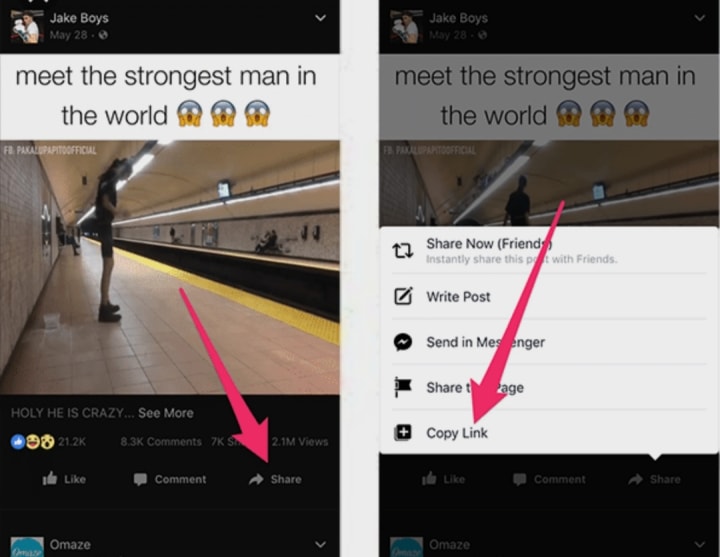
Once you’ve found the video you want to download, you’ll need to copy its URL. To do this, click on the video to open it, and then click on the “Share” button located beneath the video player. From the options that appear, select “Copy Link.”
Step 3: Choose a downloading tool.
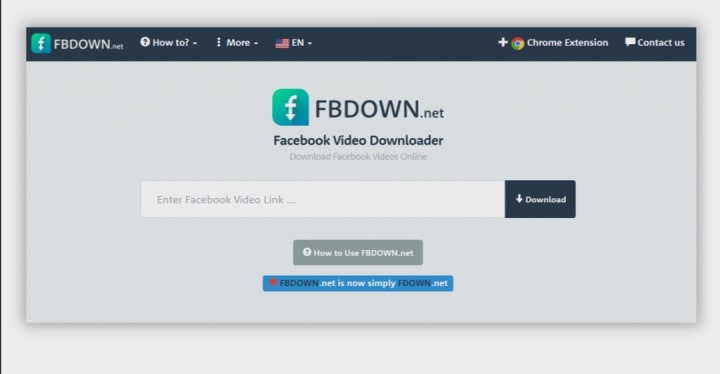
There are several downloading tools available online that you can use to download Facebook videos. Some of the most popular ones include FBDown, Getfvid, and SaveFrom.net. Choose the tool that you prefer and trust.
Step 4: Paste the URL into the downloading tool.
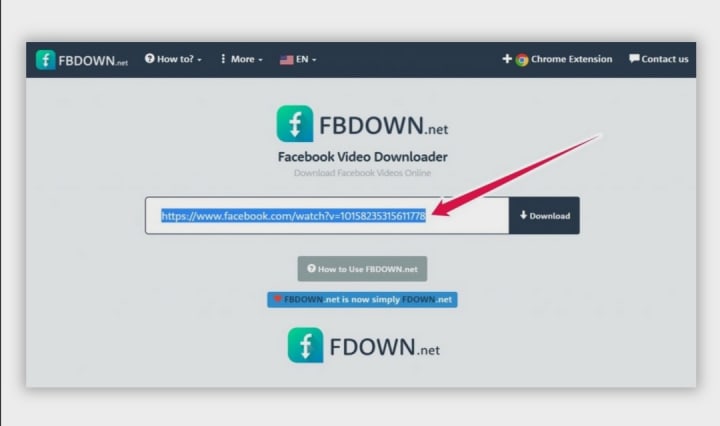
Once you’ve chosen a downloading tool, open it and paste the URL of the Facebook video into the tool’s input field. The tool will then generate a download link for the video.
Step 5: Download the video.
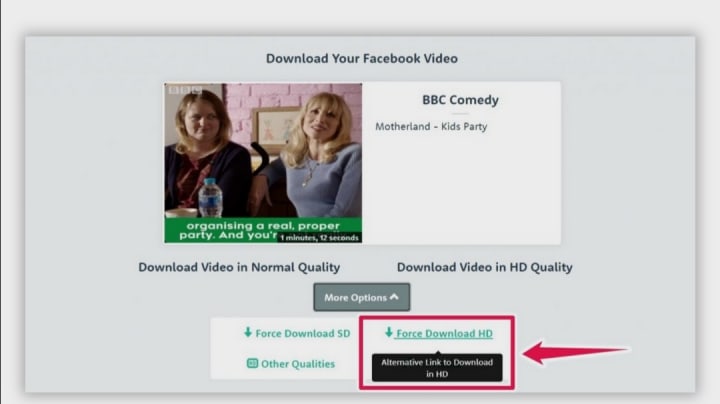
Click on the download link provided by the tool, and the video will begin downloading to your device. The time it takes to download the video will depend on the size of the file and the speed of your internet connection.
Here are some additional tips to keep in mind when downloading Facebook videos:
- Only download videos that have been made available for download by the owner.
- Avoid downloading videos that are copyrighted, as this can lead to legal consequences.
- Use a reputable downloading tool to avoid malware and viruses.
- Never provide personal information, such as your Facebook login details, to a downloading tool.
- Always scan downloaded files with antivirus software before opening them.
In conclusion,
downloading Facebook videos can be a convenient and useful feature for many users. However, it’s important to do so legally and safely. Follow the steps and tips outlined in this article, and you’ll be
About the Creator
Keep reading
More stories from Knowledge War and writers in 01 and other communities.
How Crypto Arbitrage Bots Find Opportunities Humans Often Miss
The cryptocurrency market operates 24 hours a day, seven days a week, across hundreds of trading platforms around the world. Unlike traditional financial markets that follow fixed trading hours, crypto markets are constantly active, creating continuous fluctuations in asset prices. Because different exchanges operate independently, the same cryptocurrency can sometimes be priced slightly differently across platforms. These price differences create opportunities for a trading strategy known as arbitrage.
By smithtaylor4 days ago in 01
The Man Who Never Appeared on the Camera
Every small community has its own collection of stories that people whisper about late at night, stories that some claim are real while others insist are nothing more than exaggerated rumors passed down through generations, and in the quiet town of Brookdale there was one particular story that had survived for nearly thirty years because no one could ever fully prove whether it was true or simply a strange coincidence that had grown into a legend.
By The Curious Writerabout 10 hours ago in 01
My First Time Skiing and I Got Lost, Alone, in the French Alps
Looking back, I can trace some of my life’s biggest adventures to a simple action from my sister. She’d introduced me to Tommy (a very long time ago), a colleague of hers, who had overshared his penchant for Italian-looking women, and I ticked that box.
By Chantal Christie Weissa day ago in Humans




Comments
There are no comments for this story
Be the first to respond and start the conversation.