
Exchange 2019 to Microsoft 365 Migration – A Perfect Solution
Migrate Exchange 2019 to Office 365
Users need to do a few things to make sure that the move of their mailbox data from an on-premises system to Office 365 goes smoothly. To make sure you know what you need to do to get ready for the Exchange 2019 to Office 365 migration, we made this detailed guide.
Exchange 2019 edition is the newest version of the Exchange Server family. It is better in many ways than the older versions. But the company needs to meet certain criteria in order to move to Office 365. It's true that Office 365 is popular and comes with a lot of useful apps that help people work together better.
Moving away from the on-premises Exchange server will take time, effort, and careful planning.
Because of this, this piece will give you a list of requirements and migration methods that will help you get the job done quickly. In the end, we will also tell you about one option that is better than the others.
Why should you switch from Exchange on-premises to Office 365?
Office 365 has a lot of great features that make people want to use it. There are a few that we've all agreed on and explained -
• When it comes to working together, Office 365 gives users more tools than the on-premises Exchange system. Office 365 has a lot of different apps, such as Skype for Business, SharePoint, and many more.
• The cloud stores all user info, so you don't have to worry too much about its safety.
• Users can get to their data at any time, from anywhere in the world, without having to set up a system on-site.
• It's hard to keep up with all the equipment that Exchange Server needs.
• In addition, businesses have to pay a lot of money to keep the whole infrastructure in good shape.
• The storage choices in Office 365 are better, and they're good enough for individual users as well.
• After moving from Exchange 2019 to Office 365, you can use a lot of other services, such as Power BI, Dynamics 365, and many more.
Moving files from Exchange 2019 to Office 365 - how to do it?
It's not easy to move info like emails, contacts, calendars, etc. to Office 365 in the cloud. It is also necessary to keep data safe while the transfer is happening. Microsoft offers several ways to move from Exchange 2019 to Office 365, which we will go over one by one in this part.
Cutover Method to Move Exchange On-Premises Data -
Users can begin the process of moving their Exchange server folders to the Office 365 environment in this way.
You can use this method if you only need to move up to 2000 files to Office 365, though. Before you start the Exchange 2019 to Office 365 transfer process, there are a few things you should think about.
The main domain you use for the Exchange server should work in the target setting, which is Office 365.
Following the migrations, you need to make sure that each user in Office 365 has an account on the On-Exchange system. Also, give the license to each person whose Office 365 account you make.
IMAP Migration to Move On-Premises Exchange Mailboxes
One way to move user mailboxes to Office 365 is through this method, but it only takes emails and not contacts, calendars, or tasks. Users can move up to 50,000 emails from their Exchange 2019 mailbox to Office 365 using this transfer tool. Also, you can only move items that are up to 35 MB in size. Also, the user should be able to reach all the other people who are part of the migration.
These are some resources that users can use to look for ways to move from Exchange 2019 to Office 365. However, because these methods have their flaws, users need to find a better option. To fill in the blank, we will talk about one piece of third-party software that will make the transfer process easier.
A better way to move safely from Exchange 2019 to Office 365 -
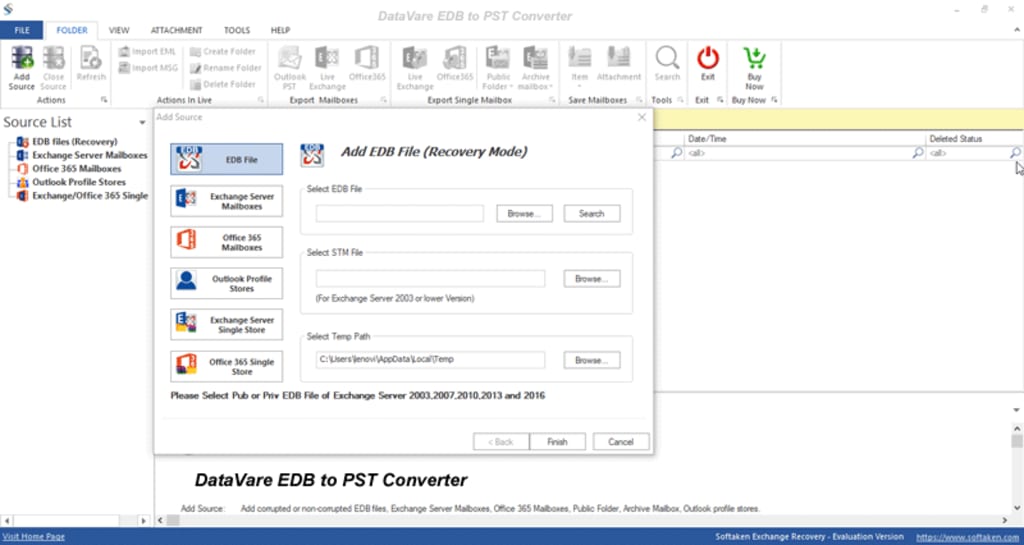
The DataVare Exchange to Office 365 Migration tool makes it a lot easier to move data from user Exchange 2019 folders to Office 365. This software makes it easy to move multiple accounts of any size to Office 365.
It simplifies the steps you need to take to connect to the Exchange server. Then, once linked, users can add as many mailboxes as they need. Users won't have any problems with the transfer either because it has an easy-to-use interface.
Users can use the software's folder transfer feature to move files from a source folder to a target folder. Also, its data filter feature lets you handle only the Exchange mailbox data you need to. Users can choose any filter criteria, and the program will move based on that.
It also lets users use the choice to export in parts. Once the user starts the stopped migration again, this choice lets the software process only the new data. There will also be no duplicate user info during the migration.
Let's take a look at the program that moves data from Exchange 2019 to O365 –
• Adding the Exchange server folders is the first step in moving from Exchange 2019 to Office 365.
• After that, go to the program ribbon bar and click on Office 365.
• Choose the folder and subfolders that you want to move to Office 365.
• The next step is to link your Office 365 mailboxes to your program. To join, use your Outlook profile.
• Use the criteria for filtering the info based on your needs.
• Once you do these things, the software will begin the transfer.
• There is a free version of this migration program that users can use to learn more about it.
Statement at the End -
Users need to know a lot about the technical side of things in order to keep their info safe during the migration. But the goal of this blog is to teach people how to move from Exchange 2019 to Office 365. We hope that the answer we gave you will be very helpful as you move to Office 365.
About the Creator
How to Become a Mobile App Developer in 2026
The Google ecosystem has undergone a tectonic shift where mobile development is no longer defined by syntax proficiency but by Agentic Optimization. This structural realignment means that risk exposure for developers now hinges on their integration into the Trust Graph rather than mere technical stack knowledge.
By Devin Rosario7 days ago in 01
Crowdfunding Platforms vs Business Credit
Securing funding is one of the most critical challenges facing entrepreneurs today. Whether you're launching a new product, expanding operations, or bringing an innovative idea to life, the capital you choose and how you obtain it can significantly impact your business's trajectory. Two increasingly popular funding approaches have emerged in recent years: crowdfunding platforms and business credit building. Each offers distinct advantages, challenges, and strategic implications that every entrepreneur should understand.
By Start My Business7 days ago in 01



Comments (1)
The Shoviv Exchange to Office 365 migration tool makes migrating from an Exchange on-premises server to an Office 365 Exchange online mailbox easier. You can also use its free trial version. Visit here: 1. https://www.shoviv.com/pages/migrate-exchange-to-office365.html 2. https://www.shoviv.com/exchange-migration.html Read more: https://www.linkedin.com/pulse/how-migrate-hosted-exchange-office-365-shoviv-software-sgxef