
Everything You Need to Know About the New MacBook Pro
Apple’s Latest Powerhouse Redefines Performance, Creativity, and AI on the Go


Here’s a detailed rundown of the key features and changes in the most recent MacBook Pro (as of late 2025):
1. The New Chip: M5
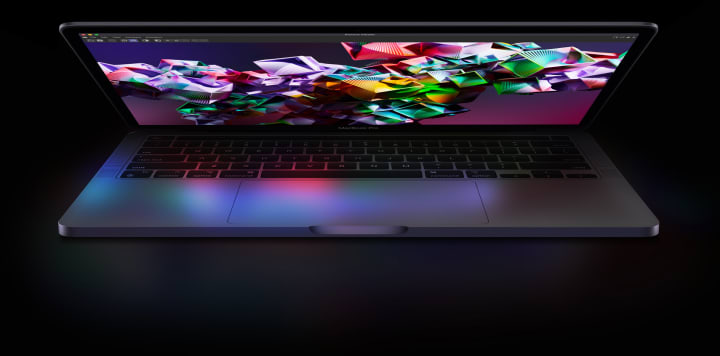
* The latest MacBook Pro (14-inch) now runs on Apple’s M5 chip.
* CPU: 10 cores (4 performance + 6 efficiency)
* GPU: Also 10-core, with neural accelerators in each core. That helps a lot with AI workloads.
* Memory Bandwidth: ~153 GB/s.
* Neural Engine: 16-core neural engine — good for machine learning, on-device AI, etc.
* Media Engine: Hardware support for H.264, HEVC, ProRes, ProRes RAW, AV1 decode — great for creators.
Why this matters: The M5 is more powerful for AI tasks than its predecessor, and for things like local model inference, creative work, and data workflows, it’s a serious upgrade.
2. Performance Gains
* AI Tasks: Apple claims up to 3.5× faster AI performance vs the M4.
* Graphics: ~1.6× faster graphics in pro apps vs M4.
* Multithreaded CPU: Apple says around 20% faster than M4 in multi-core tasks.
* Memory Bandwidth: As noted above, the 153 GB/s is higher, which helps for data-heavy workflows.
Real-World Testing: According to Tom’s Guide, the battery life while web surfing (150 nits) was about 18 hours and 14 minutes — very good, though a bit short of Apple’s “up to 24 hours” claim.
3. Storage / SSD
* The SSD is significantly faster: in tests, read/write speeds exceeded Apple’s “2× faster” claim.
* Storage Configurations: You can configure up to 4 TB SSD
* This is helpful for large project files, video work, or running large AI models locally.
4. Display
* 14.2″ Liquid Retina XDR display.
* Pretty high brightness: up to 1,600 nits peak for HDR content.
* ProMotion (adaptive refresh rate) up to 120 Hz.
* Optional nano-texture finish to reduce glare.
5. Memory / RAM
* Comes standard with 16 GB unified memory, configurable up to 32 GB.
* Good memory bandwidth helps with multitasking and high-performance tasks.
6. Battery Life & Power
* Apple’s rated “up to”: 24 hours of video streaming.
* In real-world use, somewhat lower (see the Tom’s Guide result above).
* Battery: 72.4-Wh battery.
* Charging: Uses USB-C to MagSafe 3. Supports fast charging with 96W+ adapters.
7. Ports & Connectivity
* Retains familiar MacBook Pro ports: USB-C / Thunderbolt, HDMI, SD card slot, headphone jack.
* Using MagSafe for charging gives some convenience + frees a USB-C port when charging.
* Wireless: Uses Wi-Fi 6E (not Wi-Fi 7). From user reports, this is seen as a bit behind future-proofing.
8. Camera, Audio, and Build
* 12 MP Center Stage webcam — better for video calls.
* Six-speaker sound system with good spatial audio.
* Build: No radical redesign — same chassis/industrial design as earlier Pro models. Some users wanted a design refresh but didn’t get one.
* Finish Options: Space Black and Silver.
9. macOS & Intelligence
* Ships (or supports) macOS Tahoe, which integrates Apple Intelligence features.
* Apple Intelligence: On-device AI support, privacy — helps with writing, creativity, summarizing, etc.
* Good synergy: The M5 is clearly built with AI workflows in mind (local LLMs, generative tools).
10. Price & Launch
* Starting price: £1,599 for the base 14-inch model. (Check local pricing in your country.)
* Release / Availability: For some regions, it was available to preorder; check your local Apple Store
Trade-Offs / Things to Consider

While the new MacBook Pro is very compelling, there are some things to watch out for / consider before upgrading:
1. Design is Nearly Identical
* The external design hasn’t changed much. If you were hoping for a total redesign (thinner chassis, new ports, etc.), this probably isn’t it.
* Users note the same notch, same body.
2. Battery Life vs Claims
* Apple’s “up to 24 hours” is a best-case scenario. Real-world tests are closer to ~18 hours in some workflows.
* That said, 18+ hours is still very impressive for a high-performance pro laptop.
3. Connectivity is Not Cutting Edge
* Base model sticks with Wi-Fi 6E, not the newer Wi-Fi 7.
* Some users feel this is a missed opportunity for future-proofing.
4. Cost of High-End Storage
* Upgrading to the 4 TB SSD is expensive.
* But if you need really fast, large storage (for video, AI models, large datasets), the speed and capacity gains make it more justifiable.
5. No Pro / Max M5 Yet
* As of now, the “standard” M5 is out for the 14-inch, but the more powerful M5 Pro / M5 Max variants (if/when they come) might change the equation for power users.
* Some users are debating whether to wait for an OLED redesign or future chips.
Who This New MacBook Pro Is Best For
* AI / Machine Learning Users: Because of the neural accelerators and improved Neural Engine, this is very good for on-device AI.
* Creative Professionals: Video editors, 3D artists, photo editors — the faster GPU and SSD help a lot.
* Developers: Multithreaded tasks, compiling code, multitasking.
* Writers / Productivity Users: The battery life + AI tools (via macOS Tahoe) make this a solid writing/work machine.
* Students: Power + portability + long battery life make it great for all-day use.
Alternatives to Consider
* MacBook Pro 14″ (M4 Pro): If you don’t need the M5’s AI performance, the M4 Pro is still very powerful.
* MacBook Pro 16″ (M4): More screen space, same chip gen, but heavier.
* Waiting Strategy: Some users are thinking about waiting for M5 Pro / Max / or an OLED redesign before upgrading.
About the Creator
AxisVibes
We brings you the latest in entertainment, tech, business, finance, and how-to guides. Fresh insights and practical tips to help you stay ahead everyday.
Custom AI Solutions vs. Off-the-Shelf AI: What Enterprises Should Choose
In 2024, the corporate world rushed to buy AI. Executives purchased licenses for ChatGPT, Copilot, and Gemini, hoping these tools would instantly revolutionize productivity. By 2026, a different reality has set in. While these off-the-shelf tools are powerful, they are often disconnected from the actual work an enterprise does. They can write a poem, but they cannot query a company’s legacy inventory database or automatically reconcile a complex invoice.
By ViitorCloud Technologies5 days ago in 01



Comments
There are no comments for this story
Be the first to respond and start the conversation.