
Duplicate Files Fixer- How to Get More out of It?
Remove duplicate files with the help of Duplica

Hassled with a lot of duplicates taking up space on your device? Worry not, duplicate finder and remover can be of great help. Having a duplicate finder and cleaner ensures you can sit back and relax. It automatically scans your system inside out for any duplicates that might be taking up huge storage space on your device. Wondering which is the best duplicate finder and remover utility? Let us introduce you to a feature-packed and a reliable utility- Duplicate Files Fixer. This powerful utility supports multiple operating systems including Windows, Mac, and Android.
Duplicate Files Fixer - An Introduction
Duplicate Files Fixer is a smart and robust solution that automatically scans out duplicates from your system like images, videos, documents, music and many other formats. Believe us, this tool checks your device inside out and you'll get a pile of duplicates that have been created unknowingly. Although you have the liberty to choose which file to delete and which not. Once you have sorted the list of files, you can click on the Remove Duplicates button and free up a huge disk space on your system.
Having Duplicates Files Fixer:
- Make your device clutter free.
- Recover ample amount of disk space.
- Removes the stress of manual searching and sorting thousands of files.
Available for all platforms i.e. Mac, Windows, and Android.
Read Also:- How to Delete Duplicate Photos on a Mac
How To Recover Disk Space Using Duplicate Files Fixer?
A duplicate remover tool is quite helpful when you get low disk space error on your device. It might be due to one or more copies lying inside your computer either because of multiple downloads or unknowingly creating copies of a single file stored under different folders. Whatever is the case, a duplicate finder and remover like Duplicate Files Fixer is always a saviour.
Download Now- Duplicate Files Fixer
Further in this article, we'll cover:
- How To Use Duplicate Files Fixer On Windows.
- How To Use Duplicate Files Fixer On Mac, and
- How To Use Duplicate Files Fixer On Android.
Duplicate Files Fixer: Windows Version
- Download Duplicate Files Fixer on your Windows computer.
- Install the file and launch the application to start looking for the duplicates on your computer.
- When launched, you'll see Activate Now option, either enter the license key (if already purchased) or purchase the software to get the license key and then activate the software to get access to all features.
- Now, select one or more folders from your system and click on Scan For Duplicates.
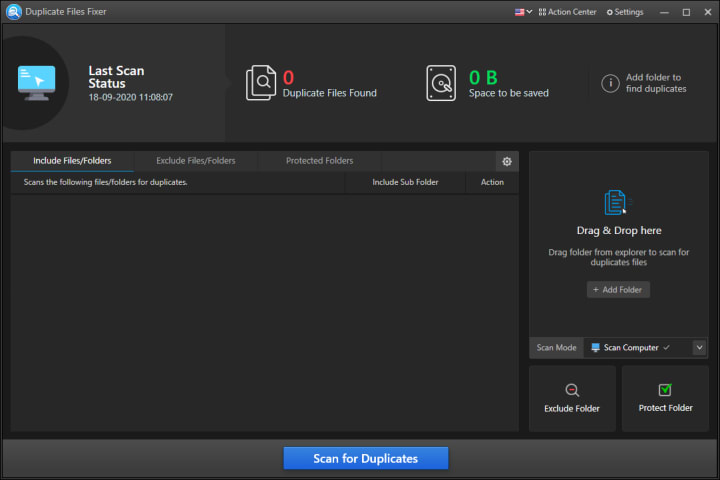
- The scanning will begin and the process will look into your system for any duplicates.
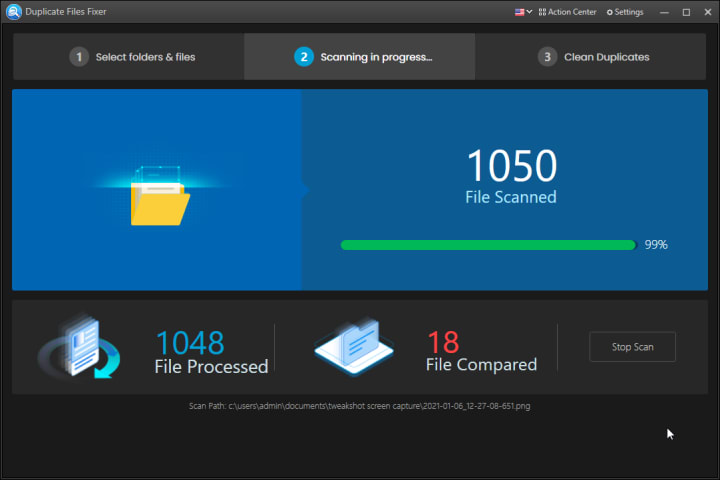
- The next window will show you the data of the files scanned and you'll have to click on Go to Fix Duplicates to get the list of duplicate files.
- It will then show you the list of duplicates, you can preview them and click on the Auto Mark button to select duplicates automatically keeping the original one unselected.
- Then, click on Delete Marked.
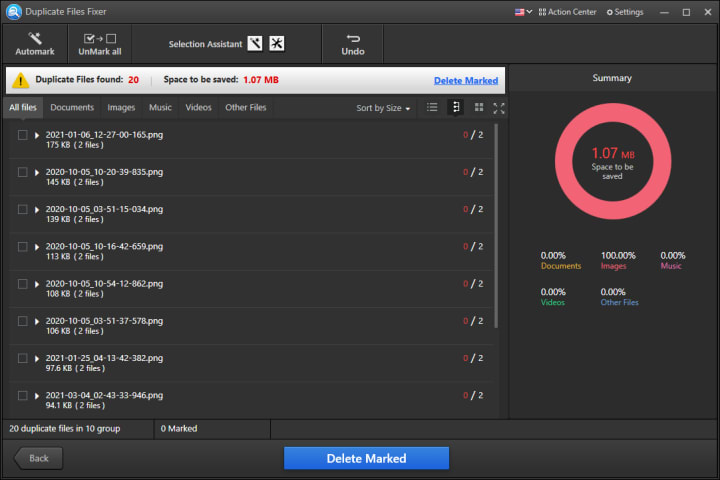
- If you have accidentally deleted a wrong file, you can Undo them immediately using the Undo button located at the top bar of the software window.
Similarly, Duplicate Files Fixer can be used on Mac and Android devices. All you have to do is install the app and run as per the instructions you see on screen. Continued reading to learn more.
Duplicate Files Fixer- Mac Version
- Follow the steps below to start using Duplicate Files Fixer on macOS. Download and install the application on your Mac.
- To use its complete features, we recommend buying it's full version.
- When installed, launch the app and Add Folders you wish to scan.
- Click on Scan Now to begin the scanning process.
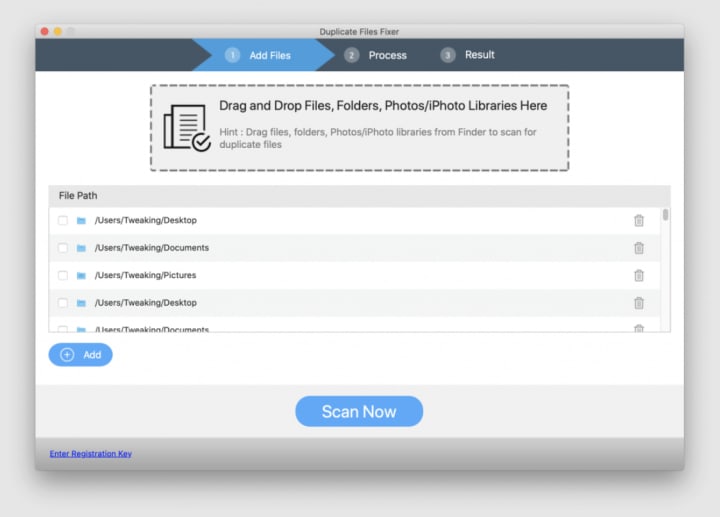
- Wait for the scan to complete.
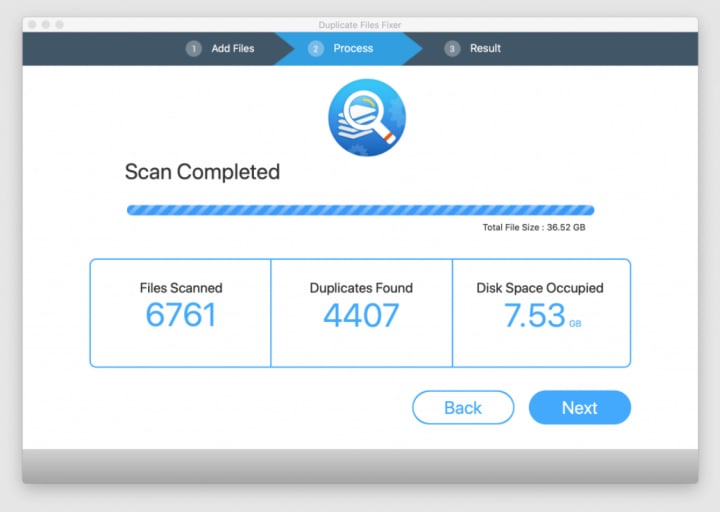
- Click on Next and you'll get a list of duplicates. Preview them and auto-mark the identical ones.
- Click on Delete Marked to get rid of duplicate files in a go.
- Isn't it time saving and speedy? You can also use this awesome application on Android devices too.
- Here's how.
Duplicate Files Fixer- Android Version
Duplicate Files Fixer and Remover is used by a million plus users across the world. It has been an amazing experience using this wonderful application that can help you declutter your device for duplicates including documents, photos, videos, music and a lot more. To use this, follow the steps below:
Download Duplicate Files Fixer and Remover from Google Play Store on your Android device.
- You'll see a beautiful and interactive interface where you can select for the folders to scan for duplicates.
- Select the folders and click on Start Scan Now to process scanning.
- Wait for the process to complete and you'll see a list of duplicates. Just like other platforms, you can choose the auto-select tool to eliminate the manual process completely.
- Click on Delete Now if you've a backup created already. Otherwise click on Backup Now to create a backup first and then remove them completely from your system.
- We recommend that you choose to have it's Premium version so that you can make use of all its features without any hassle. With the premium version of Duplicate Files Fixer and Remover, you’ll be able to make more space in your device.
How Duplicate Files Fixer A Unique Tool?
- Simple, and easy to understand software for all users be it a beginner or an expert.
- Interactive interface that is easy to learn and run.
- Selection Assistant lets you select duplicates and delete them by location, size, group or more.
- Supports more than 14 languages.
- Scan files and delete them at a good speed.
- Include or exclude certain file formats from scanning using Advanced Scan Settings.
Conclusion
Duplicate Files Fixer is a unique utility designed for all the major operating systems to recover disk space, delete duplicates and optimize files efficiently. Its basic to advanced settings are worth enough to ensure you clean up your system duplicates precisely, and accurately. Get this wonderful application for your Windows, Mac or Android devices now!
We have an utmost belief on Duplicate Files Fixer, what about you?
Do share with us in the comments section below.
About the Creator
Aditi singh
An experienced and passionate person in the field of Technology. I like to write about the latest trends and share my views about them.
Keep reading
More stories from Aditi singh and writers in 01 and other communities.
How to Delete Duplicate Photos on a Mac
We tend to back up all our memories, selfies, photos and albums from our iPhone, iPad or other storage devices on our Mac. Knowingly or unknowingly, we end up creating clutter on our Mac with duplicate photos. Repeated backup or sync service may add duplicate images on our MacBook.
By Aditi singh5 years ago in 01
How Do Blockchain Startups Build Communities Through Web3 Marketing?
The rise of decentralized technologies has transformed how digital businesses interact with users. Unlike traditional startups that focus primarily on customer acquisition, blockchain startups thrive on community-driven ecosystems. In the world of Web3, a project’s success is not determined only by technology or funding but also by the strength and engagement of its community. A passionate community supports product adoption, drives governance decisions, and promotes the project organically across digital channels.
By Jack santoa day ago in 01




Comments
There are no comments for this story
Be the first to respond and start the conversation.