
Discovering Mechanical Keyboards For A Better Typing Experience
Diving into the world of mechanical keyboards as a secondary hobby to writing. A review and a guide for beginners.

Hey y’all!
While I don’t intend to be a full time blogger, I do enjoy sharing information from what I learn while doing things that I like. Here is my experience getting into what I thought would be a new single hobby that actually turned out to be two different ones in one.
I'm the kind of person that jumps from hobby to hobby, wanting to explore new things. Currently, I smoke tobacco pipes and have a passion for tobacco pipe making but, I've put that on hold, temporarily, due to the intense heat of the Texas summer. My shop is in the shed and I will just die of a heatstroke if I work out there at this time.
Since I need to be fiddling and tinkering at all times, I had to sit down and think about what what else to do.
"What can I do for fun that requires a lot of creativity and that I can do in the comfort of the central AC in my house, or anywhere else for that matter?"
Then it happened. I discovered writing.
"Hey!" I said to myself, "This could be a great new hobby for me! Even though I'm not an avid reader, I do enjoy picking up a book or reading a short story every once in a while. Why not try writing my own stuff? I'm pretty sure I can be creative enough to, at the very least, write fictional short stories."
Just when I thought my wallet was safe, being the meticulous person that I am, I began doing research on how to get started with this potential hobby. I tend to dive very deep on a subject once I gain enough interest and I tend to go all in with it. This also means looking up what the best tools for the job are.
As I search through the internet, I find out about mechanical keyboards and become instantly obsessed. Just to clarify, there is no belief in my mind that they will make me a better writer, but I knew they would make the experience more enjoyable.
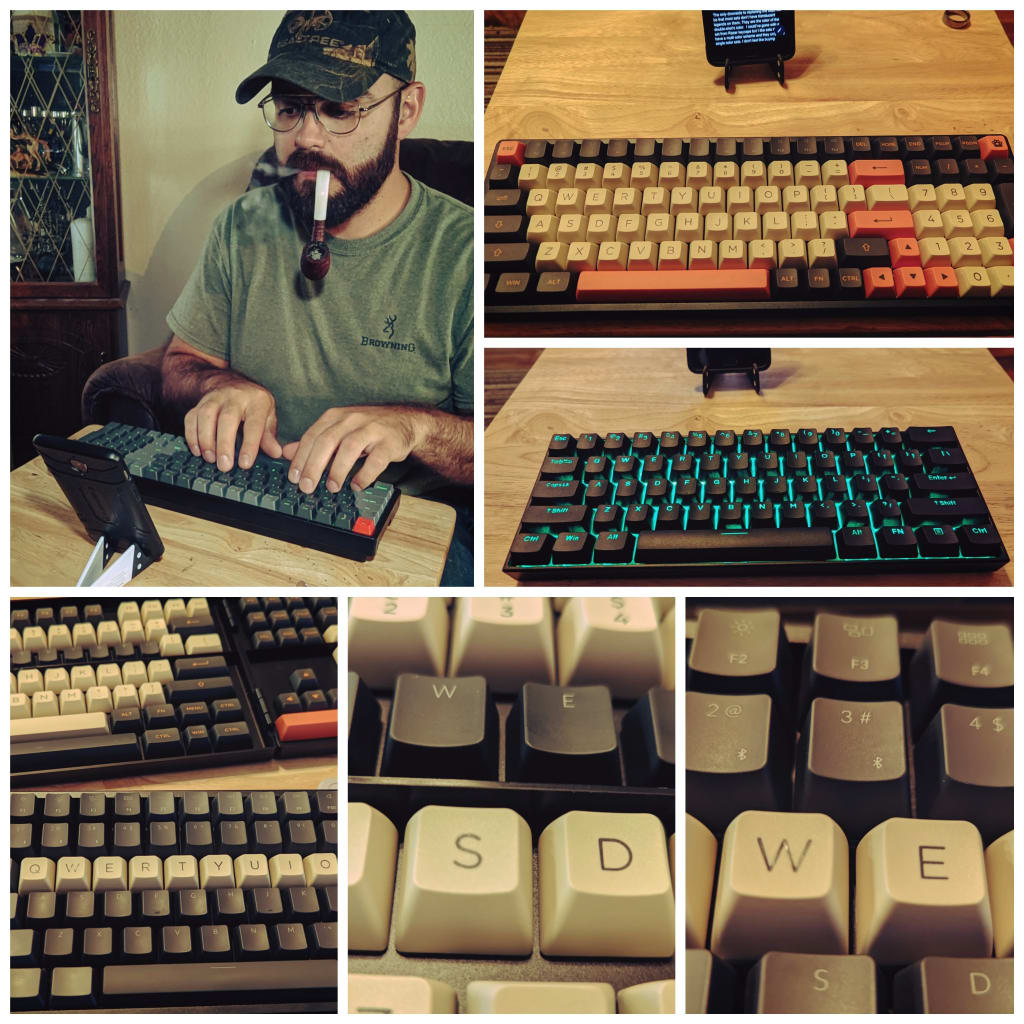
Now I am the proud owner of two mechanical keyboards. One is an Anne Pro 2, in black, with PBT caps and Box White Kailh switches. The other, a Keychron K4 that is hot-swappable (meaning you can easily swap the switches for a different kind) with Gateron blue switches and ABS keycaps. I am using an old phone as my hardware for the word processor.
Before finally deciding what I was going to get, as far as mechanical keyboards, it took several days of reading through dozens of specs and hundreds of reviews. I am not all about just reading the negative reviews but there seems to be a lot of bad stuff out in the market that people seem to take the plunge on and end up with the opposite of technology; bad keyboards, bad customer service should they need it, etc.
When they were both delivered the same day, I started with the Anne Pro 2. This is what is called a 60% keyboard which means it has available sixty percent of the keys a full one would have. I had read many reviews criticizing some possible QA issues with this keyboard but, at the same time, it also has 4k+ reviews with most of them being 4 or 5 stars in Amazon. I played with the keyboard for several minutes and immediately fell in love with it. I could not find any issues with it.
There were no connectivity issues by any of the available methods (Bluetooth 4.0 or USB C wired). I easily connected it to three devices; my personal laptop and 2 different phones (you can pair it with up to 4 devices in memory). The battery has a capacity of 1,900 mAh and will last about 80 hours without backlight.
I am yet to attempt messing with the driver software because it has been perfect out of the box but, if I want to mess with saving macros I am going to have to download the software and there will be no way around that.
The keycaps feel amazing. They are thick and they are textured, which I like. It feels so natural pressing on the keys. It looks like the keycap profile is OEM. One thing I really liked about choosing this keyboard is that they give you the option of getting it shipped with one of many different switches. In my research, I determined that I would like best to use clicky/tactile switches. I read that the Cherry MX Blue and Gateron Brown were very common… but I tend to want what is not common. After reading about over twenty different kinds of clicky switches, I settled on purchasing the version with the white box switches from Kailh. I am glad I did because they just feel amazing. I read that there is a Kailh Box Thick Jade that is also clicky/tactile but is slightly heavier on the downstroke pressure of the key, which I think I will be exploring soon on a different keyboard since this one has the switches soldered to the board and I don't think I want to mess with de/re-soldering every single switch.
The frame is plastic but it is very solid. The unit is heavy so you can be sure it will not be moving anywhere while you type. There are no legs to change the angle but the frame itself is already angled, making the typing experience very comfortable.
This is an RGB keyboard so you do get to play with all the different patterns available. I personally do not care for rainbows or multi colors so I will leave it solid green backlit. A feature I thought was really nice is being able to adjust the intensity of the backlighting. Sometimes it isn’t that dark and you don't need it to be that bright.
Overall, I am very pleased and it definitely does not feel like a waste of money. There are plenty of features to justify the cost.
The second Keyboard I ordered was the Keychron K4. This is another winner in my humble opinion. It seems Keychron is a strong competitor in the market, also providing cost effective mechanical keyboards that won’t harm your finances… too badly. The reason I say that is because this is a highly customizable 96% RGB keyboard. Being hot-swappable, you can buy different switches and even combine them by just snapping them on and off the board. The same applies to the stabs (the mechanical arms that stabilize the larger keys such as the space bar.). This keyboard was shipped with the Gateron Blue switches and, while they require slightly less pressure than the Kailh to actuate them, they still feel pretty good. They are even more clicky than the Kailh BOX white. They are loud as you will hear from everyone that has tried these but, to me, they are not annoying at all (although those around you might have a different opinion if you are using them in a public or office setting.).
The frame on this unit is the same, strong plastic that all their keyboards come with but with the addition of aluminum sliders that reinforce the frame. It has legs to set the keyboard in two more steeper angles, in addition to the natural angle built in the frame. Any of the three positions are comfortable but, because the frame is much taller than the Anne Pro 2, the biggest set of legs seems more comfortable to me. I don't tend to rest my wrists but rather keep them in an elevated position so I don’t need a rest.
A negative I would have to mention is the ABS keycaps that it comes with. It feels really good to type on the keyboard itself but the keys feel really thin and are too smooth for my preference. That is not to say that some will like this but, I like to have a textured/rougher surface on the tops and like the sound and feel of thicker caps.
The keycaps on the K4 come in OEM profile, which is pretty standard. There are different profiles and what it means is that the shape will be slightly different as far as the height of the cap and the size of the top surface of each. Some of them look more stylized in their shape at the edges than others.
To fix my issue with the keycaps, I have ordered a new set called “YUNZII Akko Carbon Retro PBT Double Shot”. They are a lower priced, high quality clone of the more expensive GMK sets. These will have an ASA profile, which is a combination of OEM and SA profiles. Also, when you see the word double-shot for keycaps, it means that there is a proportionally smaller second layer added under the top layer of the cap. Something to keep in mind when buying new caps for this keyboard is that you have to make sure you get both a single unit “0” keycap and also a 1.75 units wide right shift keycap. Most sets will only have standard/normal sized caps but this set has extra keycaps for several keys in different sizes. The only thing I find rather weird is that the F and J caps are much shorter than all others. I get that they did it on purpose since they are the index keys but, I would much prefer they were as tall as all others. This doesn’t seem to affect typing but it just looks odd.
All in all, it is a magnificent looking set and they feel like they will last a very long time.
The only downside to replacing the stock caps will be that most sets don’t have translucent legends on them but, in this case, the fonts are large and clear enough to compensate for that. I could’ve gone with a set from Razer keycaps but I like sets that have a multi color scheme and they only have single color sets. I don't feel like buying multiple sets so I can use just a few keys from each.
Back to the K4, I’ve also had great success using its Bluetooth 5.1 and USB C type wire. You are able to store up to three devices in memory. Same as the Anne Pro 2, I am yet to experience any failures in connectivity. It is worth mentioning that this unit sports a gigantic 4,000 mAh battery that lasts 200+ hours without backlight.
One other “downside” of the K4 is that you are not able to adjust the intensity of the backlight but, the battery is big enough for me to be worrying about it.
Overall, it is an impressive keyboard for the money. The fact that you can customize it without necessarily breaking the bank is most attractive.
To close this article, the two hobbies, tobacco pipes and writing, go together really well. The bad part is that now I have two hobbies in which I will continue to spend money on.
I have to admit, when I get into making things I try to figure out, "What can I do to get something back out of the invested time and money I am putting into this?" I just hope I am able to stick to it and go somewhere with it.
About the Creator
Rafael Romero
Rafael is always looking to dive into the next popular hobby. You name it and he has done... a few. From musical instruments, recording music, art school, fixing engines and woodworking, he now explores writing as his next creative outlet.
Keep reading
More stories from Rafael Romero and writers in 01 and other communities.
I Forgive You, John
John is one of the biggest Hollywood actors of the eighty’s, starring in almost every big box office movie at the time. He is tall, fit, in his early thirties, and has very desirable facial features. He possesses an incredible ability to memorize scripts and has a tongue so sharp, he could cut paper with it. He had a knack at convincing anyone, including the big movie studios, to do his bidding and get what he wanted, even without the help of his manager. He owned the most luxurious condo in the most expensive part of town, the meanest-looking street-legal car, and had multiple partners. He was living the dream.
By Rafael Romero4 years ago in Fiction
Smart Cloud Security Tips for a Safer Home Network
In these days’s virtual age, cloud offerings have come to be an imperative part of our personal and professional lives. From storing a circle of relatives' snap shots to coping with economic statistics and smart home devices, the cloud offers convenience and accessibility like by no means before. However, with comfort comes a chance. Cyber threats are evolving swiftly, and domestic customers are increasingly turning into targets. Ensuring your house cloud surroundings are secure is now not optionally available—it’s crucial. Here are smart cloud protection recommendations that will help you shield your private home community and private data.
By Muhammad Hanzla3 days ago in 01
Rachel Reviews: The Spiral Archive by Pieter Hendrik
It's difficult for me to know where to start with a review of this book as it was, for me, an entirely unique experience and one that I'll probably never have again. I don't want that to be interpreted as unenjoyable but it has left me scratching my head a little and ruminating on its content, its themes and its characters.
By Rachel Deemingabout 4 hours ago in BookClub




Comments
There are no comments for this story
Be the first to respond and start the conversation.