
Cyber Security Basics: Secure Sockets Layer (SSL)
Overview & SSL Handshake Explained
Why Secure Socket Layer?
SSL (Secure Sockets Layer) is a protocol that is used to establish secure connections between web servers and clients. It is primarily used to secure the transmission of sensitive information, such as login credentials and financial data, between a website and a user's device.
There are a few key reasons why SSL is important for websites:
Security: SSL helps to protect sensitive information from being intercepted by third parties as it is transmitted between a website and a user's device. This is especially important for websites that handle sensitive information, such as online stores and banking websites.
Trust: When a website has a valid SSL certificate, it displays a padlock icon in the address bar of the browser, which can help to increase user trust in the website. This is especially important for websites that handle financial transactions or sensitive personal information.
SEO: Search engines, such as Google, consider the use of SSL as a ranking factor when determining the relevance and credibility of a website. As a result, having an SSL certificate can help to improve a website's search engine rankings.
Compliance: Some industries and organizations are required to use SSL to meet regulatory or compliance requirements. For example, the Payment Card Industry Data Security Standard (PCI DSS) requires that websites that handle credit card transactions use SSL to encrypt the transmitted data.
In summary, the benefits of using SSL on a website include improved security, increased trust, improved search engine rankings, and the ability to meet regulatory or compliance requirements.
SSL Handshake Explained:
The SSL (Secure Sockets Layer) handshake is the process that occurs when a client (such as a web browser) and a server (such as a website) establish an SSL/TLS (Transport Layer Security) connection. The SSL handshake is used to establish a secure connection between the client and the server and to negotiate the encryption and authentication methods that will be used to secure the connection.
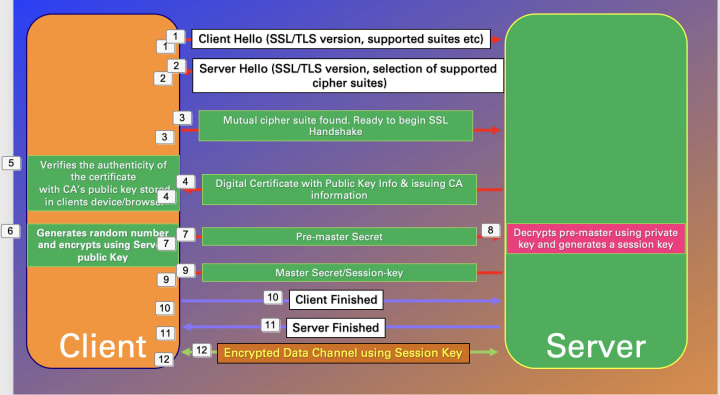
1. The client sends a "Client Hello" message to the server, which includes information about the client's SSL TLS version and a list of supported cipher suites, indicating the encryption and authentication methods.
2. The server responds with a "Server Hello" message of its own, which includes its own SSL TLS version and a selection of cipher suites that it supports.
3. The client and server use this information to negotiate a mutually supported cipher suite. If a mutually supported cipher suite is found, the client sends a message to the server indicating that it wants to begin the SSL handshake.
4. The server responds with a message containing its digital certificate, which includes its public key and information about the issuing certificate authority (CA).
5. The client verifies the authenticity of the certificate using the CA's public key, which is stored in the client's device or browser.
6. The client generates a random number and encrypts it using the server's public key.
7. It sends this encrypted number, known as the "pre-master secret," to the server.
8. The server uses its private key to decrypt the pre-master secret and generates a session key that will be used to encrypt and decrypt data during the SSL session.
9. The server sends a message to the client with the master-secret or the session key that will be used for transmitting data.
10,11 . Both Client and Server sends Client and Server Finished messages, indicating that the SSL handshake is complete and the SSL session has been established.
12. From this point on, all communication between the client and server will be encrypted using the session key.
About the Creator
Arun Chandar
Technology Enthusiast in Cyber Security.
Keep reading
More stories from Arun Chandar and writers in 01 and other communities.
Cyber Security: The need for Cloud Access Security Broker (CASB) in SASE
Cloud Access Security Broker (CASB) Overview: A Cloud Access Security Broker (CASB) is a security tool that helps to protect an organization's data and users in the cloud. It does this by providing an additional layer of security between the cloud service and the organization's users, monitoring and enforcing security policies for access to cloud services. CASBs can be used to secure access to a variety of cloud services, including Software-as-a-Service (SaaS), Platform-as-a-Service (PaaS), and Infrastructure-as-a-Service (IaaS) offerings. They can provide security features such as authentication, authorization, data loss prevention, and threat protection. CASBs can be deployed as a standalone solution or as part of a larger security infrastructure.
By Arun Chandar3 years ago in 01
react-native-toast-message Guide: Top UI Alerts (2026)
You and I both know the feeling. You spend hours architecting a state management system only to have your app look like a primary school project because your notifications suck. It is 2026 and we still struggle with simple messages popping up.
By Sherry Walkerabout an hour ago in 01
Global Security Market Size and Forecast 2025–2033: Protecting a Digitized World in an Era of Rising Threats
Global Security Market Overview The global security market is entering a decisive phase of expansion as governments, enterprises, and institutions confront an increasingly complex risk environment. According to Renub Research, the Security Market is expected to grow from US$ 142.66 billion in 2024 to US$ 264.71 billion by 2033, registering a strong CAGR of 7.11% from 2025 to 2033. This growth reflects the convergence of digital transformation, rising geopolitical tensions, urbanization, and escalating cyber and physical threats worldwide.
By Renub Research2 days ago in 01
How to Succeed at the Benson Directory®
Congratulations and welcome to the Benson Directory® employee #22391! As our newest call handler, you will have the privilege of speaking with dozens of unique and interesting people on a daily basis as well as the opportunity to earn bonuses for high performance. Contained within this handbook you will find a set of ease to follow instructions designed to help you settle in to your new role and begin paving the way to success.
By S. A. Crawford4 days ago in Fiction



Comments
There are no comments for this story
Be the first to respond and start the conversation.