
Configure recoil.js to your React Project
Recoil.js configure


Managing state in React applications, especially as they scale, can become increasingly complex. While React's built-in state management with hooks like useState and useContext works for small apps, it often becomes cumbersome in larger projects. This is where Recoil.js, a state management library developed by Facebook, comes into play.
Recoil provides a more intuitive and scalable solution to manage state, aligning seamlessly with React's functional programming model. It introduces atoms and selectors, allowing developers to manage global state in a flexible, efficient, and declarative way.
In this guide, we will explore how Recoil simplifies state management in React, from setting up the library in your project to using its powerful features. Whether you’re building a small app or a large-scale project, Recoil can help you handle state management with ease.
By the end of this guide, you'll understand how to configure Recoil in your React project, and how to use atoms and selectors to manage both local and global state effectively. Let’s dive in!
What is recoil.js to React?
Recoil.js is a state management library for React that provides a set of simple and powerful tools for managing state. It allows you to manage global state without prop drilling and offers a fine-grained control over state changes.
Key features include:
- Atoms: The building blocks of Recoil state that can be shared across components.
- Selectors: Functions that derive state based on atoms or other selectors.
- Reactivity: Recoil automatically updates components when the state changes.
Recoil allows you to easily manage both local and global state, making it ideal for building scalable applications.
How are they different from each other?
It seems like React ( global version of useState)
You can manage your state very easily.
It has very simple concepts like atom and selector.
Very clean and simple working model.
Installation:
for npm package: npm install recoil
for yarn package: yarn add recoil
Implementing State
So basically there are two concepts introduced in Recoil i.e. atom and selectors.
Atom
An atom represents a piece of state. Atoms can be understood as something that can be read from and written to from any component. Components that are associated with this atom will automatically be re-rendered once the atom is updated.
To create an atom, use the atom function provided by Recoil. Atoms need a unique key to identify them and a default value that will be used if no value is provided.

Selectors
A selector represents a piece of derived state. You can think of this as the output of passing state to a function that modifies the given state in some way.
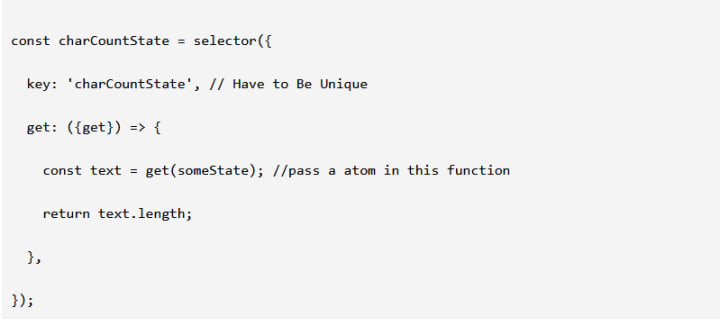
Using State:
There are two ways to get the declared state into our components. i.e. by useRecoilState or useSetRecoilState, useRecoilValue.
useRecoilValue:
Whenever you want to use the value of the state but don’t want to update it in the whole component.

useRecoilState:
Whenever you want to use the value of the state and also want to update it globally through the component itself.

useSetRecoilState:
Returns a setter function that can be used asynchronously to change the state. The setter may either be passed a new value or an updater function that receives the previous value as an argument.

Conclusion:
Recoil.js offers a powerful and flexible approach to managing state in React applications, making it easier to share and update state across components. With features like atoms, selectors, and hooks, Recoil enables developers to build scalable, maintainable applications without needing complex boilerplate code.
By following this guide, you've learned how to configure Recoil in your React project, create atoms and selectors, and use them in your components. Whether you're building a small app or a large-scale application, Recoil can help streamline your state management and keep your codebase clean and efficient.
About the Creator
Bitontree
At Bitontree, we help tech leaders scale teams and solve challenges. Founded in 2019, we deliver enterprise solutions and partner with brands like IKEA and Bajaj, building trust for 5+ years.
How Chinese Crypto Marketing Agencies Drive Community Growth in 2026?
In 2026, Chinese crypto marketing agencies have become central architects of community growth across the global blockchain ecosystem. What was once a regional approach has evolved into a global strategy, with agencies in China blending deep cultural nuance with advanced technological engagement. These agencies are no longer just promoters they are builders of communities, designers of narratives, and orchestrators of long-term engagement strategies.
By Jack santoa day ago in 01
How to Choose a Mobile App Development Company in 2026
The Google ecosystem is currently undergoing a structural realignment that fundamentally changes how mobile applications are discovered and validated. We are witnessing a tectonic movement away from traditional index-based search toward a unified Trust Graph where Entity Signals dictate market survival.
By Devin Rosario8 days ago in 01




Comments
There are no comments for this story
Be the first to respond and start the conversation.