
Common Shopify SEO Mistakes and How to Avoid Them
Fix These SEO Mistakes & Rank Higher on Shopify

Shopify is one of the most widely used eCommerce platforms. It has user-friendliness, scalability, and other strong features, but still, there are critical mistakes made by most store owners which don't allow their site to rank better in search engines. Optimizing your store right will bring in organic traffic, thereby increasing sales. Here's the most common SEO for Shopify mistakes and how to avoid them in this guide. Optimizing your store right will bring in organic traffic, thereby increasing sales. Here's the most common SEO for Shopify mistakes and how to avoid them in this guide.

Top Shopify SEO Mistakes That Hurt Your Rankings
Now, let’s break down the most common SEO mistakes that Shopify store owners make and how to fix them.
1. Ignoring Keyword Research
Probably one of the most significant mistakes store owners make is that they fail to do keyword research. Most believe they already know what the customers are searching for, but in reality, without data-driven research, they could miss some of the highest-intent keywords.

How to Fix It:
- Use tools like Google Keyword Planner, Ahrefs, or SEMrush to find relevant keywords.
- Target a mix of short-tail (e.g., "Shopify SEO") and long-tail keywords (e.g., "best SEO practices for Shopify stores").
- Optimize product titles, descriptions, and blog content with relevant keywords without overstuffing.
2. Not Optimizing Product Pages Properly
Your product pages are critical for conversion; however, many Shopify stores neglect to optimize these pages for search engines. Some of the problems include missing meta descriptions, duplicated content, and a lack of structured data which can damage your rankings.

How to Fix It:
- Use original product descriptions rather than the ones provided by manufacturers.
- Include appealing title tags and meta descriptions using primary and secondary keywords.
- Apply alt text for product images for better rankings on image search.
3. Poor URL Structure
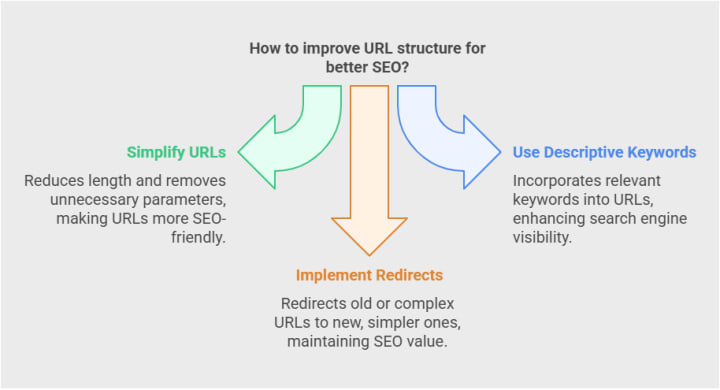
Shopify’s default URL structure isn’t always SEO-friendly. Many store owners leave their URLs too long or filled with unnecessary parameters.
How to Fix It:
- Shorten, simplify, and use keywords in your URLs, for instance, yourstore.com/men-leather-jacket.
- You shall not use 'collections' and 'products' words in any URL whenever this is possible.
- Apply 301 redirects if the URL is changed to prevent any broken links being created.
4. Not Leverage Blog Content
Most Shopify stores focus entirely on product pages while neglecting the blog section. This can be an unused chance to obtain organic traffic via quality content.

How to Fix It:
- Blog section: Post buyer intent-aimed content
- How-to guides, comparisons, and insights in the industry
- Each post is optimized using internal links toward relevant product pages.
5. Slow Page Speed
Page speed is a ranking factor, and a slow Shopify store increases the bounce rates, thus affecting the conversion rates of a website. Many owners make use of large themes, poorly optimized images, and too many apps that decrease the page loading speed.

How to Fix It:
- Use a lightweight, mobile-friendly theme optimized for speed.
- Compress images with tools like TinyPNG or Shopify apps like Crush.pics.
- Minimize the use of unnecessary third-party apps and scripts.
6. Poor Mobile Optimization
Poor mobile optimization can result in a massive loss in traffic and sales because most online shoppers use mobile devices.

How to Fix It:
- Select a responsive Shopify theme that adapts to all screen sizes.
- Test mobile usability using Google's Mobile-Friendly Test.
- Reduce large images and unnecessary animations for fast load times.
7. Not Using Internal Linking
Shopify store owners often don't use internal linking, which distributes link authority and keeps the visitor engaged.

How to Fix It:
- Link related products, blog posts, and category pages naturally.
- Use descriptive anchor texts instead of generic phrases like "click here."
- Implement a breadcrumb navigation for better user experience and SEO.
8. Not Setting Up Google Search Console and Analytics
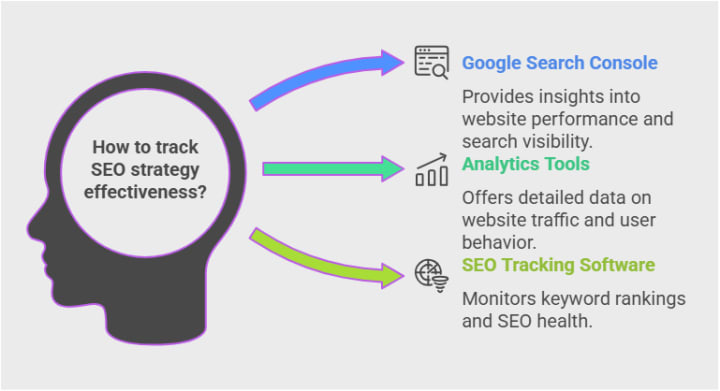
You can't determine if your SEO strategy for Shopify is working or not without the aid of tracking tools.
How to Fix It
- Enable Google Search Console for the tracking of indexed, ranking errors, and the rest.
- Leverage Google Analytics for understanding the traffic source and the behaviors of the visitors.
- Run report reviews from time to time in order to catch improvement opportunities
9. Underestimation of Technical SEO
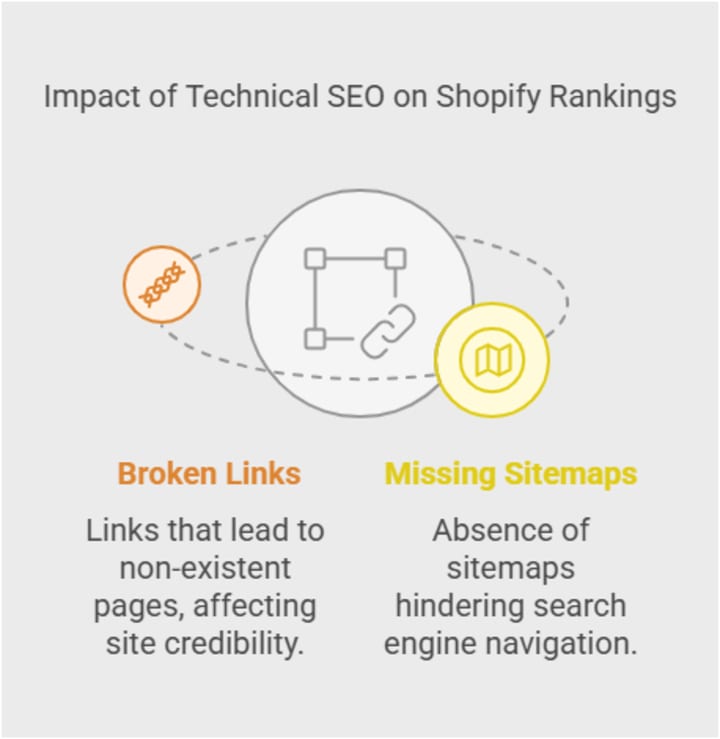
Technical SEO blunders like having broken links and missing sitemaps can greatly hamper a Shopify store's ranking.
How to Fix It
- Submit your XML sitemap to Google via Search Console.
- Make sure that proper redirects are set up for correcting 404 errors.
- Ensure the proper usage of canonical tags, so that duplicate content does not arise.
Final Words
You can ensure an improvement in your store's search rankings by keeping away from common SEO mistakes while using Shopify. You will see more organic traffic coming your way if you create a Shopify store that focuses on keyword optimization, technical SEO, mobile-friendliness, and content marketing.
Start implementing these fixes today, and you’ll see a noticeable improvement in your Shopify store’s SEO performance!
About the Creator
Keep reading
More stories from Href Stellar US and writers in 01 and other communities.
10 Game-Changing eCommerce Strategies to Boost Sales in 2025
With the fast pace of change in eCommerce, simply having a web store won't be enough to get ahead of your competition. Even to be successful in 2025, you will need to improvise your eCommerce strategies to ensure they both sell and provide a good user experience. We'll discuss 10 transformative eCommerce strategies to ensure you are maximizing sales and staying competitive in the online space.
By Href Stellar US10 months ago in 01
What Real Estate Apps in San Diego Get Wrong About Users?
Laura Kim didn’t question whether people liked the app. The numbers were undeniable. Thousands of installs each month. Long browsing sessions. Homes saved and unsaved repeatedly. Map views that stretched late into the night.
By Mike Pichai4 days ago in 01



Comments
There are no comments for this story
Be the first to respond and start the conversation.