
Coding Chronicles #1 | npx playwright test | Two Issues
Issue 1 - Cannot Find Module 'fs/promises' | Issue 2 - Locate span element with ID to test the visibility of an icon

A usual day in the life of a software programmer brings out many coding challenges. Most of these challenges need a few minutes of online search. I wish to start a series of mini blogs dealing with some of these challenges. The complexity of these challenges will range from average to complex.
In the article, I will talk about a couple of issues I faced while using Playwright.
- Issue 1 - Cannot Find Module 'fs/promises'
- Issue 2 - Locate span element with ID to test the visibility of an icon
Let's start with an introduction of the Playwright.
Playwright
Playwright is an open-source automation tool designed for end-to-end testing. Developed by Microsoft, Playwright supports many browsers, including Chromium, Firefox, and WebKit.
Official Documentation of Playwright - Fast and reliable end-to-end testing for modern web apps | Playwright
Issue 1 - Cannot find module 'fs/promises'
In my current project, I use Playwright to automate end-to-end tests. The DevOps pipeline executes these tests after successful deployment to the Dev environment. In this way, we can prevent faulty code from running on our test environments.
The tests ran fine on the local machine but failed on the Release pipeline. The error was
Cannot find module 'fs/promises'
Fs/promises module is part of the NodeJs library. They assist in handling asynchronous code using async and await.
NodeJs is a prerequisite to run the Playwright tests. The DevOps engineer confirmed that the build agents have NodeJs installed on them. Hence, I wrote a PowerShell task in the pipeline to get the version of NodeJs.
Upon running the pipeline, I found the issue.
The version of NodeJs on my local machine is v16.20.1, whereas the version on the build agents is v12.19.0.
Node.js 12.x introduced support for ECMAScript (ES) modules. The support included the ability to use 'import' and 'export' statements. Complete support for 'fs/promises' was added in Node.js 12.17 onwards.
Solution
The solution was to upgrade NodeJs to match my local machine. I used the “Node.js tool installer” task in my release pipeline.
To learn more about this task, read here.
I resisted the temptation to ask the DevOps engineer to upgrade NodeJs on the build agent. Many other pipelines will be using the build agents. These pipelines might build and deploy legacy code that needs an older version of NodeJs. If we upgrade the version on the agents, it might create issues for other applications.
Using the Node.js tool installer enforces a different version of NodeJs for this particular release pipeline.
The YAML to perform the task is:

Issue 2 - Locate Span With Id & Tests An Icon
The second issue was to locate an HTML span element for testing the visibility of an icon.
Locator Interface.
Before providing a brief on the issue, I will provide a quick introduction to the Locator Interface.
Locators are the central piece of the Playwright's auto-waiting and retry-ability. Locators represent a way to find element(s) on the page anytime.
Official Document of Locator Interface - Locators | Playwright
Use Case
In my current project, I have an HTML section with file uploads. There are some validation rules for each file. We must display a delete icon if a file does not pass these validation rules. We won't show the delete icon for successfully uploaded files.
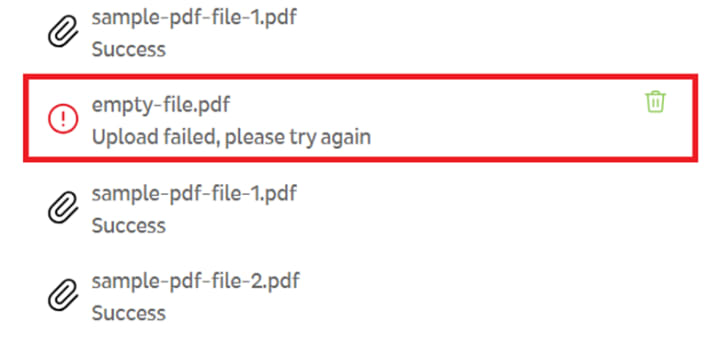
We use an SVG within a span element to display the delete icon. Each span element will have an ID. Filename forms part of this ID. ID is the safest way to locate span elements. The HTML structure won't impact the test case even if it changes.
Solution
Firstly, I will get the locator object for the span element

If there are any validation errors for the file filename, the test case should ensure the visibility of the delete icon. Hence, we will use the method toBeVisible().
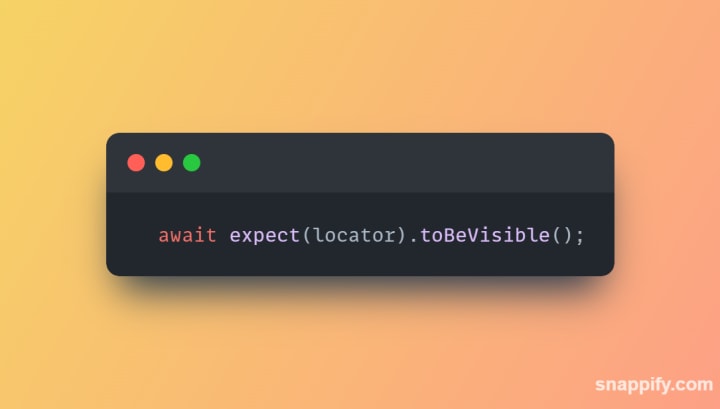
If there are no validation errors for the filename, the test case should ensure the delete icon is not visible. Hence, we will use the method toBeHidden().

Thanks for reading. I hope to create more code chronicles on full-stack development in the future. Kindly share any ideas to improve on this series.
Thanks
Tarun
About the Creator
Keep reading
More stories from tarun bhatt and writers in 01 and other communities.
Install Dynatrace Extension On Azure Function & App Service using Terraform
Terraform is a programming language to provision cloud infrastructure (Infrastructure as Code). IaC is all about deploying infrastructure through software. It helps achieve consistent and predictable environments.
By tarun bhatt2 years ago in 01
Custom AI Solutions vs. Off-the-Shelf AI: What Enterprises Should Choose
In 2024, the corporate world rushed to buy AI. Executives purchased licenses for ChatGPT, Copilot, and Gemini, hoping these tools would instantly revolutionize productivity. By 2026, a different reality has set in. While these off-the-shelf tools are powerful, they are often disconnected from the actual work an enterprise does. They can write a poem, but they cannot query a company’s legacy inventory database or automatically reconcile a complex invoice.
By ViitorCloud Technologies7 days ago in 01



Comments
There are no comments for this story
Be the first to respond and start the conversation.