
Cloud Computing Essentials: 7 Core Concepts for Beginners
Demystify cloud computing! This guide breaks down the 7 foundational concepts—from IaaS, PaaS, and SaaS to elasticity and the pay-as-you-go model—in simple, beginner-focused language.


You’ve probably used the cloud today—without even realizing it. Every time you stream a show on Netflix, back up your photos to Google Drive, or check your bank account on a mobile app, you’re interacting with a globally distributed network of servers we call cloud computing. It's the silent, powerful backbone of modern technology, shifting the power of computation from your desk to vast, centralized data centers.
For beginners, the world of the cloud—with its acronyms, models, and endless provider names—can feel overwhelming. But before you can master advanced tools like Kubernetes or serverless functions, you must first understand the essential physics of this new world. This guide is your starting point. We’ll demystify the technology and help you understand the 7 key concepts that form the foundation of cloud technology. You'll gain the confident vocabulary needed to start building your career in the most in-demand field in tech.
7 Core Cloud Computing Concepts
To truly grasp how the cloud works, we look to the industry's universally accepted characteristics. These seven concepts define what makes the cloud so transformative, efficient, and powerful.
1. On-Demand Self-Service
The days of submitting a ticket, waiting three weeks, and having a technician manually provision a physical server are over. On-Demand Self-Service means a user can instantly provision resources—like servers, storage, or databases—without human interaction from the service provider.
This instant access is key. It democratizes computing, giving small teams and individual developers access to infrastructure that was once reserved only for industry giants. You log into a console, click a button, and the resource is available in minutes.
2. Broad Network Access
One of the most powerful features of the cloud is its sheer accessibility. Broad Network Access ensures that cloud capabilities are available over the network and accessed through standard mechanisms that promote use by heterogeneous client platforms—meaning, you can access your resources from virtually any device with an internet connection: laptops, phones, tablets, or even IoT devices.
This allows for true mobility and collaboration, ensuring that your data and applications are always within reach, regardless of where your team is located.
USER ACCESSING CLOUD RESOURCES:
Laptop/PC ─┐
├── Internet ───► Cloud Server (Shared Pool)
Mobile Device ─┘
3. Resource Pooling
Imagine a giant pool of computing resources—processors, memory, storage, and network bandwidth—all housed within the provider's data center. Resource Pooling is the practice of sharing these physical resources securely among multiple users, a concept called multi-tenancy.
The provider dynamically allocates and reallocates these resources to different customers as needed. You, the user, don't know (or need to know) the exact location of the hardware, only that you have the resources you asked for. This secure sharing of infrastructure is what drives efficiency and lowers costs.
4. Rapid Elasticity
This is arguably the most financially and operationally valuable concept for businesses. Rapid Elasticity is the ability of a cloud environment to scale up or scale down resources quickly and automatically to meet sudden changes in demand.
Example: A popular e-commerce site expects a massive traffic spike on Black Friday. The cloud infrastructure can automatically spin up hundreds of new servers in minutes to handle the load, and then shut them down just as quickly once the spike is over. This prevents crashes and wasted money.
5. Measured Service
Measured Service is the foundation of the cloud's cost model: pay-as-you-go. The provider continuously monitors and measures resource usage (like storage used, CPU cycles consumed, or data transferred). You are then billed only for what you actually use.
This ties directly to elasticity. If your company only needs 10 servers for 50 weeks a year and 100 servers for two weeks, you only pay for the extra 90 servers during those two weeks. It eliminates the need for massive upfront capital expenditure on hardware you might not fully use.
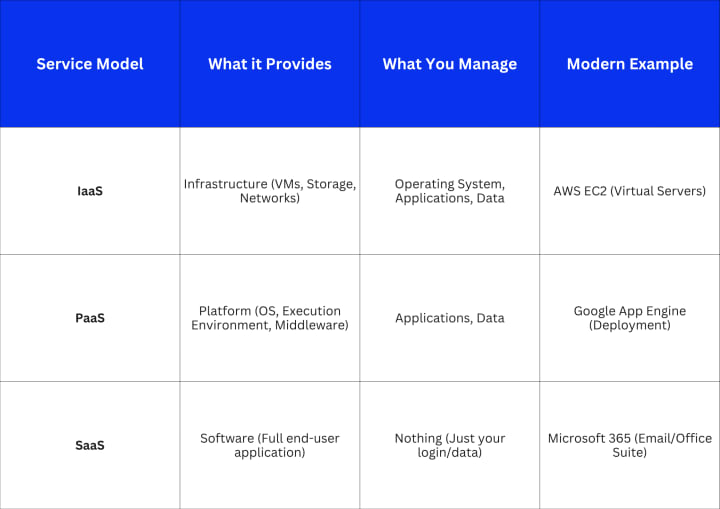
6. Service Models (IaaS, PaaS, SaaS)
Cloud services are categorized into three main layers, often visualized as a stack. Understanding these layers is critical for choosing the right tool for your job.
7. Deployment Models
Where the cloud infrastructure resides determines its deployment model. Choosing the right one balances control, security, and cost.
- Public Cloud: Services offered over the public internet by third-party providers (e.g., AWS, Azure, GCP). Advantages: Scale, low cost.
- Private Cloud: Exclusive cloud infrastructure dedicated to a single organization, managed internally or by a third party. Advantages: Security, control.
- Hybrid Cloud: A mix of public and private cloud environments, seamlessly connected, allowing workloads to move between them. Advantages: Flexibility, best of both.
- Multi-Cloud: Using services from multiple public cloud providers (e.g., AWS for compute, Azure for AI). Advantages: Vendor lock-in avoidance, specialized features.
Cloud in Everyday Life
These technical concepts aren't just for data center engineers; they fuel the digital services you rely on daily. When you upload a video to YouTube, rapid elasticity ensures the platform scales instantly to handle millions of simultaneous uploads and streams. When you use a collaborative tool like Slack, that's SaaS in action.
For businesses, the cloud is no longer optional—it’s the foundation for speed and innovation. Modern software, especially mobile app development, relies entirely on cloud systems to power its backend, handle user authentication, and manage real-time data flow. The rise of cloud-powered, scalable app infrastructure is precisely why developers and agencies—like those working on cutting-edge solutions in the South, such as the teams specializing in mobile app development in Georgia—can focus on feature development instead of worrying about physical server space. The cloud abstracts away the tedious infrastructure work, allowing developers to be faster and more creative.
Common Misconceptions
As a beginner, you’ll encounter some myths that can cause confusion. Let's clear up the most common ones.
- ❌ Myth: “The Cloud is Just the Internet.” While the cloud uses the internet for access (Broad Network Access), it is fundamentally different. The cloud refers to the specific, managed computing resources (servers, storage, etc.) hosted in data centers. The internet is merely the network that connects you to those resources.
- ❌ Myth: “The Cloud is Insecure.” This is a critical misconception. While data breaches happen, cloud providers invest billions into physical and digital security, encryption, and compliance—often achieving a security standard far higher than what most small or medium-sized businesses can afford to build themselves.
- ✅ Truth: “The Cloud Boosts Scalability and Collaboration.” This is the core value proposition. By enabling Rapid Elasticity and Broad Network Access, the cloud directly translates to business benefits: less downtime, instant growth potential, and easy collaboration across global teams.
Getting Started in Cloud Computing
The best way to solidify your understanding of these cloud computing basics for beginners is by doing. Don’t wait for perfect knowledge; start building as you learn.
- Sign Up for Free-Tier Services: Major providers like AWS, Azure, and Google Cloud Platform (GCP) all offer generous free tiers. Sign up and explore the console—this is where theory meets reality.
- Learn Key Console Tools and Dashboards: Get familiar with the primary services in the IaaS category, such as spinning up a simple virtual machine or creating an S3 (AWS) bucket for storage.
- Try Deploying a Simple Static App: Follow an official tutorial to deploy a basic website using PaaS or serverless tools. The friction you hit and solve during deployment will teach you more than any lecture.
After seeing countless students succeed, I’ve learned that the most important step isn't reading another book. It’s opening the cloud console and experimenting. Every cloud expert started by breaking things, fixing them, and building as they learned.
Key Takeaways
- On-Demand means instant access to resources without human intervention.
- Elasticity allows infrastructure to shrink or grow automatically based on demand.
- Measured Service is the pay-as-you-go model that controls costs.
- IaaS, PaaS, and SaaS define the different layers of management responsibility.
- Understanding these 7 core concepts is the critical first step in a cloud career.
Next Steps
Now that you have the vocabulary of the cloud, you can move forward with confidence.
- Dive Deeper: Choose one of the three major providers (AWS, Azure, or GCP) and commit to a free introductory course on their platform.
- Hands-On: Complete a mini-project, like deploying a Docker container to a cloud VM.
- Explore: Research advanced cloud design patterns like serverless and microservices—these are the powerful tools built on the foundation you just learned.
The future runs in the cloud—learn the basics today, and you’ll shape tomorrow’s digital world.
Frequently Asked Questions
What is the biggest mistake beginners make in cloud computing?
The biggest mistake is ignoring the Measured Service model. Many beginners forget to shut down the resources (like virtual machines) they are no longer using in their free-tier accounts, leading to unexpected, albeit small, charges. Always remember to "turn off the lights" when you leave the cloud room.
How does multi-tenancy affect security?
Multi-tenancy (part of Resource Pooling) involves multiple users sharing the same underlying hardware. Cloud providers use strict isolation mechanisms, including hardware virtualization and advanced networking, to ensure that one customer's data and processes are completely inaccessible to others. This compartmentalization is what makes the model secure.
Is hybrid cloud the best model for every company?
No. While Hybrid Cloud offers great flexibility, it also introduces significant operational complexity, requiring skilled teams to manage the connections, data synchronization, and security across both private and public environments. It's best suited for established organizations with legacy systems that cannot move entirely to the public cloud.
What is a "region" and an "availability zone" in the cloud?
A Region is a distinct geographical location (like "US East"). Each region is composed of multiple, isolated, and physically separate locations called Availability Zones (AZs). AZs are physically distant enough to minimize the risk of a single disaster affecting them all, but close enough for low-latency network connections. Using multiple AZs is essential for high availability and disaster recovery planning.
Why is vendor lock-in a common concern?
Vendor lock-in refers to the difficulty of switching cloud providers once you heavily utilize their specialized services. While core services like IaaS are highly portable, platforms built on proprietary PaaS or SaaS tools become deeply integrated into one vendor's ecosystem. Using a Multi-Cloud or Hybrid Cloud strategy can mitigate this risk by distributing workloads across different platforms.
About the Creator
Keep reading
More stories from Devin Rosario and writers in 01 and other communities.
Why Are Penpot’s Fonts So Different From Web — Essential Setup Tips
The Typographic Two-Step It’s a tale as old as digital design: You’ve spent hours perfecting the typeface in Penpot—the kerning is tight, the weight is just right—only to load the final webpage and watch your beautiful typography fall apart. The text looks subtly heavier, the letter spacing feels off, and that crisp anti-aliasing is suddenly muddy. What gives?
By Devin Rosario4 months ago in 01
Mastering MAP Monitoring for Sustainable Online Brand Growth
A single discounted listing can unravel a carefully built pricing strategy almost overnight. When one reseller drops below the agreed MAP level, others quickly follow, and margins begin to compress across marketplaces before anyone has time to react. This chain reaction is entirely preventable.
By Swiftproxy4 days ago in 01



Comments
There are no comments for this story
Be the first to respond and start the conversation.