
Canva vs. CapCut: Two Creative Giants, Two Very Different Paths
Creative Giants

In today’s creator-driven internet, visual content is everything. From Instagram posts and pitch decks to TikTok videos and YouTube Shorts, people are expected to create eye-catching content faster than ever. That is exactly why Canva and CapCut have exploded in popularity. While both tools promise professional-looking results without a steep learning curve, they are built for very different creative missions.
If you are torn between Canva and CapCut, the real question is not which one is “better,” but which one fits the way you create. Let’s take a deeper look at how each platform works, what they excel at, and where they clearly diverge.
Understanding the Core Purpose of Each Platform
Although Canva and CapCut sometimes overlap, they were designed with different users and outcomes in mind.
What Canva Is Really Designed For
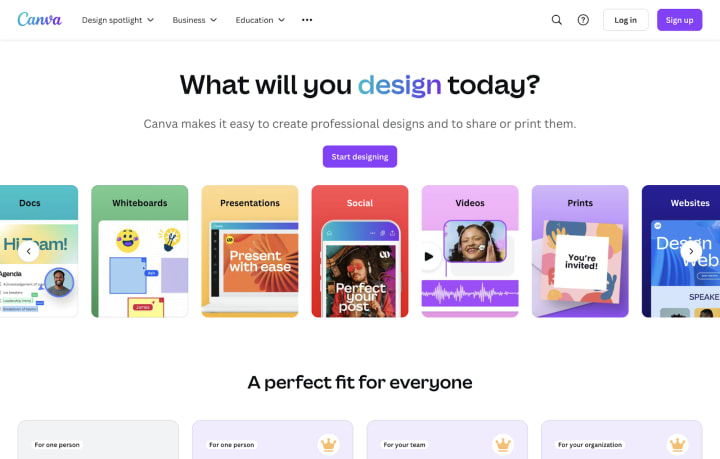
Founded in 2013, Canva began as a solution for people who needed polished designs without graphic design training. Over time, it has grown into a full visual communication platform used by students, educators, marketers, startups, and large teams.
One of Canva’s biggest strengths is its enormous template ecosystem. Users can choose from millions of layouts covering everything from Instagram posts and YouTube thumbnails to resumes, reports, menus, invoices, and full presentations. These templates are not just placeholders—they are professionally structured designs that can be customized in minutes.
Canva’s editor is intentionally simple. You click, drag, resize, and adjust elements without worrying about layers, anchor points, or complex timelines. This ease of use makes it especially attractive for people who want fast results rather than technical control.
Another major advantage is collaboration. Canva allows multiple people to work on the same design at once, leave comments, control permissions, and organize assets into shared folders. For teams, classrooms, and businesses, this turns Canva into more than a design tool—it becomes a shared workspace.
Canva also includes built-in photo editing features, such as color correction, filters, cropping, and effects. Paid users unlock AI-powered tools like background removal, object erasing, and smart resizing for different platforms. While Canva does offer video creation, it is best suited for simple edits like combining clips, adding text animations, transitions, and background music.
In short, Canva shines when the goal is clear communication through visuals, whether static or lightly animated.
What Sets CapCut Apart
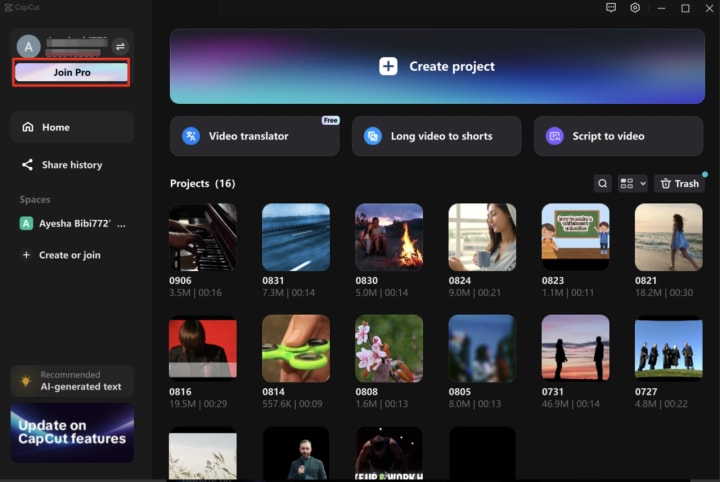
CapCut comes from a completely different background. Developed by ByteDance, the company behind TikTok, CapCut was built specifically for modern video storytelling. It is optimized for short-form, high-impact video content that matches current social media trends.
CapCut’s biggest appeal is how quickly it can turn raw footage into something polished. Its video templates automatically sync transitions, effects, and music to your clips, allowing even beginners to produce trend-ready videos in minutes. This is especially powerful for creators working with TikTok, Instagram Reels, and YouTube Shorts.
Unlike Canva, CapCut operates on a traditional video timeline. Users can cut, trim, split, layer, and rearrange clips with precision. Features like speed ramping, reverse playback, and motion effects give creators much more control over pacing and emotion.
CapCut also leans heavily into automation. Its AI-generated captions save enormous amounts of time, and batch editing tools make it easy to apply consistent styles across multiple text layers. Audio tools are equally impressive, with beat detection, sound effects, voiceovers, and royalty-free music built directly into the app.
Advanced features like chroma key (green screen), overlays, filters, and cinematic transitions push CapCut closer to professional editing software—while still remaining approachable for casual users. Another major advantage is offline editing, which makes CapCut ideal for mobile creators who work on the go.
Try CapCut Pro now and unlock your full creative potential!
Where Canva and CapCut Overlap - and Where They Don’t
At a glance, Canva and CapCut may seem similar, but their priorities quickly become clear once you use them side by side.
Shared Strengths
Both platforms are designed with beginners in mind and require no prior design or editing experience. They are available on mobile and desktop, offer free versions, and provide premium plans for users who want more advanced features and assets. Each tool also includes template-driven workflows that speed up content creation.
Key Differences That Matter
The most important difference is purpose. Canva is a visual design platform first, while CapCut is a video editor at its core. Canva’s video tools are meant for simplicity, whereas CapCut’s entire ecosystem revolves around motion, timing, and effects.
Internet access is another factor. Canva is largely cloud-based and works best online. CapCut, on the other hand, allows offline editing, which can be a major benefit for creators who travel or work without stable connections.
Pricing also differs slightly. Canva Pro typically costs more but includes brand kits, collaboration tools, and a massive asset library. CapCut Pro is more affordable and focuses on unlocking premium effects, transitions, and advanced editing tools.
Choosing the Right Tool for Your Creative Goals
There is no universal winner - only the right fit for your workflow.
CapCut Is the Better Choice If…
- You focus heavily on video content, especially short-form platforms like TikTok and Reels.
- You want trendy effects, dynamic transitions, and advanced motion tools.
- You need features like green screen, overlays, speed curves, and auto-captions.
- You prefer editing on your phone or working offline.
Canva Is the Better Choice If…
- Your work revolves around graphics, presentations, documents, or branding materials.
- You want an all-in-one platform for visual communication, not just video.
- You collaborate with teams, clients, or students.
- You value ready-made templates and a huge design asset library.
Common Questions Creators Ask
1. Can CapCut fully replace Canva?
Not really. CapCut excels at video, but it is not built for layout design, documents, or branding systems. For those tasks, Canva remains far more practical.
2. Which platform is better for social media?
Both play important roles. CapCut dominates short-form video creation, while Canva is ideal for thumbnails, stories, posts, and consistent branding visuals.
3. Which one should beginners start with?
Beginners can confidently start with either. Canva is a great entry point for visual design, while CapCut is perfect for learning video editing. Many creators eventually use both to cover all their content needs.
Final Thoughts
Canva and CapCut are not competitors in the traditional sense—they are complementary tools built for different creative outcomes. Canva helps you communicate ideas clearly through design, while CapCut helps you tell stories through motion and sound. Understanding that distinction makes the choice much easier.
If your content strategy includes both visuals and video, mastering both platforms may be the smartest move you can make.
About the Creator
Gulshan
SEO Services , Guest Post & Content Writter.
Practical Methods for Collecting Real-Time Business Insights
Data drives business. Period. Every decision, from product launches to marketing campaigns, rests on the quality of the data behind it. Collect the wrong data—or rely on guesswork—and even the best strategies can fail spectacularly. Collect it well, and you gain a competitive edge that’s hard to beat.
By Swiftproxy6 days ago in 01
Hyper Personalization in 2026 The Indi IT Solutions Approach
The digital landscape in 2026 has moved far beyond simple data collection. Users no longer appreciate being tracked by brands. They expect to be understood in the moment. For enterprise leaders, the challenge has shifted. It is no longer about how we gather more data. The focus is now on how we use intent. We must use real-time intent to reshape the interface.
By Del Rosario6 days ago in 01




Comments
There are no comments for this story
Be the first to respond and start the conversation.