


Chrome Browser :
Usually a Web browser is built using processes and threads.It could be one process with many different threads or many different processes with a few threads communicating over IPC.
Chrome browser Kernel : Blink (Renders HTML & CSS), V8 (Renders runtime JavaScript).
- Blink — open source, developed by Google, written in C++
- V8 — open source, developed by Google, written in C++
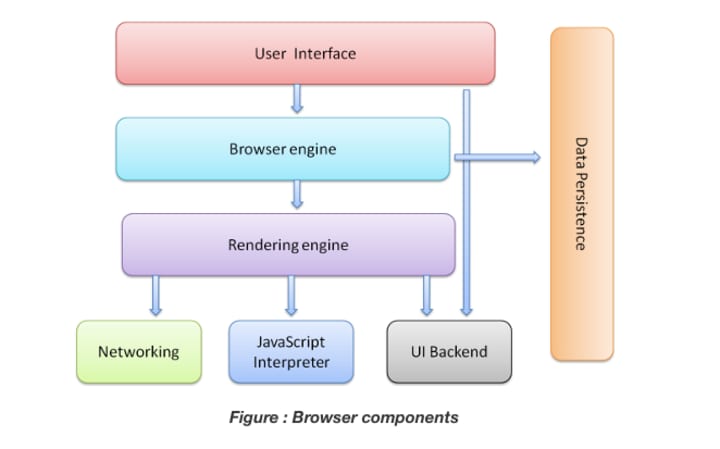

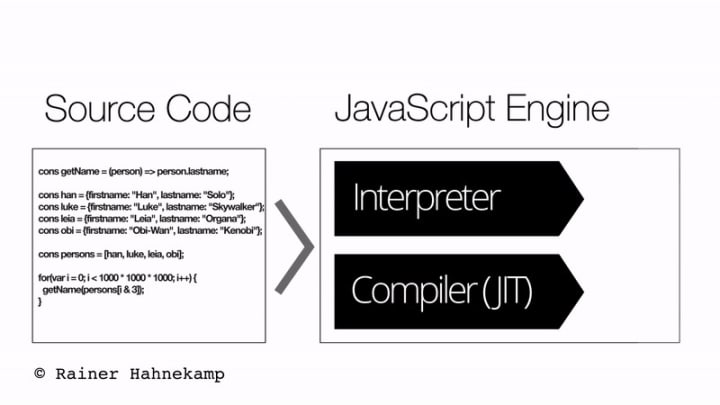
There are four different processes running in Chrome, they are:
- Browser
- Render-er
- Plug-ins
- GPU


Benefits of Multi-Process Architecture in Chrome :

You can imagine each tab has it's own render-er process. Let’s say you have 3 tabs open and each tab is run by an independent render-er process. If one tab becomes unresponsive, then you can close the unresponsive tab and move on while keeping the other tabs alive. If all tabs are running on one process, when one tab becomes unresponsive, all the tabs are unresponsive.
Undergoing Architectural Changes:
Chrome is undergoing architecture changes to run each part of the browser program as a service allowing it to split into different processes easily or aggregate into one. The general idea is that when Chrome is running on powerful hardware, it may split each service into different processes giving more stability, but if it is on a resource-constraint device, Chrome consolidates services into one process saving memory footprint. A similar approach of consolidating processes for less memory usage has been used on platforms like Android before this change.
Per-frame render-er processes - Site Isolation :
Site Isolation is a recently introduced feature in Chrome that runs a separate render-er process for each cross-site iframe. One render-er process per tab model which allowed cross-site iframes to run in a single render-er process with sharing memory space between different sites.
Running a.com and b.com in the same render-er process might seem okay. The Same Origin Policy is the core security model of the web; it makes sure one site cannot access data from other sites without consent. Bypassing this policy is a primary goal of security attacks. Process isolation is the most effective way to separate sites. With Meltdown and Spectre, it became even more apparent that we need to separate sites using processes. With Site Isolation enabled on desktop by default since Chrome 67, each cross-site iframe in a tab gets a separate render-er process.
Focus on Modules :
- Chrome consists of three different modules: the rendering engine, browser kernel and plug-ins.
- Each of these modules is isolated in it's own operating system process.

Rendering Module:
- The rendering engine converts HTTP responses into rendered bitmaps, the browser kernel interacts with the OS, and the plug-ins module handles each plug-in execution.
- Runs in a sandbox with restricted privileges and no access to OS.
- Each isolated web program in the browser is assigned to it's own rendering engine.
- Rendering engine is responsible for parsing web content, creating DOM tree representation in memory, manipulating the DOM tree while executing script instructions.
- Also, rendering engine enforces SOP policy and manipulates directly with untrusted web content. Historically most of the web browser security vulnerabilities were detected in the parsing and decoding tasks.
- Thus, the rendering engine does most of the parsing like HTML, CSS, XML, JavaScript, regular expressions parsing and image decoding. To interact with the user and OS, the rendering engine uses simple and restricted browser kernel APIs.
Browser Kernel Module :
- Browser kernel runs with full user privileges on behalf of the user.
- It manages each instance of the rendering engine and implements browser kernel APIs.
- Browser kernel handles storage management, which includes cookies, bookmarks, and passwords, because such activity requires file system access.
- Browser kernel executes network operations, e.g. downloads the image, but sends it to rendering engine to decode it.
- Browser kernel interacts with the OS, handles user inputs and forwards it to a rendering engine that has a focus.
- Browser kernel, keeps the information about granted privileges to each rendering engine such as list of files that certain rendering engine may upload.
Plug-ins Module :
GPU in Chrome :
Google Chrome is famous for using too much memory and slowing down devices. This specifically occurs in Chrome because it splits up every tab and extension into a different process, so if one of them goes down all the others stay intact.
If you suddenly notice your CPU fan is running super fast and making noises while your computer is slowing down, then you opened up the task manager in Chrome to check which tab or extension is using so much memory. And you notice that an item which goes by the name of ‘GPU process‘ is using a lot memory.
What is the Chrome GPU process?
The ‘GPU process’ is a process in Chrome which is only used when the browser is rendering video or graphics on a webpage. If there is no video or graphical content on a webpage, then you will notice the GPU process memory usage is at 0%.
This feature for many people speeds up their browsing experience by using the additional hardware capabilities available in the device. Traditionally browsers only used the CPU to render web page content but as a GPU is available in almost every device nowadays, Chrome utilizes the power of the GPU to render webpages and therefore speedups your browsing experience.
These are just a tip of an ice berg... So id suggest you to go over developer documentation to get a more clear view about the topics discussed above.
About the Creator
Motti Kumar
Hey guys i'm Motti Kumar and it’s a pleasure to be a guest blogger and hopefully inspire, give back, and keep you updated on overall cyber news or anything hot that impacts us as security enthusiast's here at Vocal Media.
Keep reading
More stories from Motti Kumar and writers in 01 and other communities.
Cross-Site Scripting Vulnerabilities in Elementor Impact Over 7 Million Sites
On February 23, 2021, the Wordfence Threat Intelligence team responsibly disclosed a set of stored Cross-Site Scripting vulnerabilities in Elementor, a WordPress plugin which “is now actively installed and used on more than 7M websites” according to a recent announcement on the Elementor blog. These vulnerabilities allowed any user able to access the Elementor editor, including contributors, to add JavaScript to posts. This JavaScript would be executed if the post was viewed, edited, or previewed by any other site user, and could be used to take over a site if the victim was an administrator.
By Motti Kumar5 years ago in 01
Handbags in Modern Fashion: Design, Function, and Consumer Perspectives
Handbags have long been more than simple accessories. Historically rooted in utility, they have evolved into cultural symbols reflecting personal style, social identity, and changing fashion trends. Today, handbags occupy a unique space where craftsmanship, branding, and consumer behavior intersect. From everyday carryalls to luxury-inspired designs, the handbag market continues to grow and diversify, especially among women seeking both practicality and visual appeal.
By charliesamuela day ago in 01


Comments
There are no comments for this story
Be the first to respond and start the conversation.