
Bring Customers Back: Top 5 Shopify Back-in-Stock Apps
Never lose a sale again! Discover the top 5 Shopify back-in-stock apps to notify customers, boost engagement, and maximize your store’s revenue.

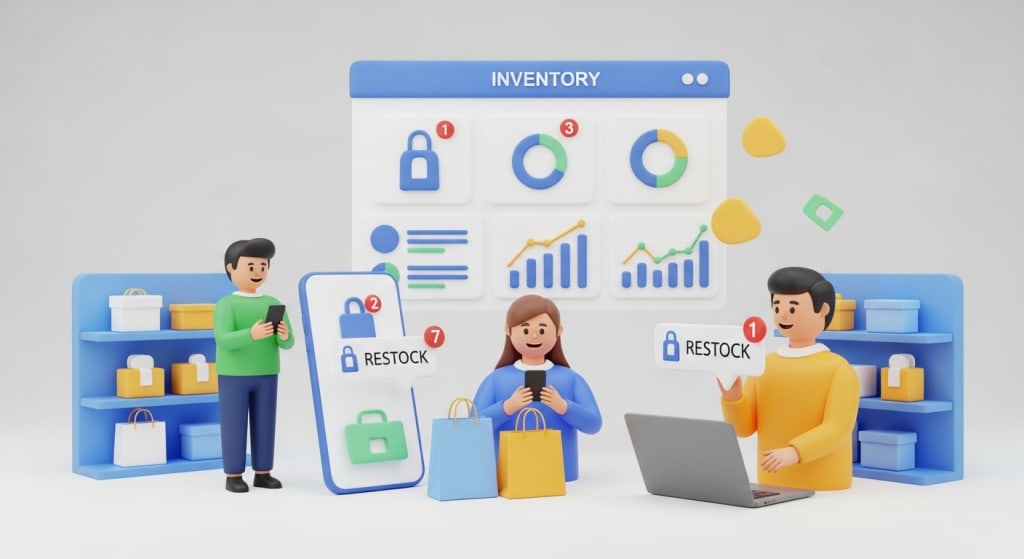
Quick Summary: Not having a product in stock doesn’t mean your customers will stop coming back forever! With a smart back-in-stock app for Shopify, you can reach out to excited customers when their favorite products are back in stock, turning their upset into joy. This guide will dive into the five best back-in-stock apps for 2025 to help you select the best app for supply and demand, drive customer engagement, and ultimately sell more!
Getting low or "out of stock" in an online store can be a hassle not only for the customers shopping at your store but for you as well. Customers are visiting your store ready to spend money on the things you sell, and if the item they want is not available, they may check out one of your competitors, never to return.
A Back-in-Stock app will allow you to do just that by allowing customers to sign up for alerts when a product becomes available again. This simple feature will help you turn those missed sales into complete purchases and will keep every customer engaged in your store.
Shopify back-in-stock apps make it simple to provide notifications to your customers via email and/or text, so they do not have to refresh your storefront continuously to check for their desired item.
For store owners, this means salvaging those sales that may have been missed due to a lack of inventory. In this blog, we will explain the importance of Back-in-Stock apps, the best way to choose the right back-in-stock app for your store, and the final section will highlight 5 Back-in-Stock apps for you to consider utilizing in your store, all simplified.
Why You Need a Back-in-Stock App for Your Shopify Store
Running an online store means dealing with inventory changes, and usually, best-selling items fly off the shelf. And when items are out of stock, customers will often leave the site and go shop at a different store. The Back-in-Stock app deals with just this problem by informing customers when an item is back in stock, and customers can sign up for Back-in-Stock alerts. After your item is restocked, they receive a text or email alerting them to return to your store.
This way, the customer is returning to your store instead of going to a competitor. By using back-in-stock alerts, you also reduce car abandonment because consumers know you will alert them when items are restocked and available to purchase.
These apps provide valuable insights into demand for store owners. If many customers sign up for a back-in-stock alert for a specific product, it shows that more inventory may be needed in the future. These Shopify back-in-stock apps are very easy to implement and integrate with no coding (and they are mobile-friendly). With this type of technology, online stores can keep customers engaged, increase sales, and become more equipped to handle dealing with inventory and supplier processes.
How Stockouts Affect Your Business
Stockouts happen when your products run out, which can be brought on by supply chain issues or an overwhelming demand for your item. With every stockout, you risk losing a sale, and potentially worse, your customer might not return. Back in stock apps are the safety net here. They collect email addresses or phone numbers from potential buyers, and when your item is available again, they automatically ping your buyers.
Real-World Examples
Picture a toy store during the holiday season. The hot game closes, and there are no alerts, so kids and parents are disappointed. By using a Back-in-Stock app, parents sign up to be notified when more arrive. This keeps the excitement alive for the kids and ensures the sale takes place at your store.
How to Choose the Best Shopify Back-in-Stock App
Finding the appropriate Back-in-Stock app for your Shopify store does not have to be complicated. To begin, the most important consideration should be ease of use. The app should be easy to install and work with your theme without needing complex coding. Of course, you will want to look for apps that send automated notifications via email or text while having the ability to customize the buttons and messages to fit your brand. And of course, integration with services like Mailchimp to grow your email list is worth considering.
Price and support matter too. Many apps offer free plans initially, before switching to a paid model as your store grows. When chewing over possible apps, be sure to read the reviews, consider the "reliable" apps that had an overall good score in the ratings, data protection, and security with customer data will matter.
While testing, multilingual capabilities, support, and the free trial will help reduce the amount of risk involved in the trial and testing.
Benefits of Using Back-in-Stock Alerts
Alerts to notify customers when previously out-of-stock items return have many benefits when running an online store. Not only do alert notifications convert previously lost revenues by informing customers when they can make their desired purchase again, but they also reduce the trouble and effort needed for a customer to continue checking if an item has been restocked or not, which will lead to a more positive online shopping experience. Alert notifications build strong levels of trust and loyalty from customers, similar to a "if you see it, buy it" approach.
Alerts build a level of urgency for your once-limited stock until they are potentially sold out again. Alert notifications create familiarity and valuable knowledge of your most popular products, which go a long way to improving stock management and ultimately a more favorable customer experience. Alerts without question also grow your email addresses naturally, increase your chances for repeat sales, and establish more favorable levels of customer retention over time. All of these benefits after one integration can improve performance in your online store.
Top 5 Shopify Back-in-Stock Apps: Detailed Reviews
Now, let's look into the five best apps. Each app supports tracking items out of stock through some back-in-stock alert functionality. Each entry will list how it works, its features, its benefits, and any other information to help you determine which app is right for you.
1. SB Coming Soon Product‑PreSale
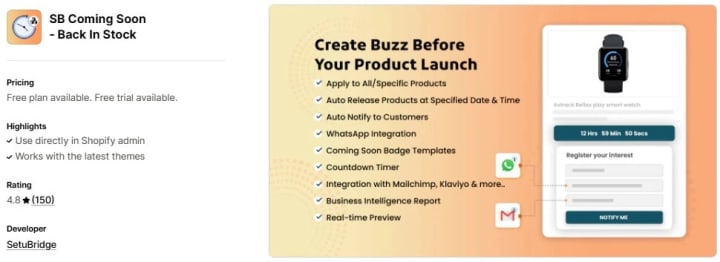
This Shopify Back-in-Stock app is designed to build excitement for your products! Back-in-stock timer badges, special notifications, and tags help create buzz about products returning to your online store. This app is perfect for pre-sales and notifications about upcoming out-of-stock products.
How It Works
You will add a "Notify Me" or "Coming Soon!" button to products that are out of stock. When the product is back in stock, the app automatically sends an email to the list of customers who opted in to be notified when the item is restocked. It integrates with your email tool for easy delivery of notifications.
Features
- Custom badges and countdown timers.
- Arrival date displays.
- Unlimited email notifications.
- Integrations with Mailchimp, Klaviyo, and others.
- Multilingual support and scheduling.
Benefits
It drives interest before products arrive, turning waits into sales. Easy setup means quick solutions for stock issues. Unlimited alerts keep costs low while reaching many customers.
Pros and Cons
Pros: Great for pre-launches, no email limits, and user-friendly.
Cons: Free plan limits product numbers.
Pricing and Ratings
Starts at $5.99/month with a free plan. Rated 4.8/5 from 150+ reviews.
2. Notify! Back in Stock|PreOrder
This app manages alerts, pre-orders, and wishlists. There are new buttons for sign-ups, and multi-channel notifications will be sent.
How It Works
On out-of-stock products pages, the app displays "Notify Me" or "PreOrder" options. When customers sign up for notifications, alerts will be sent to customers via email, text, or push notification when the product is in stock. The app will also track low stock.
Features
- Pre-orders with payments.
- Wishlist for all users.
- Low-stock widgets.
- Custom emails and designs.
- Automated workflows.
Benefits
The app encourages customers to return and make repeat purchases with the use of wishlists. Custom alerts can be made to meet your brand's needs and notify customers when products are back in stock.
Pros and Cons
Pros: Unlimited pre-orders on paid plans, multi-channel alerts.
Cons: Free plan has notification limits, pricier for small stores.
Pricing and Ratings
Starts at $9.90/month with a free plan (10 notifications). Rated 4.9/5 from 2,545+ reviews.
3. Back In Stock, Notify Me: Kbite
This app is for alerts and analytics. It tracks demand and sends updates when items are restocked or prices drop.
How It Works
Alert contextual examples add to cart functions, of stock status provides a sign-up button. The consumer receives an email or text for restocks. The Analytics tab shows products in demand.
Features
- Automatic alerts.
- Price drop notifications.
- Waitlist data.
- Mailing list sync.
- Custom buttons.
Benefits
Recover out-of-stock sales and grow your list of contacts. Recover lost sales, remind consumers via email, and gain insights in analytics to show popular products to informed planning for stock levels for the next time around to avoid extra costs and having stock on hand.
Pros and Cons
Pros: Free plan with unlimited sign-ups, easy interface.
Cons: Branding on free, email limits.
Pricing and Ratings
Starts at $5/month with a free plan (30 notifications). Rated 5/5 from 2,863+ reviews.
4. Preorder, Back In Stock ‑ STOQ
This app helps you manage pre-orders and alerts with deposit options. It easily supports global stores.
How It Works
Add widgets for waitlists or payments. Automatically sends alerts when back in stock. works with multiple locations.
Features
- Deposits for pre-orders.
- Custom widgets and emails.
- Klaviyo integration.
- Analytics for waitlists.
- Multi-location support.
Benefits
Provides a way to generate revenue before you have stock to fulfill orders. Builds lists before stock arrives and offers 24/7 support to solve issues fast. Able to handle international sales with ease.
Pros and Cons
Pros: No extra fees, unlimited on pro, great support.
Cons: SMS costs more, free limits.
Pricing and Ratings
Starts at $10/month with a free plan (30 notifications). Rated 5/5 from 2,183+ reviews.
5. Preorder, Back in stock Duck
Give folks the option to pre-order products and notify them via WhatsApp. Simple for beginners.
How It Works
Includes buttons for pre-orders or alerts. Emails or WhatsApp all notifications at established intervals or levels.
Features
- Pre-order controls.
- Auto alerts.
- WhatsApp integration.
- Variant-specific settings.
- Klaviyo support.
Benefits
Engages customers on their preferred channel, increasing lost sales. Use demand information to plan. The simple setup helps with technology issues.
Pros and Cons
Pros: WhatsApp feature, no fees within limits, live chat help.
Cons: Branding on free, notification caps.
Pricing and Ratings
Starts at $10/month with a free plan (30 notifications). Rated 5/5 from 325+ reviews.
Key Takeaways
- Back-in-Stock apps recover up to 40% of lost sales from out-of-stock products.
- They send automatic back-in-stock notifications, building customer loyalty.
- Features like analytics help plan inventory better.
- Most apps have free plans and high ratings for reliability.
- Choose based on your store size and needs for the best solution.
Conclusion
Unavailability of a product doesn't mean an end to sales. With a Back in Stock App, you can send back-in-stock notifications and keep customers in the funnel. The top five Back in Stock Apps for Shopify provide streamlined solutions. They simply allow notification, pre-order, and data collection. They accumulate on a continuum of small to large scales.
The best way is to check these out with a free trial and see the difference. These mechanisms do not simply regain lost revenue but also continue the relationship with the customer for the possibility in the future. The online marketplace is an ever-growing one, and leveraging back-in-stock notifications is a great way to elevate and expand the business.
FAQs
What is a Back-in-Stock App?
A Back-in-Stock app is a Shopify tool that allows customers to create alerts for out-of-stock products. The app sends back-in-stock alerts when a product is back in stock, which helps recover sales and merchandising opportunities.
Why Should I Use a Shopify Back-in-Stock App?
Stockouts can mean you lose customers. The app brings you back by alerting your customers, improving their experience, and providing data on demand. They essentially resolve a sales loss problem without any labor on your part.
How Do Back-in-Stock Alerts Work?
Customers click a button to sign up for alerts. The app manages tracking inventory levels and sends an automated email or text to customers letting them know the product is back in stock.
What Are the Best Features in These Apps?
Keep an eye out for custom buttons, multi-channel alerts, pre-orders, and analytics. These are all super useful when it comes to managing out-of-stocks!
Are There Free Options?
Sure, all the top apps eventually have free plans, but there are limits, like only a few notifications. With paid apps, you get much more value and variety for building out your growing store.
How Do I Install One?
Most take just a matter of minutes to install from the Shopify App Store, no coding required, and they will match your theme.
Can These Apps Help with Inventory?
The great news is that yes - sign-up data does show popular items to help you purchase wisely and avoid future out-of-stock on your best sellers.
About the Creator
Sagar Panchal
Sagar Panchal, CEO of SetuBridge Technolabs, founded the company in 2012 to deliver innovative eCommerce solutions.
Keep reading
More stories from Sagar Panchal and writers in 01 and other communities.
Top 5 Savillex product providers in the USA
Quick Summary: This in-depth review covers the top 5 providers of Savillex products in the USA for 2025. There are 5 providers, Capitol Area Technology, Cole-Parmer, Delta-Sci, Dabos, and Mono.ipros along with their features, advantages, and distinctive characteristics. The benefits each reseller brings to the market may vary, including specific technical support, large catalogs, and unique pricing models, among others.
By Sagar Panchal4 months ago in 01
How to Choose a Web Design Agency for Long-Term Product Growth
If you are looking at a site like a catalog of past work and thinking about hiring a web design agency for B2B and product teams, you are probably already past the phase where “making it look good” is the main problem.
By Valeriia Shulga3 days ago in 01
Handbags and the Ongoing Discussion Around Replica Designer Bags
Handbags are among the most enduring accessories in human history. Originally created for practical storage, they gradually evolved into objects that combine utility, craftsmanship, and visual identity. Historical records show that handbags have been used across cultures to carry personal items, currency, and tools, adapting their form as materials and lifestyles changed. Today, handbags sit at the intersection of fashion, economics, and personal expression.
By charliesamuel6 days ago in 01
Miss Persephone's Manual to a Seemingly Ordinary Life
Miss Persephone was found at the dining table, her blue eyes swollen, her tears arriving and retreating like the tides of the ocean. Earlier that day, her family had visited her in the retirement home where she had lived for eight years. It was her eightieth birthday.
By Imola Tóth2 days ago in Fiction



Comments
There are no comments for this story
Be the first to respond and start the conversation.