
6 Easy Video Editing Apps for Non-Video Editors
Tried and Tested by a Professional Content Producer


I may or may not get into a bit of trouble for talking about this. So, before you decide to socially burn me at the stake, please read.
Video is the leader in content.
There is no denying it especially when social giants such as Instagram are taking the leap to make their platforms more video-focused. Whether it’s paid ads you’re producing, branded assets, or educational pieces, there is no denying that the content we predominantly consume daily online is, in fact, video.
So, what happens when you have a small business and don’t know much about video editing and video marketing let alone how to hop onto video trends? There are a few solutions for you.
- You hire a social media person who knows video and can edit them for you
- You outsource to a freelancer/contractor to edit them for you
- You hire an agency to manage it for you
- You take the time to learn how video editing works and get all the fancy-pants software
- You download a basic mobile app that was designed for videos for social media and work with that.
Now while I do recommend at least 2 of these options (I will talk about them later) even starting with that last option will do your business a world of favours. Video is the number one flavour when it comes to preferred content on social media and it feeds the hungry algorithm gods enough that your engagement does increase over time. The kicker though is consistency.
Before I go into a lengthy discussion about video content strategies (I promise to leave it for later), let’s get on with the promised list of the 6 easiest (in my opinion) mobile video editing apps you can use to make some punchy social videos.
1. Adobe Rush

This is an app produced by Adobe that was just made for social content creation. You start with a free trial then you can buy it. But trust me, it's worth it. Out of all the 6 I tested, I found this the easiest to use, and the same video I had edited on the other apps was finished and exported within minutes.
It didn’t take me long to figure out where all the components were and how to trim the videos. Each app comes with both free and paid assets (with pro versions of course) but I found Rush to have the most amount of free resources to use that were also fun. Bonus for having the option to colour grade as well.

Something I think that may be a setback is the trimming of the clips is either too sensitive or not sensitive enough and if you're relying on music to help transition your pieces it may be a bit finicky but it's really not a major setback. However, your choice in templates is vast and they're actually pretty good!

There is a decent choice in regards to exporting so you can make sure that it's the right size for whatever platform you want to post on. This is very important!
I would definitely recommend this one, especially if you're already familiar with the Adobe UI and can navigate around it. It may be a bit difficult for beginners but one that I would recommend learning as it will make your video editing easier in the long run due to its ease of access and also high customizability.
Below is a test video edited on Adobe Rush.
10/10
2. InShot

If you're not familiar with Adobe at all but still crave the ease that Rush could bring, InShot was my next pick for best and easiest. InShot has been quite popular on Instagram Reels with some of the trends only replicable on 3rd party apps.

InShot is one of those apps and I had made some videos following common trends using this app. It’s by far the easiest to use to do this so if you’re searching for a platform where you can do this, InShot is the place to go other than Adobe Rush.
The UI is really easy to use and is incredibly newbie-friendly. If you’re in the market for a great free video editing app that’s outside of the Adobe realm, then this is definitely the next best thing.
The app is highly comprehensible and easy to use, highly customizable with all sorts of extra bits and pieces that you may not have considered you wanted before editing and the whole UI makes it easy to access all of these elements. The colour-grading is reminiscent of Instagram’s image editing.

A couple of things to consider, however. There are ads throughout the use of the app. When exporting, you have ads pop up that you can exit, ads when you have finished exporting, banner ads when exporting and you can only remove them with the paid version.
There are many free assets to use and they are pretty fantastic, but when you get to the point where you want to use more and get more creative with your editing, you would want to use the paid assets. This can be done by paying for their monthly or yearly subscriptions which will give you access to all their locked assets and also an ad free app.
Final thoughts, great app which is highly customizable but the ads ruin the magic. I love that they support the artists who contribute to the platform.
8/10
3. KineMaster

3rd on the list we have Kinemaster. It's entirely free but again, as expected, there are purchasable assets. You have access to basic free elements but if you want more advanced features, you would need to get a pro subscription.
The UI is pretty decent and comprehensive and the app layout means that everything is accessible and ready to use. Working in landscape mode makes navigating the app easier than Rush. You have the ability to work with "keyframes" which you could expect in more advanced software.
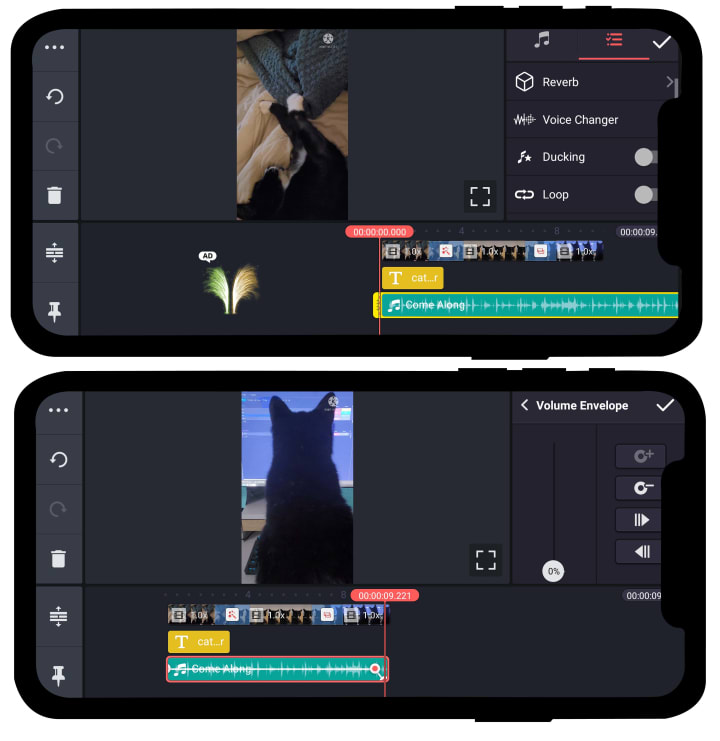
That leads me to my next point. I found it gimmicky for a basic mobile editor; extra capabilities like adding reverb to audio, recording voiceover, advanced audio editing, just makes it pointless to me being a basic editing app. You may as well get a desktop software that has the same capabilities and more.
If it's something you believe you can benefit from learning or using then go for it. But, for a small biz owner who needs to quickly edit videos to upload, it may be a bit overwhelming unless you want to take the time to learn those features. The watermark at the top is a bit annoying but I believe you can have it removed with the paid version.
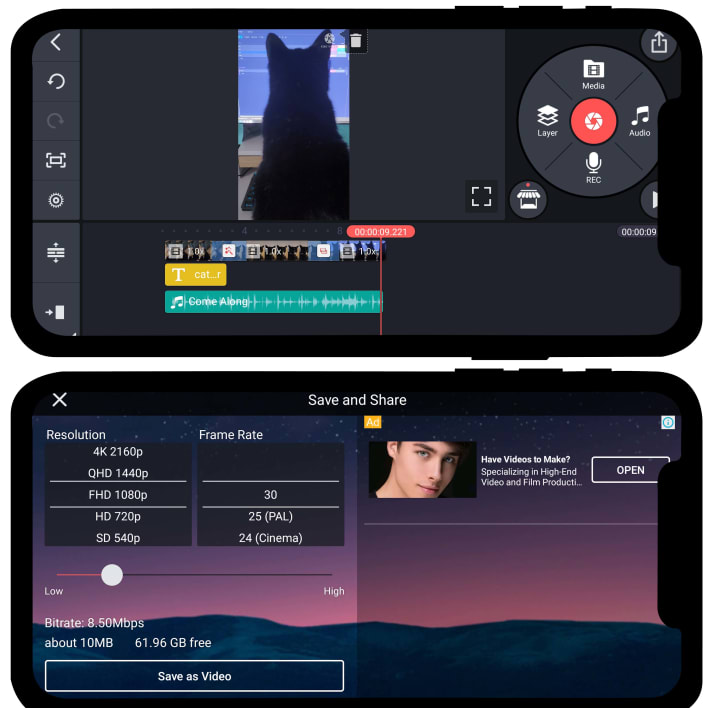
There are ads but not as many as expected, and they are subtly placed and don't really impede on your editing. They can be removed with their paid version. However, having access to a decent range of export settings is impressive and also the allowed export sizes as well.
7/10
4. PowerDirector
PowerDirector holds a special place in my heart. It was where I kind of started my independent video production journey by producing Vlogs for a documentary I was a 2nd camera person on back in 2015. That was such a long time ago but at the time I needed an app that could work on my tiny Asus notebook that wasn’t premiere pro.
I remember looking around and found a review about PowerDirector, downloaded it, and began using it. I look back at it now and cringe at the basic level I could edit but the software I had was also limited to the free version.

When looking for apps for this article, I found PowerDirector again and downloaded it on mobile. It had the same UI but there were way more features that I could use now. It was easy to edit my quick 10-second video. I also appreciated that you had the option to pick what aspect ratio you wanted for what video type and that made the setup time quicker.

The UI reminded me of a more basic version of Kinemaster (so without the extra bits) but then I started to notice that I missed those gimmicks. How you could add keyframes, adjust audio manually, the effects, etc. Power Director also has a paid version which opens up more assets (such as effects, text, transitions, music), and has the logo visible in the video itself.

There are ads but not many and the edit time was fairly consistent with that of InShot, so it was faster than Kinemaster. These two were close to competing for 3rd place but it was PowerDirector’s minimalism that made it to the mighty fourth place.
6.5/10
5. Canva

Most will recognise Canva as a graphic design platform to create posts for social media, online ads, and websites. But turns out Canva branched out to a variety of other medium types such as video. Canva is definitely a go-to for plenty of social media managers that don’t have great graphic design skills or the funds to hire a graphic designer.
I have a love-hate relationship with Canva. I feel that if you want graphics designed then you should support your local artists and contract out a designer instead of relying on a drag-and-drop app. However, not everyone can afford a designer or have enough work to hire a designer.
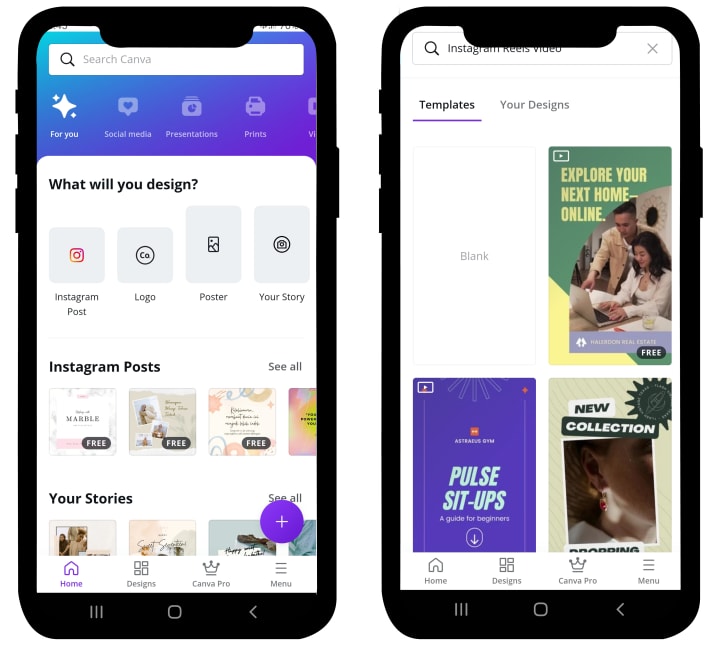
This applies to video editing. As important as it is to hire where you can for skills or outsource aspects of your business as you grow, it’s not feasible for everyone. Until the time comes whereby you can hire a designer or video editor, Canva does just fine and you can produce amazing results with it as well.

Just like the other apps mentioned above, Canva has free and pro versions of the app. But the golden difference is that Canva’s free assets library is pretty extensive and varies in style, aesthetic, and customizability. You start with any type of base template and work from there. There are transitions set up for you, colours can be swapped and changed easily, and the videos look great!

The kicker is that the videos you edit through Canva are more suited for social ads as opposed to other forms of content types (brand anthems, explainers, vlogs, etc). If you want to make an ad for Instagram Stories, then Canva is fantastic for this. Otherwise, I can’t really see it as a video editing platform per se, but a social media ad creator instead.
5/10
6. Vimeo

I have to be honest. I didn’t have a great experience with this platform. I bring it up on the list because it does have some great features and you can upload to their video streaming platform as a creator which I think is great for creative videos but making promotional material for your business… this is not the app for you.

If you are a video editor or enjoy making videos with story and good design, then this app is a great starting point. But then I may as well recommend Da Vinci or Adobe Premiere to you. I also found the UX was disorganized in comparison to the other apps.
Media takes ages to upload and then whenever you want to preview the video you have to render it out which takes ages for even a short video. When the video has exported (which also takes forever), you receive an email to let you know (probably because it takes so long) and finally you have to download it. The whole process is just too long for something so basic.
You also have a watermark that is only removable if you pay for a subscription fee (which I don’t see the value in when you can use free versions of other platforms that are easier to use and offer more).
Not to mention you can only make 30-second videos with the free version. I find that limiting in an already very limited app.
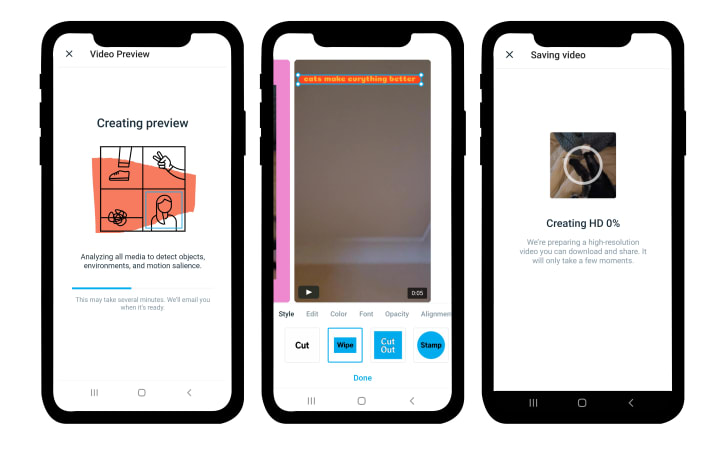
The free assets that Vimeo offers, however, are damn good and impressive. I enjoyed the transitions and animations. The text animations were fun and the overlays for videos are exquisite for creative work. Vimeo also offers a great range of genre for music which is something that each platform sort of struggles with.
However, my overall experience was tarnished by the frustration of an unintuitive app. Still, check them out and see if it would be something that could work for you.
3.5/10
So, why should you still consider getting a video editor, content creator, digital producer, content manager, or video marketer? Because we are the experts in our fields. The return on investment in us is damn high because it’s our job to know what your business needs in order to thrive on a marketing level.
You’re also supporting fellow business owners by hiring or contracting us out. At the same time, it can be financially difficult to afford one of these experts but I do recommend adding them to your business roadmap at some point in the future.
Until then, I hope this resource helped you in sourcing some basic applications for you to make videos for your social media. Have fun!
...
If you liked this essay, feel free to follow me here and here. Leave a tip if you like, or not. I'm not your boss ;)
About the Creator
Michelle Kaldy
I am a photographer and content creator, here to educate and take you on my post film school journey. With a BA in Film and Video Editing, I survive the big bad world with my wits and camera in hand. Straight Outta Film School!
Keep reading
More stories from Michelle Kaldy and writers in 01 and other communities.
Modern Communication in the Modern Workplace - Essay
Introduction Modern forms of communication possess a plethora of technologies and attitudes within its meaning. However, when placed into a workplace context, the forms of which it takes becomes all the more imperative to maintaining efficiency and the spread of accurate and current media.
By Michelle Kaldy5 years ago in 01
Why Mobile Apps Break When They Start Growing (and How to Build Them So They Don’t)
One of the quiet truths about mobile software is that scalability almost never hurts you at the beginning. Early versions of an app feel fast. Traffic is light, the backend is cooperative, and even questionable decisions don’t cause visible damage.
By Valeriia Shulga6 days ago in 01
Pearl
1980 something. we all hung out at Pearl and you and i were nothing special, or so i thought. i mean we all danced, drenched in our own sweat, our own saline solution of fear, too many beers, shots, laughter, tears, fucks in the bathroom and i don't know when we began to be afraid. do you?
By ROCK aka Andrea Polla (Simmons)7 days ago in Fiction



Comments
There are no comments for this story
Be the first to respond and start the conversation.