
5 macOS Apps For a Better Work Life Balance
Powerful and productive


Mac Operating System is one of the mature operating systems. And it sure does live up to that claim. But still, somewhere down the line, macOS is still trailing behind other operating systems like Windows 10 in some of the crucial departments like gaming, multitasking, and many more.
In contrast to their other operating systems, Apple, fortunately, allows you to tweak and customize the macOS to your liking. So, I have been on the hunt for cool apps. Here are a few of my findings that could help you use your Mac all the more effectively.
Focus : Distraction blocker
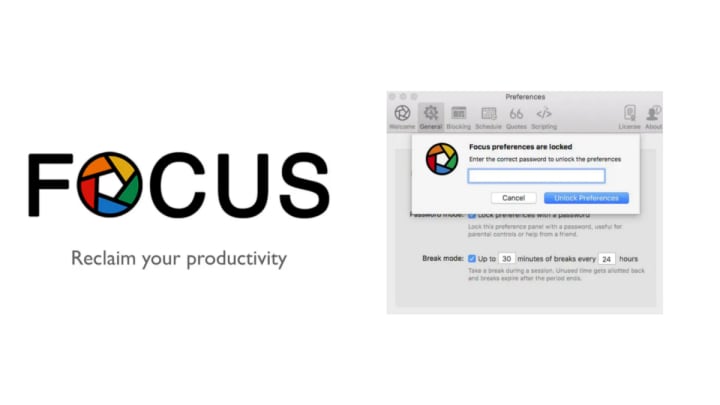
Focus is an amazing website and application blocker specially made for macOS. It lives in your menu bar and with a just click, you can create an ideal work environment by blocking unwanted websites and apps. It has a Pomodoro timer, productivity scheduler, and an inbuilt productivity tracker.
It has a powerful web blocker and can work in almost all major browsers. You can block entire domains and homepages. It also allows you to whitelist certain websites. Not only that it also can block applications on your Mac. It works insanely well without any browser extension. It is priced at $19.99, a one-time purchase, and is absolutely worth the price tag.
Backblaze : A powerful backup tool

It can be quite troublesome when your mac suddenly stops working or is stolen. You have to struggle hours on end to restore your files even after doing all that it's no guarantee that all your lost files will be restored. That's where Backblaze comes to the rescue.
Backblaze is a powerful and simple backup app designed by ex-Apple employees. It is a well-integrated and almost feels like a native app. It was built for Mac using Apple's very own Xcode. It also uses very little system resources( <1% of CPU & Memory). It is all automated and only costs $6/ month to backup your entire mac.
Affinity Photo : A better Photoshop alternative

Photo: Affinity, SerifAdobe Photoshop is arguably one of the most used photo editing apps. But it is a bit expensive and you have to pay every month to use it. That can be a dealbreaker for many. Affinity Photo is the best yet alternative. It is powerful and as good as photoshop with all the bells and whistles attached to for a one-time fee of $50.
It is well integrated with the macOS and takes full advantage of Metal Compute, Open GL, and Core graphics. It is fully optimized for 64-bit and multi-core processors and supports external eGPU. It even has support for MacBook Pro's touch bar(if you're into that sort of thing).
Parallels Desktop 16 : Windows 10 on Mac

Photo: Parallels DesktopParallels Desktop 16 is the app you need to buy for your Mac if you want to run Windows, ChromeOS, and Linux. The app lets you run the Windows 10 side by side within the macOS without the need for dual-booting into Windows 10 and restarting. You can install apps in the Windows system and place it on the desktop for easy and quick access.
You can share files, copy and paste text between the macOS and Windows seamlessly. You can even run graphic-intensive apps. However, you still need to have a Windows license key to run the OS. Apart from that everything is pretty slick and fast without any noticeable hiccups. There are a bunch of editions for the app like student plan and business plan costing $79.9 a year and $99.9 a year respectively.
OneCast : Xbox Games on Mac

Photo: OneCastOneCast app lets you stream Xbox One games to your supported Mac device with just an app. The app has a mobile version, which enables you to swiftly move between devices to game on mobile and Mac. All you need to do is to connect your Xbox One console and the Mac to the same WiFi network and that's it.
You can stream games up to 1080p and it runs natively on the macOS without any noticeable lag. You can download the app from the OneCast website for a one time purchase of $20. PlayStation also has a similar app for its console streaming to other devices called PS4 remote play.
Takeaway
There are some other apps like Reeder 4, a newsreader for mac, Spark an easy-to-use personal email client. Even more like Pixelmator for quick image editing and Otter for transcribing your voice notes, meeting conversations, class notes, and also personal notes.
These apps can help you get more out of your Mac machine in a sneaky yet effective way and can improve your productivity except for the OneCast app, which is all about having fun. That's it for this article. Let me know your favorite apps and tools. Thank you for reading.
About the Creator
Abhinav Chandoli
An Introvert, a YouTuber, a nerd, and a gamer. Writing about technology, science, and games. Contact: [email protected]
Keep reading
More stories from writers in 01 and other communities.
Iran, Israel, and the United States: A Deepening Crisis Reshaping the Middle East
Introduction The relationship between Iran, Israel, and the United States is one of the most complex, volatile, and consequential trilaterals in global politics. The tensions among these three actors are rooted not only in ideology or security concerns, but in decades of conflict, nuclear fears, proxy wars, shifting alliances, and regional ambitions.
By Muhammad Islam khan swati2 days ago in 01
How to Plan Effective Crypto PR Campaigns in South Korea?
South Korea has emerged as one of the most influential markets in the global crypto ecosystem. With a highly connected population, deep retail participation, strong developer communities, and a regulatory environment that continues to evolve, the country presents both powerful opportunities and unique challenges for crypto-focused public relations efforts. Planning an effective crypto PR campaign in South Korea requires more than global visibility tactics; it demands cultural fluency, regulatory awareness, platform-specific communication, and trust-centric storytelling. This guide explores how crypto projects, exchanges, Web3 platforms, and blockchain startups can design structured, credible, and impactful PR campaigns that resonate with South Korean audiences in 2026 and beyond.
By Jack santo2 days ago in 01




Comments
There are no comments for this story
Be the first to respond and start the conversation.