
10 Essential Steps To Improve Your Website Security
Website Security: The Definitive Buyer’s Guide

1-Keep Software And Plugins Up-To-Date
Every day, a large number of websites are harmed as a result of obsolete software. Sites are being scanned for potential hackers and bots to attack.
Your website's health and security depend on regular updates. Your site is not secure if its software or applications are out of date.
Take all requests for software and plugin updates very seriously.
Security enhancements and vulnerability fixes are frequently included in updates. Check for updates on your website or install an update notification plugin. Automatic updates are another solution for ensuring website security on some platforms.
Your site will become less secure the longer you wait. Make it a top priority to keep your website and its components up to date.
2- Add HTTPS and an SSL Certificate
A secure URL is required to keep your website safe. If visitors to your site offer to send personal information, you'll need to send it through HTTPS rather than HTTP.
What exactly is HTTPS?
HTTPS (Hypertext Transfer Protocol Secure) is a protocol for ensuring Internet security. While the content is in transit, HTTPS prevents interceptions and disruptions.
Your website will also require an SSL Certificate in order to establish a secure online connection. If your website requires visitors to register, sign up, or make any type of transaction, you must encrypt the connection.
What is SSL, and how does it work?
Another important site protocol is SSL (Secure Sockets Layer). This transfers personal information from website visitors to your database. SSL encrypts data to prevent others from accessing it while it is in transit.
It also prevents individuals without proper authority from accessing the data. An SSL certificate from GlobalSign is a good example of one that works with most websites.
3- Choose a Smart Password
It's difficult to keep track of all the websites, databases, and apps that require passwords. To remember their login information, a lot of people use the same password everywhere.
However, this is a serious security blunder.
For each each log in request, create a new password. Create passwords that are complex, unpredictable, and tough to guess. Then save them somewhere other than the website directory.
As an example, you could create a password using a 14-digit combination of letters and digits. The password(s) could then be saved in an offline file, on a smartphone, or on a different computer.
Your CMS will ask for a login, and you'll need to create a strong password. Also, avoid including any personal information in your password. Make it entirely unguessable by not using your birthday or pet's name.
Change your password to a new one after three months or sooner, and then repeat. Smart passwords are long and should always contain at least twelve characters. Your password must be a mix of numbers and symbols. Ensure that uppercase and lowercase letters are alternated.
Never reuse a password or share it with anyone else.
If you're a business owner or CMS administrator, make sure all of your employees' passwords are changed on a regular basis.
4- Record User Access and Administrative Privileges
Initially, you may feel comfortable granting access to your website to few high-level employees. You give them administrative rights in the hopes that they will take good care of their sites. This is the ideal scenario, but it isn't always the case.
Employees, unfortunately, do not consider website security when logging into the CMS. Instead, they're focused on the job at hand.
If they make a mistake or overlook an issue, it might lead to a serious security problem.
It's critical to thoroughly evaluate your staff before granting them access to your website. Check to see whether they've used your CMS before and if they know what to look for to avoid a security breach.
Every CMS user should be educated on the importance of passwords and software updates. Inform them of all the ways they can contribute to the website's security.
Make a record and update it frequently to keep track of who has access to your CMS and their administrative settings.
Employees are hired and fired on a regular basis. Keeping a tangible record of who does what with your website is one of the greatest strategies to avoid security risks.
When it comes to user access, be cautious.
Click Here for additional information on how to safeguard and Protect your website.
About the Creator
Keep reading
More stories from writers in 01 and other communities.
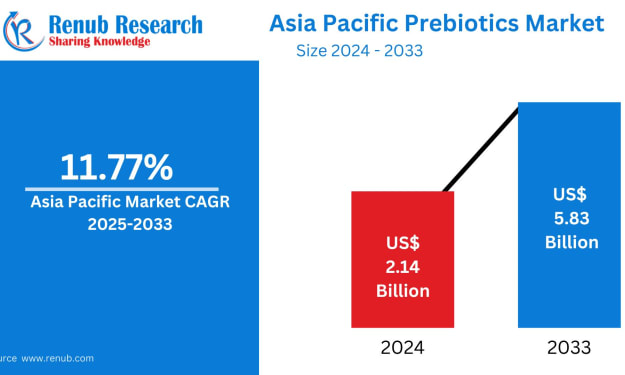
Asia Pacific Prebiotics Market Size and Forecast 2025
Asia Pacific Prebiotics Market: A Region Poised for Gut-Health Revolution The Asia Pacific prebiotics market is entering a transformative decade. With rising health awareness, aging populations, expanding functional food industries, and rapid advancements in biotechnology, prebiotics have become a central ingredient in modern nutrition strategies across the region. According to Renub Research, the Asia Pacific Prebiotics Market is expected to reach US$ 5.83 billion by 2033, growing from US$ 2.14 billion in 2024, at a robust CAGR of 11.77% from 2025 to 2033.
By Janine Root 2 days ago in 01
How to Choose a Web Design Agency for Long-Term Product Growth
If you are looking at a site like a catalog of past work and thinking about hiring a web design agency for B2B and product teams, you are probably already past the phase where “making it look good” is the main problem.
By Valeriia Shulga5 days ago in 01



Comments
There are no comments for this story
Be the first to respond and start the conversation.